Monetizing a website with ads is one of the most common revenue strategies on the web—but poorly placed ads can tank your bounce rate, destroy trust, and ultimately cost you more money than they earn. The best publishers understand that ad placement is not about cramming as many units onto a page as possible; it is about finding the sweet spot where revenue grows and users stay happy. This guide walks you through every major ad placement strategy, backed by data, UX principles, and real-world testing insights.
Whether you run a content blog, a niche authority site, or a large-scale publishing operation, the principles here will help you earn more from every pageview without pushing readers away. We will cover everything from above-the-fold best practices to mobile-specific rules, heat map patterns, sticky ad tactics, and the testing framework you need to optimize continuously.
What You Will Learn:
- Why ad placement and UX must work together for sustainable revenue
- How to balance above-the-fold and below-the-fold placements
- In-content, sidebar, and mobile-specific ad strategies
- Google's Better Ads Standards and ad density guidelines
- How to use heat maps and A/B testing to optimize positions
- When sticky and anchor ads help—and when they hurt
Why Ad Placement and UX Must Work Together
There is a persistent myth in ad monetization that more ads equal more revenue. In reality, aggressive ad placement leads to a vicious cycle: users bounce faster, session durations drop, pages-per-visit decline, and search engines notice the deteriorating engagement signals. Google has explicitly stated that page experience is a ranking factor, and intrusive ads are a core part of that evaluation.
When ad placement and UX work in harmony, you get compounding benefits:
- Longer sessions — Users who are not annoyed stay longer, generating more ad impressions per visit.
- Higher viewability — Ads placed in natural reading positions are actually seen, which improves CPMs.
- Better ad relevance — Engaged users provide richer behavioral signals, so ad networks serve better-targeted (higher-paying) ads.
- Lower bounce rates — Pages that feel clean and fast retain visitors, improving SEO rankings and organic traffic.
- Sustainable growth — A site that respects users builds repeat traffic and brand loyalty over time.
"The best ad placement is the one the user does not resent. If a reader finishes your article and barely noticed the ads, yet every unit had strong viewability—that is the gold standard."
— UX Monetization Principle
For a deeper dive into balancing design and monetization, see our guide on website design and AdSense UX best practices.
The Revenue vs. User Experience Balance
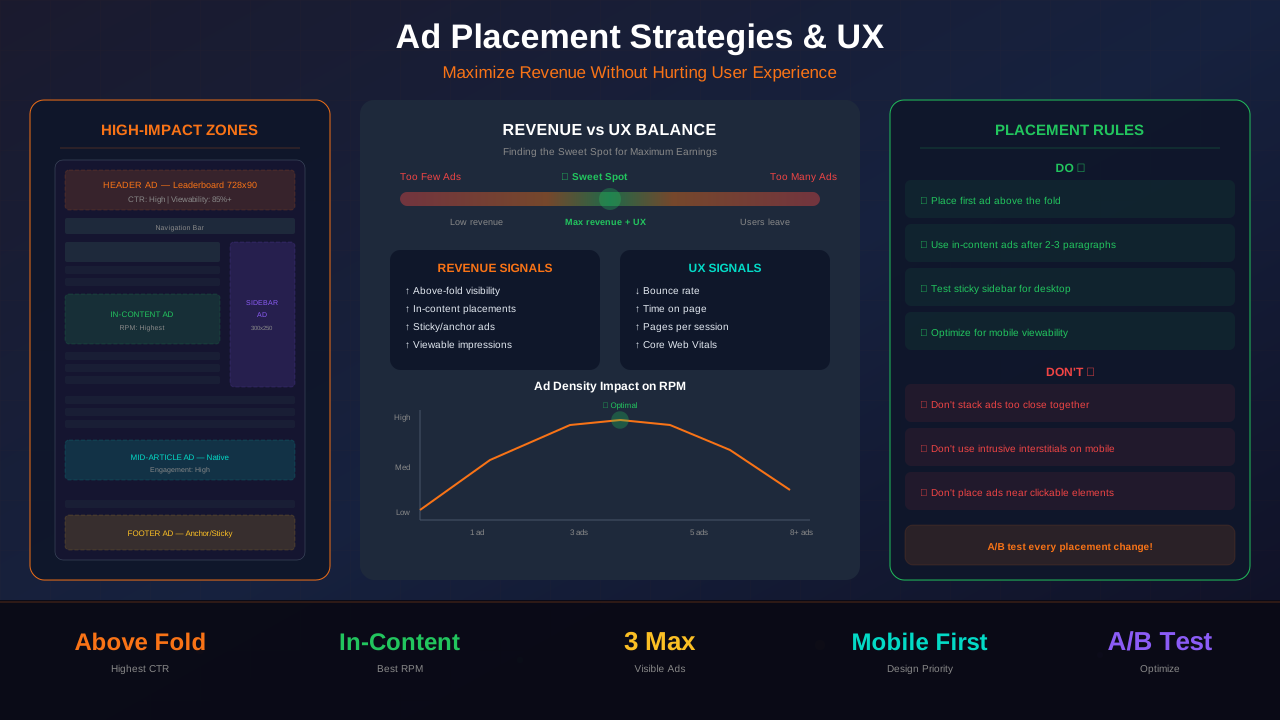
Think of ad placement as a spectrum. On one end, you have a completely ad-free page with perfect UX but zero revenue. On the other end, you have a page plastered with ads that earns well on the first visit but hemorrhages traffic. Your goal is to find the optimal point on this spectrum—maximum revenue per user over their lifetime, not just per single pageview.
The Lifetime Value Perspective
A single aggressive interstitial might earn you $0.15 on one pageview but cause the user never to return. A clean, well-placed in-content ad might earn $0.08 on that pageview—but that same user visits 20 more times over the next year. The math is clear: $0.08 × 20 = $1.60 versus a one-time $0.15. Smart publishers optimize for lifetime revenue, not session revenue.
Key Metrics to Track
To find your optimal balance, monitor these metrics together—never look at RPM in isolation:
- Revenue per session (not just per pageview)
- Bounce rate and exit rate by page
- Pages per session — drops here signal UX problems
- Ad viewability rate — below 50% means ads are placed where nobody looks
- Core Web Vitals — CLS shifts caused by ads directly hurt rankings
Above the Fold vs. Below the Fold Placements
The "fold" refers to the visible area of a page before the user scrolls. Above-the-fold (ATF) ad placements have historically commanded higher CPMs because they are immediately visible. However, Google has cracked down on pages where ads dominate the ATF area, and modern best practices are more nuanced.
See also: Content Formatting Tips That Boost CTR & Keep Readers on Your Blog →
Above-the-Fold Best Practices
ATF ads work best when they do not push the main content below the visible viewport. Google's Page Layout algorithm specifically penalizes pages where users must scroll past ads to reach the content they came for. The rule of thumb: your headline and at least the first paragraph of content must be visible without scrolling, even on common laptop screen sizes (1366×768).
Effective ATF ad placements include:
- Leaderboard (728×90) above the article title — classic and non-intrusive if properly spaced
- Medium rectangle (300×250) floated right beside the first paragraph
- Responsive ad unit in the header area with a fixed maximum height of 100–120px
For a detailed breakdown, read our complete guide to above-the-fold design and Google compliance.
Below-the-Fold Opportunities
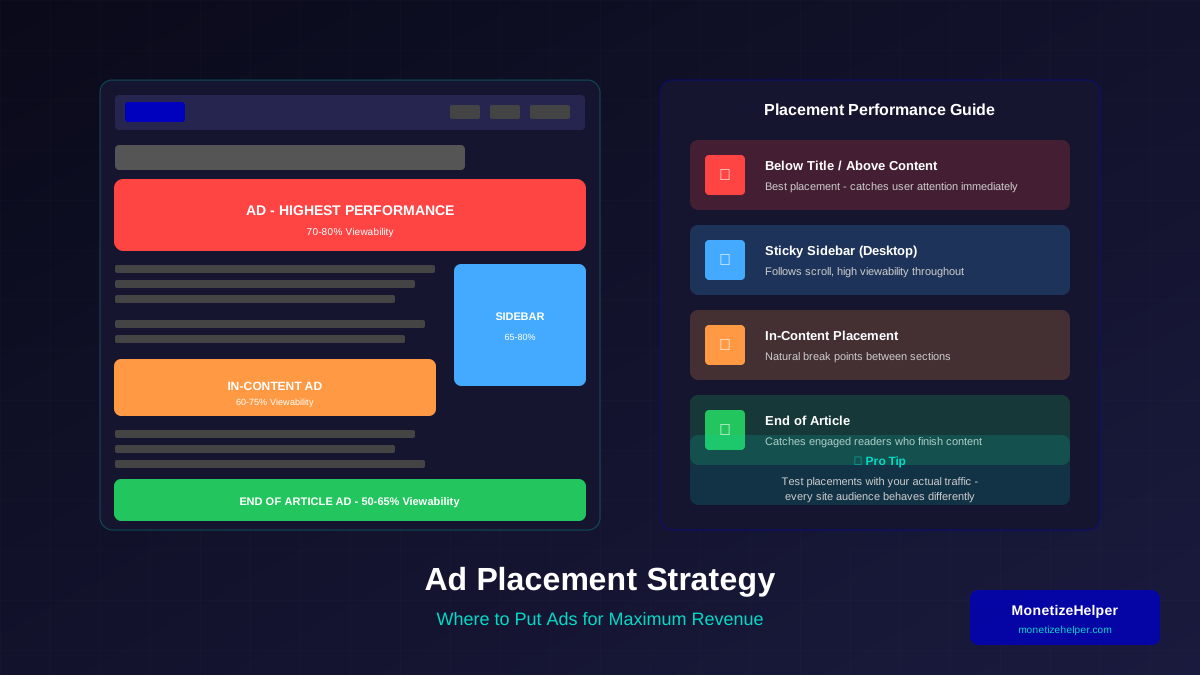
Below-the-fold (BTF) ads are often underestimated. While their viewability is naturally lower, they target engaged users who have chosen to keep reading—and these users are more valuable. BTF in-content ads placed between paragraphs, after subheadings, or near the article conclusion often achieve viewability rates of 60–70% because they sit in the natural reading flow.
The key insight: BTF ads have lower raw impressions but higher engagement quality. Advertisers increasingly value viewability over raw impressions, so well-placed BTF units can achieve CPMs comparable to ATF placements.
In-Content Ad Placement Strategies
In-content ads are placed directly within the body of your article, between paragraphs or sections. They are among the highest-performing placements because they sit exactly where the user's eyes are focused. When done correctly, they feel like a natural pause in the reading experience.
Where to Place In-Content Ads
The best positions for in-content ads follow the natural reading rhythm:
You might also find helpful: SEO-Friendly URL Design: Best Practices for Clean, Clickable URLs →
- After the 2nd or 3rd paragraph — The reader is engaged but has not yet reached the meat of the content. This is a natural breathing point.
- Between major sections (after an H2) — Section transitions are natural pauses where an ad feels less intrusive.
- After a list or blockquote — Visual breaks in content create natural ad insertion points.
- Before the conclusion — Readers who make it this far are highly engaged and valuable.
In-Content Ad Rules
To preserve the reading experience:
- Never place two ads within the same scroll viewport — Users should not see two ads at once without content between them.
- Maintain at least 300–400 words between ad units — This ensures sufficient content density.
- Use responsive ad sizes — Fixed sizes cause layout problems on different screen widths.
- Add margin/padding around ad containers — At least 16px of whitespace separates ads from content visually.
- Label ad containers subtly — A small "Advertisement" label above the unit satisfies compliance and sets expectations.
Our in-depth resource on ad placement best practices covers additional implementation details.
Sidebar Ad Placement for Desktop
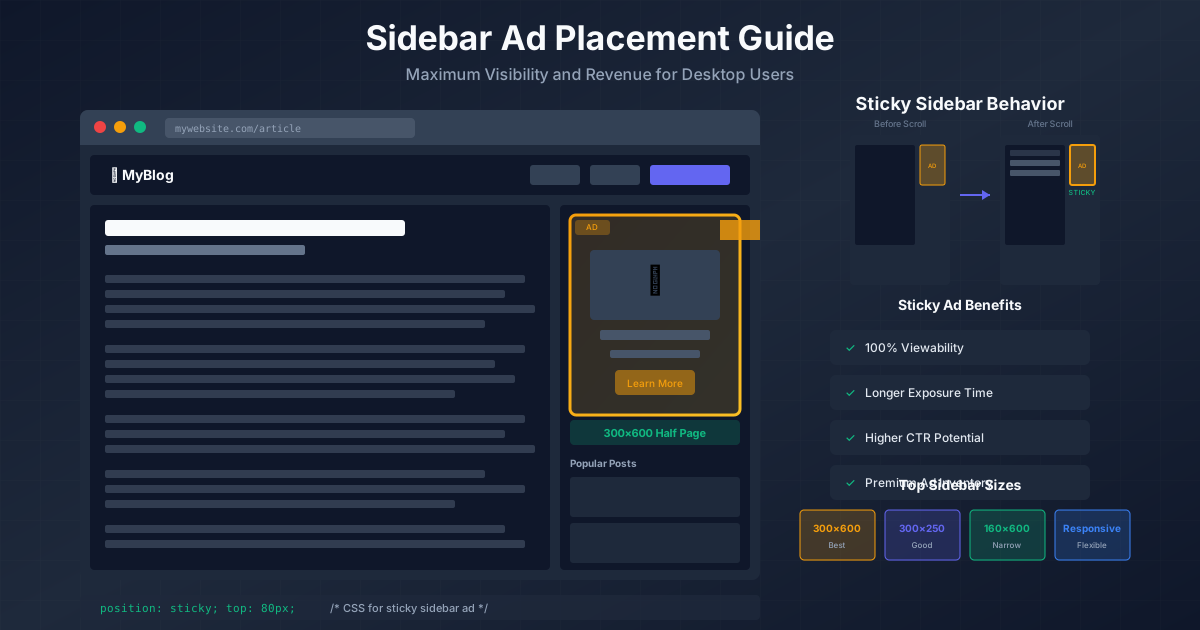
Sidebars remain valuable real estate on desktop, where screen widths of 1200px+ give you room for a content column and a 300–336px sidebar. The sidebar is especially effective for sticky ads—units that remain visible as the user scrolls through long content.
Effective Sidebar Strategies
- Place one ad unit at the top of the sidebar — This catches the eye as the page loads.
- Use a sticky ad that follows the scroll — Sticky sidebar ads can achieve viewability rates above 80%. Ensure the sticky behavior starts only after the user scrolls past the initial ad position.
- Keep the sidebar width consistent — 300px is standard and matches common ad sizes (300×250, 300×600).
- Do not stack more than two ad units in the sidebar — One static + one sticky is the recommended maximum.
The sidebar disappears on mobile, which means sidebar ads are a desktop-only strategy. This is fine—desktop users typically have higher CPCs and longer sessions. For comprehensive sidebar tactics, see our sidebar ad placement design guide.
Mobile-Specific Ad Placement Rules
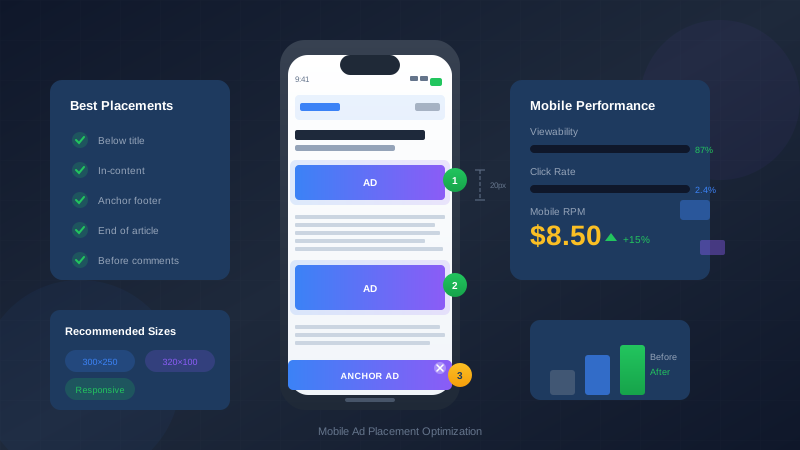
Mobile traffic accounts for 60% or more of total visits for most websites, yet mobile ad placement is trickier because of limited screen width. Every pixel of mobile real estate matters, and intrusive ads on mobile devices are the fastest way to lose visitors.
Mobile Placement Guidelines
- Use responsive ad units exclusively — Fixed-width ads cause horizontal scrolling and layout breaks on mobile.
- Keep ATF ads minimal — On a 375px-wide screen, a large ATF ad can push all content below the fold. Limit ATF ad height to 100px maximum on mobile.
- Space in-content ads further apart — On mobile, the viewport is smaller, so the same number of ads feels much more dense. Maintain at least 500 words between mobile ad units.
- Avoid interstitials that cover more than 50% of the screen — Google's interstitial penalty specifically targets mobile pages where content is not immediately accessible.
- Test anchor ads carefully — Bottom-anchored ads can work well on mobile but must include a visible and easy-to-tap dismiss button.
"On mobile, every ad is magnified. What feels like a small sidebar unit on desktop becomes a screen-dominating block on a phone. Design your mobile ad experience as a separate strategy, not a scaled-down version of desktop."
— Mobile UX Research, Google Web Fundamentals
For a complete walkthrough, read our guide on mobile ad placement optimization.
Learn more in Color Schemes for Professional Websites That Boost Revenue →
Ad Density Guidelines and Google's Better Ads Standards
The Coalition for Better Ads, which Google enforces through Chrome, defines specific ad experiences that are so disruptive they trigger built-in ad filtering. Violating these standards means Chrome users (over 65% of browser market share) may never see your ads at all.
Prohibited Ad Experiences (Desktop)
- Pop-up ads that appear before, during, or after content loading
- Auto-playing video ads with sound
- Large sticky ads that consume more than 30% of the screen
- Prestitial ads with countdown timers
Prohibited Ad Experiences (Mobile)
- All of the above, plus:
- Full-screen scrollover ads
- Flashing animated ads
- Ad density exceeding 30% of the main content area
- Postitial ads with countdown timers
The 30% Ad Density Rule
Google's mobile ad density threshold is straightforward: ads should not exceed 30% of the vertical height of the main content portion of a page. This applies to the entire page, measured from the top of the content to the end. If your article is 5,000px tall, your total ad height should stay under 1,500px on mobile.
To calculate your ad density:
- Measure the total height of your main content area on mobile
- Add up the height of every ad unit within that area
- Divide ad height by content height — keep the result below 0.30
Heat Map Patterns: Where Users Actually Look
Eye-tracking studies and heat map analyses reveal consistent patterns in how users scan web pages. Understanding these patterns lets you place ads where attention naturally falls, rather than in positions users have trained themselves to ignore.
Applying Heat Map Insights to Ad Placement
Based on these patterns, the highest-attention ad positions are:
- Immediately below the title/hero area — The first horizontal bar of the F-pattern guarantees this area gets viewed.
- Between the second and third content sections — The second horizontal bar of the F-pattern and layer cake transitions align here.
- Left-aligned in-content ads — The vertical bar of the F-pattern means the left side of the content area gets consistent attention.
- End of article, before comments — Completers are highly engaged and this is a natural stopping point.
Positions to avoid based on heat map data:
- Right sidebar on long articles — F-pattern data shows the right side gets progressively less attention as users scroll.
- Deep footer areas — Unless users are specifically looking for navigation, footer ads have very low viewability.
- Between closely spaced paragraphs — Ads in mid-thought feel jarring and get mentally filtered out.
Using white space in your web design strategically around ad placements can significantly improve both viewability and the overall user experience.
You might also find helpful: Best WordPress Themes for AdSense: Top Picks for Maximum Revenue →
Common Ad Placement Mistakes That Kill UX
Even experienced publishers make these errors. Each one directly erodes user trust and long-term revenue:
1. Ads That Cause Layout Shift
When an ad loads after the page content and pushes text down, users lose their reading position. This is measured as Cumulative Layout Shift (CLS) in Core Web Vitals and is one of the most frustrating UX issues. Always reserve space for ad containers using explicit width and height attributes or CSS min-height values.
2. Placing Ads Too Close to Interactive Elements
Ads positioned directly next to navigation links, buttons, or form fields lead to accidental clicks. These accidental clicks have near-zero conversion value, and ad networks like Google AdSense can flag your account for click fraud if the pattern is consistent. Maintain at least 150px of clearance between ads and clickable UI elements.
3. Auto-Playing Video Ads with Sound
Nothing makes a user close a tab faster. If you use video ad units, ensure they are muted by default and require user interaction to play audio. Most reputable ad networks enforce this, but always verify with your ad setup.
4. Too Many Ads on Short Content
A 400-word article with three ad units feels like an ad page with some content sprinkled in. Short content (under 800 words) should have at most one in-content ad. Save multiple ad placements for longer, high-value content that justifies the ad density.
5. Ignoring Mobile Completely
Testing ad placements only on desktop and assuming they will work on mobile is a recipe for disaster. Always preview your ad layout on actual mobile devices (not just browser dev tools) at multiple breakpoints: 375px, 414px, and 768px at minimum.
Testing and A/B Testing Ad Positions
The only way to know what truly works for your audience is to test. Assumptions based on industry averages will get you close, but site-specific factors—content length, audience demographics, traffic sources—mean the optimal placement for your site may differ from general best practices.
See also: UX Design Principles That Boost Blog Revenue: A Complete Guide →
What to A/B Test
- Ad position — After paragraph 2 vs. after paragraph 4
- Ad size — 300×250 vs. responsive vs. 336×280
- Number of ad units — 3 ads vs. 4 ads per article
- Sticky vs. static — Sticky sidebar vs. static sidebar
- Anchor ad presence — With bottom anchor vs. without
A/B Testing Framework for Ads
- Establish a baseline — Run your current setup for 7–14 days and record RPM, bounce rate, pages/session, and viewability.
- Change one variable — Never test multiple changes simultaneously. If RPM goes up but bounce rate spikes, you need to know which change caused it.
- Run the test for at least 14 days — Ad revenue fluctuates by day of week and season. Short tests produce unreliable data.
- Ensure statistical significance — You need at least 1,000 sessions per variant for meaningful results. Small sites may need longer test periods.
- Monitor UX metrics alongside revenue — A 10% RPM increase that comes with a 25% bounce rate increase is a net loss.
Tools for Ad Testing
Google AdSense has a built-in Experiments feature that lets you A/B test ad settings. For more advanced testing, tools like Google Optimize (or its successors), Ezoic's layout testing, or Mediavine's ad placement controls offer granular testing capabilities. Heat map tools like Hotjar or Microsoft Clarity provide complementary data on how users interact with your pages around ad placements.
Anchor and Sticky Ads: When They Help and When They Hurt
Anchor ads (fixed to the bottom or top of the viewport) and sticky sidebar ads (that follow the user as they scroll) are polarizing. When implemented well, they are among the highest-earning ad formats. When implemented poorly, they are the fastest way to alienate your audience.
When Anchor Ads Help
- Bottom-anchored ads on mobile — A slim banner at the bottom of the mobile screen achieves near-100% viewability and minimal content obstruction if it is small (50–60px height) and includes a dismiss button.
- On long-form content — When users are deeply engaged with 2,000+ word articles, a subtle anchor ad generates impressions without interrupting the reading flow.
- When properly dismissible — The dismiss/close button must be clearly visible and easy to tap. A tiny X in the corner that requires precision tapping on mobile will frustrate users.
When Anchor Ads Hurt
- On short pages — If the content fits in a single viewport, an anchor ad is pure obstruction with no scroll engagement to justify it.
- When they cover content — If the anchor ad overlaps the last line of visible text or covers navigation elements, users will struggle to use the page.
- Without a close button — Persistent ads that cannot be dismissed violate Better Ads Standards and may trigger Chrome's ad filtering.
Sticky Sidebar Best Practices
Sticky sidebar ads on desktop can be extremely effective when following these rules:
- Start the sticky behavior only after the initial viewport — The ad should scroll naturally with the page initially, then stick once it reaches the top of the viewport.
- Stop the sticky behavior before the footer — The ad must not overlap your footer or comments section.
- Use a single sticky unit — Multiple sticky elements competing for viewport space creates a chaotic experience.
- Ensure the sticky ad does not cause CLS — The transition from static to fixed positioning must not shift the content layout.
Putting It All Together: A Recommended Layout
Based on everything we have covered, here is a recommended ad layout for a typical long-form blog article (1,500+ words):
Desktop Layout (3 to 4 ad units)
- Leaderboard (728×90 or responsive) — Above the article title, below site navigation
- In-content ad #1 (responsive) — After the second H2 section (roughly 400–600 words into the article)
- In-content ad #2 (responsive) — After the fourth or fifth H2 section, near the 60–70% mark of the article
- Sticky sidebar ad (300×250 or 300×600) — One unit in the right sidebar that sticks on scroll
Mobile Layout (2 to 3 ad units)
- In-content ad #1 (responsive) — After the first major section
- In-content ad #2 (responsive) — Near the article midpoint
- Anchor ad (optional) — Bottom-anchored, 50px height, with dismiss button
This layout keeps ad density well below 30%, maintains content prominence above the fold, and leverages high-attention zones identified by heat map research.
Frequently Asked Questions
How many ads should I place per page?
For articles under 1,000 words, limit yourself to 1–2 ad units. For articles between 1,000 and 2,000 words, 3–4 units work well. For long-form content over 2,000 words, you can use 4–5 units as long as the ad density stays below 30% on mobile. Always prioritize content visibility over ad count, and remember that adding more ads has diminishing returns—the fourth and fifth units on a page typically earn 60–80% less per impression than the first two.
Do ad placements affect SEO rankings?
Yes, indirectly and directly. Google's Page Layout algorithm penalizes pages where ads push content below the fold. Core Web Vitals (especially CLS) are ranking factors, and poorly loaded ads are a leading cause of layout shift. Additionally, if intrusive ads increase your bounce rate and reduce dwell time, those engagement signals can negatively impact rankings. Conversely, a well-monetized page with good UX sends positive engagement signals that can help rankings.
Should I use auto ads or manual ad placement?
Manual placement gives you more control and typically produces better UX outcomes because you can tailor positions to your specific content structure. Auto ads (like Google AdSense Auto Ads) are convenient but may insert ads in suboptimal positions—mid-sentence, inside image galleries, or in areas that cause layout shift. A hybrid approach works well: set up manual placements for your primary ad positions, then enable auto ads with exclusions for areas you want to protect.
What is a good ad viewability rate to aim for?
Industry average viewability hovers around 50–55%. You should aim for 60–70% or higher. Viewability above 70% is considered excellent and can unlock premium advertiser demand. The key to high viewability is placing ads where users actually look (in-content, near headings) rather than in peripheral areas (deep sidebars, footers). Lazy-loading ads that are far below the fold also helps—they only load when the user scrolls near them, which means every loaded ad is likely to be viewed.
How do sticky ads affect page speed?
Sticky ads themselves have minimal impact on page speed—the sticky behavior is a simple CSS position change. However, sticky ads that use JavaScript-based scroll listeners instead of CSS position: sticky can cause jank and performance issues, especially on mobile devices. Always implement sticky behavior with CSS where possible, and ensure the ad creative itself is optimized (compressed images, efficient scripts). The ad content loaded within the sticky container is what typically affects performance, not the sticky mechanism itself.
Can I place ads in the middle of a paragraph?
No. Placing ads within a paragraph (splitting sentences with an ad unit) is one of the worst UX violations you can make. It breaks the reading flow completely, looks unprofessional, and can even violate ad network policies. Always place ads between complete paragraphs, sections, or content blocks—never within them.