Your WordPress theme affects how much money you make with AdSense. The right theme loads fast, places ads well, and keeps readers engaged. The wrong one drives visitors away. Let's look at the five best themes for AdSense publishers in 2026.
Key Takeaways:
- Lightweight themes boost page speed and ad revenue
- Ad-ready widget areas make placement easier
- Free themes can work just as well as premium ones
- Mobile responsiveness is critical for AdSense earnings
- Theme settings like sidebar layout directly affect click rates
Why Your WordPress Theme Matters for AdSense
Your theme is the foundation of your entire site. It controls how fast your pages load. It determines where you can place ads. It shapes how users interact with your content.
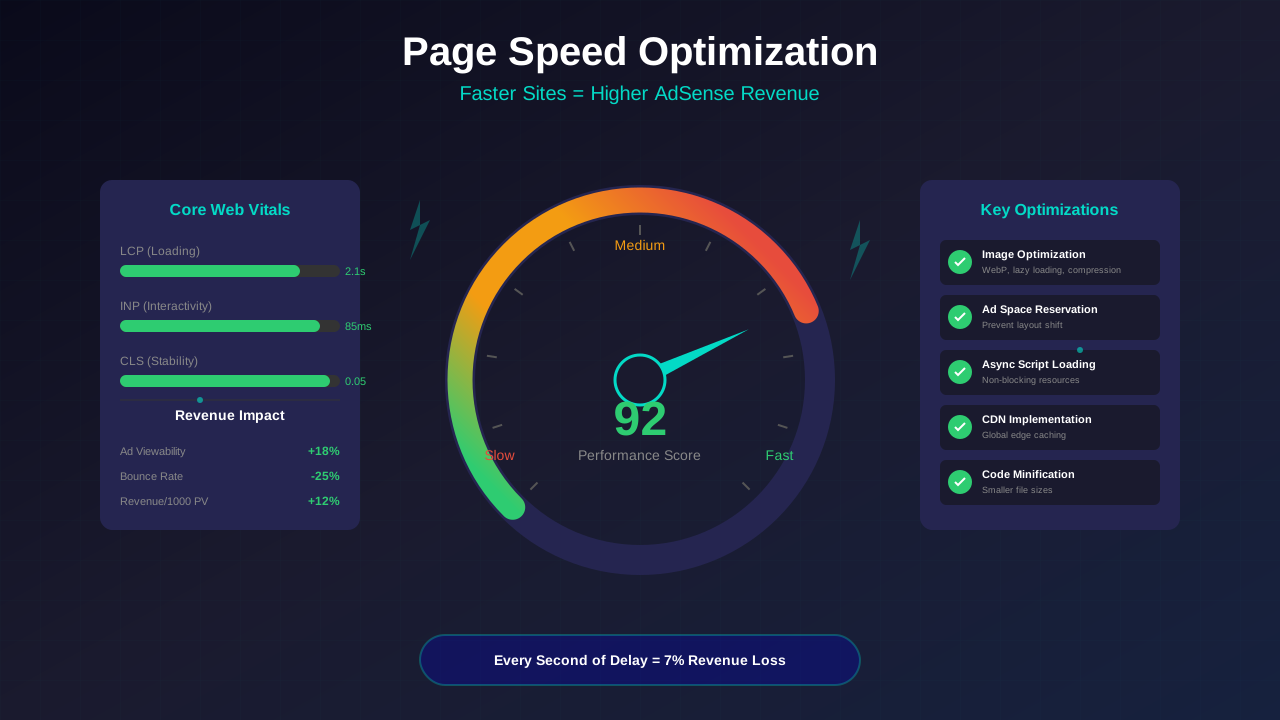
A slow theme kills your AdSense income. Google has shown that pages loading in over 3 seconds lose 53% of visitors. Fewer visitors means fewer ad impressions. Fewer impressions means less money.
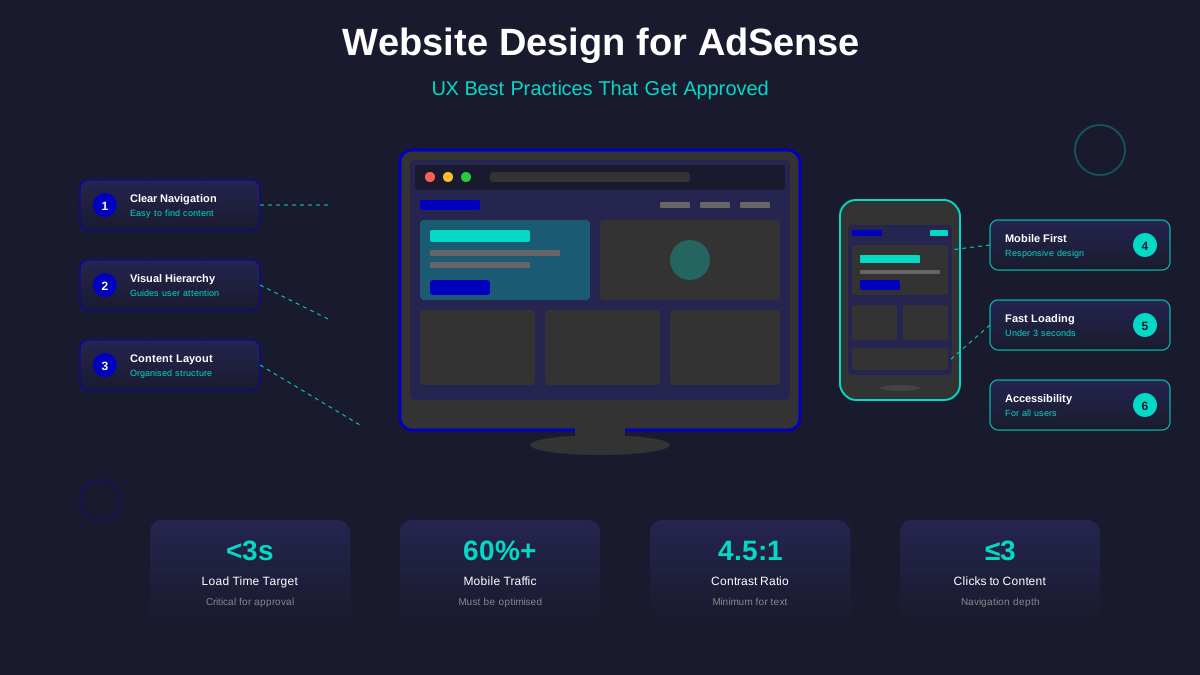
A good AdSense theme does three things well. First, it loads quickly. Second, it has built-in ad placement options. Third, it looks clean so ads don't overwhelm your content. For more on how design affects revenue, check out our guide on UX best practices for AdSense sites.
"The theme you choose sets the ceiling for your AdSense revenue. No amount of optimization can fix a slow, cluttered theme."
— WordPress Performance Handbook, 2025
The Top 5 WordPress Themes for AdSense
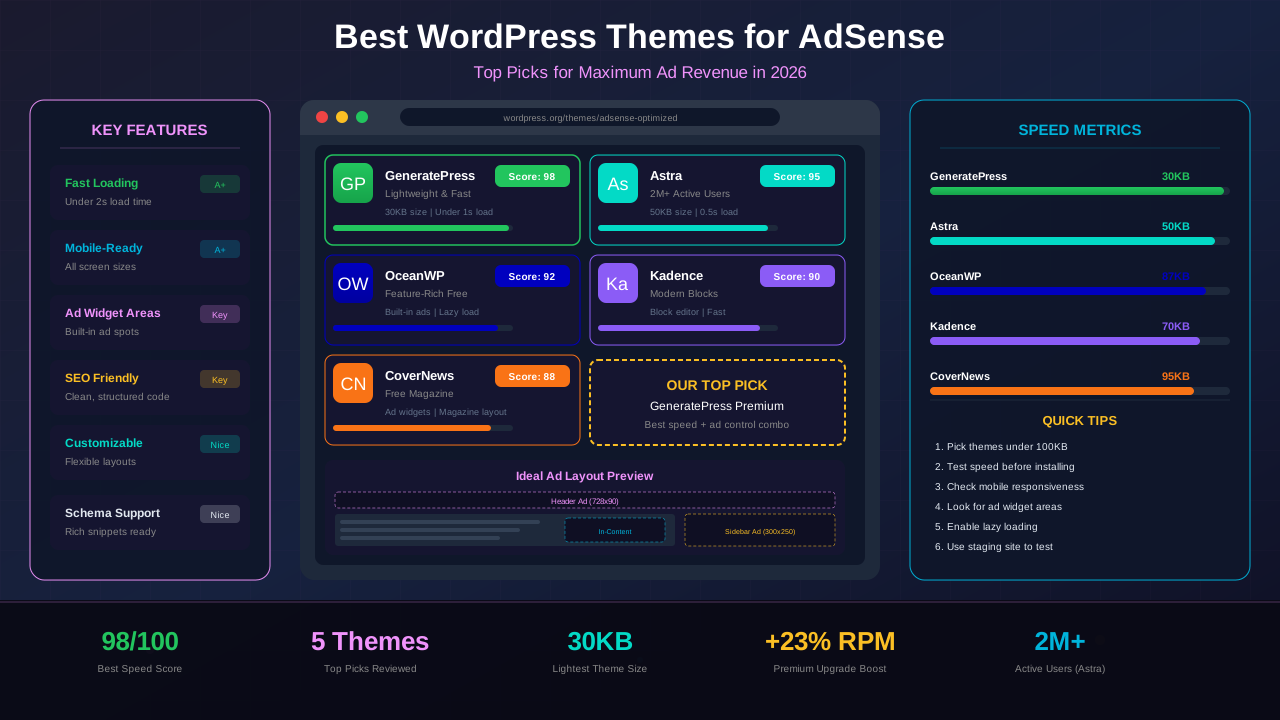
We tested dozens of themes for speed, ad compatibility, and ease of use. These five stood out as the best options for AdSense publishers.
1. GeneratePress — The Speed Champion
GeneratePress is the lightest theme on this list. The free version is under 10KB of CSS. That's incredibly small. It loads in under one second on most hosts.
For AdSense publishers, speed means everything. GeneratePress gives you a head start. It uses vanilla JavaScript instead of jQuery. This removes a major bottleneck that slows down other themes.
The premium version adds a module called Elements. This lets you insert ad code anywhere on your site. You can place ads before content, after paragraphs, or inside your header. No plugin needed.
GeneratePress works with all major page builders. But it shines on its own. The built-in customizer gives you full layout control. You can set sidebar positions, container widths, and content padding. All of these affect where your ads appear.
Best for: Publishers who want maximum speed and full control over ad placement.
2. Astra — The All-Rounder
Astra is the most popular WordPress theme in the world. Over 2 million sites use it. That popularity comes from its balance of speed and features.
Astra loads in under 0.5 seconds with a fresh install. It has a small footprint and clean code. The theme plays well with every AdSense plugin available.
See also: Content Formatting Tips That Boost CTR & Keep Readers on Your Blog →
What makes Astra special is its starter templates. You can import a ready-made blog design in one click. Many of these templates already have optimized layouts for content sites. Just add your AdSense code and you're ready to go.
The Pro version gives you custom layouts and hooks. You can insert ad code at any position in your theme. Above the header, below the title, after the third paragraph — it's all possible with Astra hooks.
Best for: Beginners who want a quick, professional setup with room to grow.
3. OceanWP — Feature-Rich and Free
OceanWP packs more features into its free version than most premium themes. It includes multiple blog layouts, custom widgets, and built-in SEO settings.
The theme has a dedicated "AdSense ready" layout. This places widget areas above, below, and within your content. You can drop AdSense code into any of these spots without touching PHP files.
OceanWP also handles mobile ads well. It lets you set different sidebar behaviors for desktop and mobile. You can hide the sidebar on phones and show a full-width layout. This gives your responsive ads more room to display properly. For deeper mobile strategies, see our guide on mobile-first website design.
Best for: Publishers who want extensive features without paying for a premium theme.
4. Kadence — Modern and Block-Ready
Kadence is built for the WordPress block editor. It uses a modern approach with block-based design tools. This matters because the block editor is the future of WordPress.
The free Kadence theme includes a header and footer builder. You can design custom headers with ad spots right from the WordPress customizer. No code required.
Kadence also scores high on Core Web Vitals. Google uses these metrics to rank your site. Better scores mean more organic traffic. More traffic means more AdSense revenue.
You might also find helpful: SEO-Friendly URL Design: Best Practices for Clean, Clickable URLs →
The Kadence Blocks plugin adds even more options. You can create custom ad containers with specific spacing and backgrounds. This helps your ads look intentional, not slapped on.
Best for: Publishers who love the block editor and want a modern workflow.
5. CoverNews — Free Magazine Style
CoverNews is designed for news and magazine sites. If you publish a lot of content, this theme shows it off well. The homepage displays articles in a grid with featured images.
Magazine themes work great for AdSense. They have more content on each page. More content means more ad spots. More ad spots means higher revenue per visit.
CoverNews has built-in banner ad areas. You get spots in the header, sidebar, and between post grids. The theme also includes a breaking news ticker and social sharing buttons.
It's completely free. For publishers who don't want to spend money on a theme, CoverNews delivers real value. The design is clean and modern out of the box.
Best for: News sites and content-heavy blogs that publish daily.
Theme Comparison Table
Here's how these five themes stack up against each other:
| Feature | GeneratePress | Astra | OceanWP | Kadence | CoverNews |
|---|---|---|---|---|---|
| Page Size | <10KB | <50KB | ~80KB | ~50KB | ~100KB |
| Free Version | Yes | Yes | Yes | Yes | Yes (fully free) |
| Premium Price | $59/yr | $49/yr | $54/yr | $149 lifetime | Free only |
| Ad Widget Areas | Via Elements | Via Hooks | Built-in | Via Blocks | Built-in |
| Block Editor Support | Good | Good | Good | Excellent | Basic |
| Starter Templates | 40+ | 240+ | 210+ | 80+ | 1 |
| Speed Score (GTmetrix) | A (99%) | A (98%) | A (95%) | A (97%) | B (88%) |
| Best For | Speed-focused blogs | All-purpose blogs | Feature-rich sites | Block editor fans | Magazine/news sites |
Free vs. Premium: Is It Worth Upgrading?
Every theme on this list has a free version. So do you really need to pay? The answer depends on your traffic and goals.
When Free Is Enough
If you're just starting out, free themes work great. You can add AdSense code with a free plugin like Ad Inserter. Most free themes support sidebar widgets where you can place ad units.
See also: Ad Placement Strategies That Boost Revenue Without Hurting UX →
CoverNews is entirely free and has built-in ad areas. OceanWP's free version includes more features than many paid themes. You can run a profitable AdSense blog without spending a dollar on your theme.
When Premium Pays Off
Premium themes save you time. Instead of using three plugins for ads, headers, and layouts, you get it all in one theme. This means fewer plugins. Fewer plugins means faster load times.
Premium versions also give you hook systems. Hooks let you inject ad code anywhere without editing template files. GeneratePress Elements and Astra Custom Layouts are powerful tools for this.
If you earn over $100/month from AdSense, a premium theme usually pays for itself. The speed boost alone can increase your RPM by 10-20%.
"I switched from a free theme to GeneratePress Premium and saw a 15% increase in ad revenue within the first month. The speed improvement was the main reason."
— AdSense publisher forum testimonial
How to Test a Theme for Ad Performance
Don't just pick a theme and hope it works. Test it properly before committing. Here's a simple process that takes about an hour.
Step 1: Check Page Speed
Install the theme on a staging site. Run it through Google PageSpeed Insights. You want a score above 90 on mobile. Anything below 80 is a red flag for AdSense sites.
Page speed directly impacts your earnings. Read more about this in our article on page speed optimization for AdSense revenue.
Step 2: Test Ad Placement Options
Add test ad units in every available position. Check how they look on desktop, tablet, and phone screens. Make sure ads don't overlap content or push below the fold.
Step 3: Measure Core Web Vitals
Use Chrome DevTools to check Largest Contentful Paint (LCP), Cumulative Layout Shift (CLS), and Interaction to Next Paint (INP). Your theme should pass all three metrics. CLS is especially important — ads should not cause layout shifts.
Learn more in Color Schemes for Professional Websites That Boost Revenue →
Step 4: Check with Real Content
Import at least 10 posts with real images. Some themes look great empty but break with content. Test long posts, short posts, and posts with lots of images. Make sure ads display correctly in each case.
Theme Settings That Boost Ad Revenue
Once you pick a theme, the settings you choose matter a lot. Small tweaks can make a big difference in your AdSense earnings.
Sidebar Position
Put your sidebar on the right side. Studies show that right sidebars get more ad views. Readers scan content from left to right. A right sidebar catches their eye naturally after reading.
Content Width
Set your content area to 720-800 pixels wide. This is the sweet spot for readability and ad placement. Wider content areas let you use larger ad units. Larger ad units typically earn more.
Font Size and Line Height
Use a base font size of 16-18 pixels. Set line height to 1.6-1.8. This makes your content easy to read. When readers stay longer, they see more ads. More ad impressions means more revenue.
Sticky Sidebar
Enable a sticky sidebar if your theme supports it. A sticky sidebar keeps your ad unit visible as the reader scrolls. This increases viewability, which increases your RPM.
For a deeper dive into design choices that affect revenue, check out our guide on responsive design for AdSense.
"Simply moving my sidebar from left to right and increasing my content width to 780px boosted my AdSense RPM by 22%. The theme settings were the only thing I changed."
— Case study from a blog earning $2,000/month with AdSense
Common Theme Mistakes That Kill AdSense Revenue
Avoid these mistakes when choosing and setting up your WordPress theme:
Using a heavy multipurpose theme. Themes with 50 demo sites and built-in sliders are slow. They load hundreds of kilobytes of unused CSS and JavaScript. Stick with lightweight themes built for blogs.
See also: UX Design Principles That Boost Blog Revenue: A Complete Guide →
Ignoring mobile layout. Over 60% of web traffic comes from phones. If your theme looks bad on mobile, you lose most of your potential ad revenue. Always test on real phones, not just browser resize.
Installing too many plugins to compensate. If your theme can't place ads without three extra plugins, pick a different theme. Each plugin adds weight and potential conflicts.
Choosing style over speed. Fancy animations and parallax effects look nice. But they slow your site down. Every second of delay costs you money. Choose a theme that's fast first and stylish second.
Not testing before switching. Always test a new theme on a staging site first. Switching themes on a live site can break your layout and cause you to lose ad revenue for days. Use a tool like WordPress staging environments to test safely.
Frequently Asked Questions
Can I use a free WordPress theme for AdSense?
Yes. All five themes on this list have free versions. CoverNews is entirely free. OceanWP's free version is very feature-rich. You can start with free and upgrade later when your revenue grows.
Which WordPress theme loads the fastest for AdSense?
GeneratePress is the fastest. Its free version adds less than 10KB to your page. Astra and Kadence are close behind. All three score above 95 on Google PageSpeed Insights.
Do I need a magazine theme for AdSense?
Not necessarily. Magazine themes like CoverNews work well for news sites that publish daily. But a clean blog theme like GeneratePress or Astra can earn just as much with fewer posts. Choose based on your content style.
How often should I change my WordPress theme?
As rarely as possible. Switching themes can cause layout issues and temporary traffic drops. Pick a good theme early and stick with it. Only switch if your current theme is clearly hurting your performance.
Does my theme affect AdSense approval?
Indirectly, yes. Google looks at your site's design and user experience during the approval process. A clean, professional theme with good navigation helps your approval chances. A cluttered, slow theme can hurt them.
Conclusion
Your WordPress theme is one of the biggest decisions you'll make for your AdSense site. The right theme loads fast, places ads easily, and keeps readers engaged.
For most publishers, GeneratePress or Astra is the best choice. They're fast, flexible, and have excellent ad placement options. If you want a free option with lots of features, try OceanWP. For block editor fans, Kadence is hard to beat. And for magazine-style sites, CoverNews is a solid free pick.
Start with the free version of any theme on this list. Test it with the checklist above. When you're earning enough, consider upgrading to premium for more ad placement control. Your theme is the foundation — build it right, and your AdSense revenue will follow.