
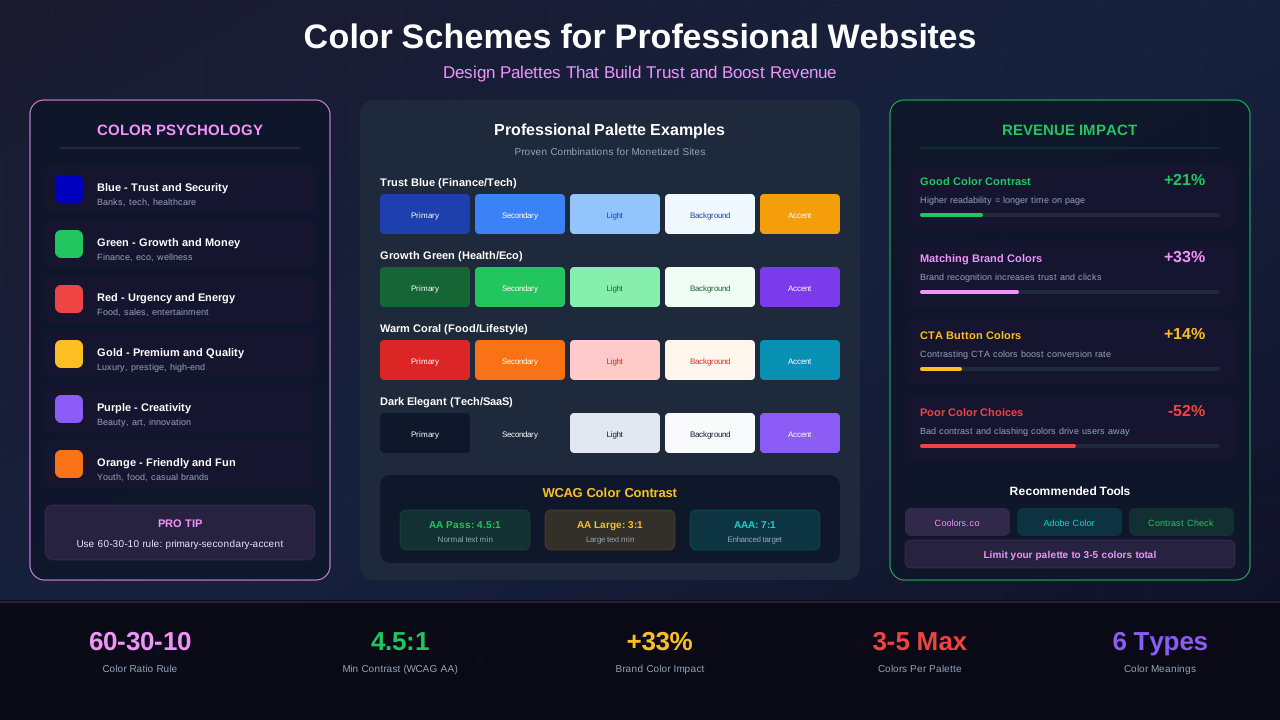
Color is the first thing visitors notice on your website. Before they read a single word, they already feel something. The right color scheme builds trust, holds attention, and quietly guides people toward your ads and content.
Poor color choices do the opposite. They make sites look cheap, confuse readers, and push people away in seconds. If you want a professional site that earns money, color is one of the easiest wins you can get.
What You Will Learn:
- How color psychology shapes visitor behavior on websites
- How to pick a strong primary brand color
- Ways to build complementary and analogous palettes
- WCAG contrast rules for accessible color choices
- How colors affect ad click-through rates
- Best color schemes sorted by website niche
- Free tools for creating professional palettes
- Common color mistakes that hurt revenue
- Dark mode considerations for monetized sites
Color Psychology for Websites
Colors trigger emotions. Blue feels safe and reliable. Red creates urgency. Green signals growth and health. These reactions are not random. Decades of research back them up.
On the web, these feelings happen in under a second. Visitors decide whether to stay or leave based partly on how your colors make them feel. A site that feels trustworthy keeps people reading longer.
Why First Impressions Depend on Color
Studies show that up to 90% of snap judgments about products come from color alone. Your website is no different. A finance blog with bright neon colors feels wrong. A kids' activity site in dark gray feels lifeless.
When colors match your niche and audience, visitors relax. They scroll deeper. They click more links and ads. That simple alignment between color and content drives real revenue.
"Color increases brand recognition by up to 80%. Consistent color use builds trust and helps visitors remember your site."
— University of Loyola, Maryland, Impact of Color on Marketing
Choosing a Primary Brand Color
Your primary color is the backbone of your entire scheme. It appears in your logo, headings, buttons, and links. Pick this one carefully because everything else flows from it.
Start with your niche. A health blog works well with green or teal. A tech site pairs naturally with blue or dark gray. A lifestyle brand can lean toward warm tones like coral or soft gold.
Three Questions to Find Your Primary Color
First, ask what emotion you want visitors to feel. Trust? Go blue. Excitement? Try red or orange. Growth? Green is your friend. Second, look at your top competitors. You want to stand out, not blend in.
Third, think about your ads. If you run display ads on a responsive layout, your brand color needs to complement ad units without clashing. A jarring palette distracts from ad visibility.
Testing Your Color Choice
Once you pick a candidate, test it everywhere. Open it on a phone screen in bright sunlight. View it on a cheap monitor. Ask five people what feeling it gives them. These quick tests save you from costly redesigns later.
See also: Content Formatting Tips That Boost CTR & Keep Readers on Your Blog →
Palette Types Explained
A single color can't carry a whole website. You need a palette — a set of colors that work together. There are several proven ways to build one.
Complementary Palettes
Complementary colors sit opposite each other on the color wheel. Blue and orange. Red and green. Purple and yellow. These pairs create strong contrast and visual energy.
Use them when you want elements to pop. A blue site with orange call-to-action buttons draws the eye exactly where you want it. But be careful. Too much contrast everywhere creates visual chaos.
Analogous Palettes
Analogous colors sit next to each other on the wheel. Blue, teal, and green. Red, orange, and yellow. These palettes feel harmonious and calm. They work perfectly for content-heavy sites where reading comfort matters.
Most professional blogs use analogous schemes because they're easy on the eyes. Visitors can read for 10 minutes without fatigue. That extra dwell time translates into more ad impressions.
Monochromatic Palettes
Monochromatic means one color in different shades and tints. A navy-to-sky-blue range, for example. These palettes are clean, elegant, and nearly impossible to get wrong. They're ideal for typography-focused designs.
Color Accessibility and WCAG Contrast
A beautiful palette means nothing if people can't read your text. Color accessibility is about making sure every visitor, including those with visual impairments, can use your site comfortably.
The Web Content Accessibility Guidelines (WCAG) set clear rules. Normal text needs a contrast ratio of at least 4.5:1 against its background. Large text needs at least 3:1. These aren't suggestions. They're standards.
Why Contrast Matters for Revenue
Low contrast forces readers to squint. They leave faster. Faster exits mean fewer ad impressions, lower RPM, and lost income. Good contrast keeps people reading and your earnings growing.
You might also find helpful: SEO-Friendly URL Design: Best Practices for Clean, Clickable URLs →
About 8% of men have some form of color blindness. That's roughly 1 in 12 male visitors. If your links rely only on color to stand out, many people will miss them entirely. Always pair color with underlines or bold weight.
"Accessible design is not a limitation. It's an expansion of your audience and your revenue potential."
— WebAIM, Web Accessibility in Mind
How Colors Affect Ad Click-Through Rates
Your color scheme has a direct impact on how visitors interact with ads. This isn't guesswork. Publishers who test color variations consistently see differences in click-through rates.
The key principle is simple: ads should blend enough to feel natural but stand out enough to get noticed. A site with a white background and blue links performs differently from one with a dark theme and green accents.
Ad Integration vs. Ad Blindness
If ads look completely different from your site's palette, visitors develop "banner blindness." They learn to ignore anything that looks like a foreign ad block. But if ads match your colors too closely, they blend into the background and disappear.
The sweet spot is subtle coordination. Use your brand colors near ad placements. Let the ad units share your font style and background tones. Google's above-the-fold placement strategies work best when colors guide the eye naturally.
| Color Strategy | CTR Impact | Best For | Risk Level |
|---|---|---|---|
| Blend with site colors | +15-25% CTR | Content-heavy blogs | Low |
| Contrast against background | +10-20% CTR | News and media sites | Medium |
| Complement brand palette | +20-30% CTR | Niche authority sites | Low |
| Clash with site colors | -10-40% CTR | None — avoid this | High |
| Match exactly (camouflage) | Policy risk | None — violates AdSense rules | Very High |
"The most effective ad placements feel like a natural extension of the page, not an interruption. Color harmony between content and ads is the bridge."
— Google AdSense Best Practices, Publisher Guidelines
Best Color Schemes by Niche
Not all niches work with the same colors. What looks great on a food blog would feel odd on a finance site. Here are proven palettes for popular website niches.
Finance and Money Blogs
Go with navy blue, forest green, and white. These colors say "money" and "trust" at the same time. Avoid flashy colors that undermine credibility. Gold accents work nicely for important elements like earnings graphs.
See also: Ad Placement Strategies That Boost Revenue Without Hurting UX →
Health and Wellness Sites
Teal, soft green, and warm neutrals create a calming environment. Visitors in this niche are often stressed or worried. Your colors should soothe, not overwhelm. A clean white background with green highlights feels welcoming.
Technology and Gadget Blogs
Dark backgrounds with bright accent colors feel modern and techy. Think dark gray with electric blue or bright teal. This niche embraces sleek navigation design with bold color accents.
Food and Recipe Sites
Warm tones dominate here. Rich reds, warm oranges, and earthy browns stimulate appetite. Keep backgrounds light so food photography stands out. Never let your palette compete with the actual food images.
Lifestyle and Travel Blogs
These niches thrive on vibrant, adventurous palettes. Coral, turquoise, and sandy gold evoke exploration and warmth. The colors should feel as exciting as the destinations you're writing about.
Tools for Creating Color Palettes
You don't need a design degree to build great palettes. Free tools make it simple. Upload a photo, pick a starting color, and get a complete scheme in seconds.
Top Free Palette Generators
Coolors.co lets you generate random harmonious palettes with one keypress. Lock colors you like and regenerate the rest. It's the fastest way to explore options.
Adobe Color (formerly Kuler) offers more control. Choose a color harmony rule, adjust your base hue, and see complementary options instantly. It also includes a contrast checker for accessibility testing.
Palette generators are starting points, not final answers. Always test generated palettes on your actual site. A color that looks great in a swatch can look terrible next to your content and ads.
Browser Extensions for Testing
Color contrast analyzers like the WAVE extension let you audit any live page. ColorZilla picks exact colors from websites you admire. These tools let you learn from sites that are already earning well.
You might also find helpful: Best WordPress Themes for AdSense: Top Picks for Maximum Revenue →
Common Color Mistakes That Hurt Revenue
Most color mistakes come from personal preference rather than data. Just because you love purple doesn't mean your audience does. Here are the most expensive mistakes publishers make.
Using Too Many Colors
Stick to 3-5 colors maximum. One primary, one secondary, one accent, plus a neutral background and text color. More than that creates visual noise. Visitors feel overwhelmed and leave.
Ignoring Mobile Appearance
Colors look different on every screen. What appears as a soft blue on your desktop monitor might look harsh on a phone. Always test on at least three different devices. Your hero section colors especially need to look perfect on mobile.
Forgetting About Readability
Colored text on colored backgrounds is the fastest way to lose readers. Body text should always be near-black on near-white (or near-white on near-black for dark mode). Save colors for headings, links, and accents only.
Chasing Trends Over Timelessness
Trendy color palettes change every year. Your brand colors should last at least 3-5 years. Redesigning your entire site because neon lime fell out of fashion is expensive and confusing for loyal readers.
Dark Mode Considerations
Dark mode is no longer a nice-to-have. Over 80% of smartphone users enable dark mode. If your site doesn't support it, you're ignoring a huge chunk of your audience.
The biggest challenge with dark mode is maintaining your brand identity. Your bright blue logo might look stunning on white but wash out on dark gray. Plan your palette with both modes in mind from the start.
Dark Mode Color Tips
Never use pure black (#000000) as your dark background. It creates harsh contrast that causes eye strain. Use dark grays like #121212 or #1a1a2e instead. These feel dark but remain comfortable for reading.
Your accent colors should stay consistent between modes. If your brand uses teal, keep teal in both light and dark versions. Just adjust brightness and saturation slightly so it pops against both backgrounds.
See also: UX Design Principles That Boost Blog Revenue: A Complete Guide →
Ad Display in Dark Mode
Most ad networks serve light-themed ads. On a dark background, these can look jarring. Consider wrapping ad containers in a slightly lighter background to create a smooth transition. A subtle border or shadow helps ads feel intentional, not accidental.
Building Your Color Scheme Step by Step
Let's put everything together into a clear action plan. Follow these steps and you'll have a professional palette in under an hour.
Step 1: Define Your Brand Emotion
Write down three words that describe how you want visitors to feel. Trusted, informed, excited? Calm, inspired, motivated? These words guide every color decision.
Step 2: Pick Your Primary Color
Choose one color that matches your emotional goals and niche. Use a palette generator to see different shades. Pick a shade that has enough depth to work as headings and buttons.
Step 3: Build Around Your Primary
Select a palette type — complementary, analogous, or monochromatic. Add 1-2 supporting colors and a neutral pair (one for backgrounds, one for text). Test contrast ratios for every combination.
Step 4: Test Across Devices
Apply your palette to a test page. View it on phone, tablet, and desktop. Check it in bright light and dim rooms. Share it with 3-5 people for feedback. Adjust before committing.
Step 5: Document Your Colors
Create a simple style guide with your exact hex codes, usage rules, and examples. This keeps your site consistent as you add pages, write new content, and integrate ad placements.
Frequently Asked Questions
How many colors should a professional website use?
Stick to 3-5 colors total. That includes one primary brand color, one or two secondary colors, and neutral tones for backgrounds and text. More than five creates visual clutter and makes your site look unprofessional.
Do color schemes really affect ad revenue?
Yes. Colors influence how long visitors stay, where they look, and whether they click. Sites with harmonious palettes see up to 30% higher engagement. Better engagement means more ad impressions and higher click-through rates.
What's the best color for a call-to-action button?
The best CTA color is one that contrasts strongly with your background. Orange, green, and red are popular choices. The key is contrast — your CTA must stand out from everything else on the page.
How do I check if my colors are accessible?
Use free tools like the WebAIM Contrast Checker or browser extensions like WAVE. Enter your text color and background color. The tool tells you if the combination meets WCAG AA standards with a 4.5:1 ratio.
Should I offer a dark mode on my website?
If possible, yes. Over 80% of mobile users prefer dark mode. Supporting it improves user comfort and can increase time on site. Use CSS media queries to detect user preference and serve the right theme automatically.