Where you put ads is super important! Bad spots waste your ads where no one sees them. Too many ads in your face will make visitors leave. Smart ad placement helps you earn more money while keeping readers happy.
This guide shows you the best places to put ads. You'll learn what works based on how people really use websites.
What You Will Learn:
- What ad viewability means and why it matters
- The best spots to place your ads
- Different tricks for phones vs computers
- How many ads you should use
- How to test and improve your ad spots
Understanding Ad Viewability
Viewability tells you if people actually see your ads. According to Google AdSense Help, an ad counts as "seen" when half of it shows for one second. Video ads need to show for two seconds.
Why Viewability Matters:
- Companies pay more when people see their ads
- Better viewability means you earn more per ad
- Google shows more ads to sites with good viewability
- Low viewability means your ad spots aren't working
Average Viewability Benchmarks:
| Viewability Rate | Rating | Action Needed |
|---|---|---|
| 70%+ | Excellent | Keep doing what you're doing |
| 50-70% | Good | Small fixes could help |
| 30-50% | Below Average | Check your ad spots soon |
| Under 30% | Poor | Big changes needed right away |
High-Performance Ad Positions
Research consistently shows certain positions outperform others. Here are the top-performing placements.
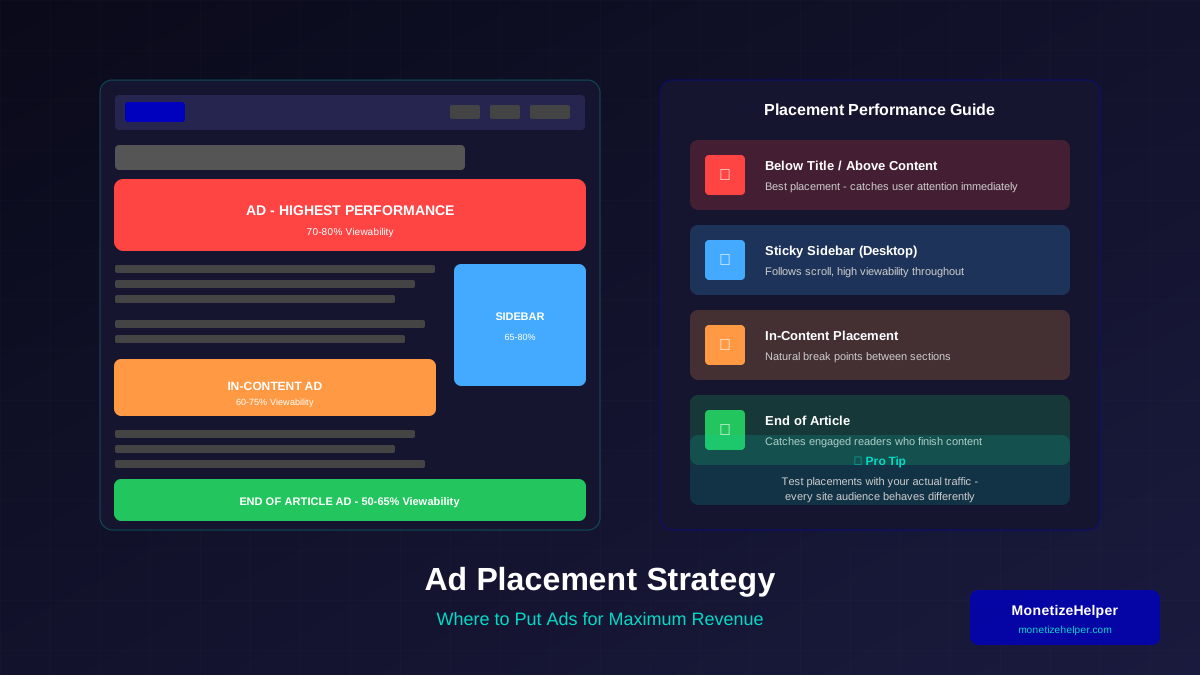
1. Below the Title/Above Content
Users look at titles first, then scan below. This position catches attention right when readers decide to engage. For detailed sizing recommendations, see our complete guide to AdSense ad unit sizes.
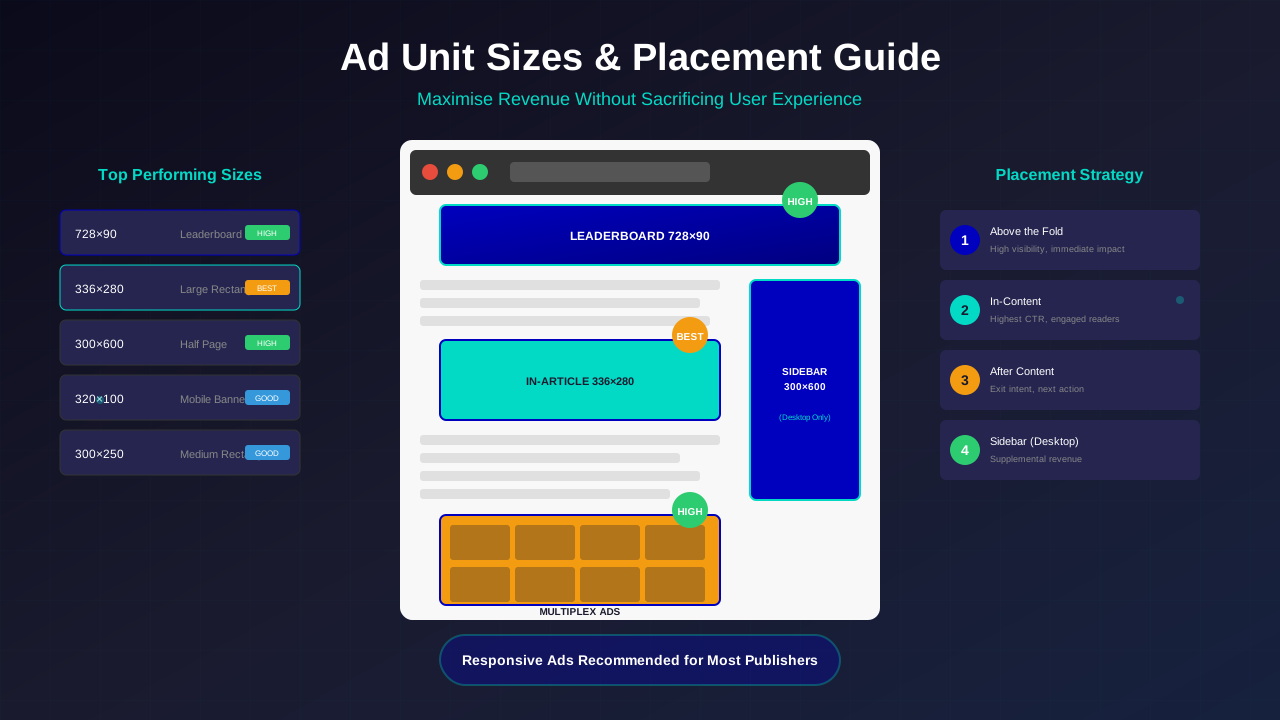
- Best for: Leaderboard (728x90) or large rectangle
- Typical viewability: 70-80%
- Why it works: Natural eye flow after headline
2. In-Content (Mid-Article)
Ads placed within content where readers naturally pause perform well. After major sections or before subheadings work best.
For more on this topic, see our guide on Ezoic vs Mediavine: Which Ad Network Pays More in 2026? →
- Best for: Rectangle ads, native ads
- Typical viewability: 60-75%
- Why it works: Engaged readers, natural break points
3. End of Article
Readers who reach the end are highly engaged. This placement catches them before they leave.
- Best for: Matched content, large rectangles
- Typical viewability: 50-65%
- Why it works: Catches engaged readers
4. Sticky Sidebar (Desktop)
A sidebar ad that follows as users scroll maintains visibility throughout reading.
- Best for: Square or vertical ads
- Typical viewability: 65-80%
- Why it works: Always visible during reading
5. Anchor Ad (Mobile)
A sticky ad at screen bottom that persists while scrolling. High viewability but use carefully. Learn more about choosing between anchor ads and sticky ads for your site.
Related reading: AdThrive Requirements Guide: What You Need to Join Raptive in 2026 →
- Best for: Mobile leaderboard
- Typical viewability: 80-90%
- Why it works: Always visible on mobile
Positions to Avoid
Some placements waste impressions or annoy users. Avoid these common mistakes.
Poor Placement Choices:
- Below the fold only: Many users never scroll
- Deep sidebar: Users focus on content, not far sidebar
- Footer only: Most users leave before reaching footer
- Behind overlays: Obscured ads get zero viewability
- Too close together: Violates policies and annoys users
Mobile Placement Strategy
Mobile requires different strategies than desktop. Screen real estate is limited, and user behaviour differs.
Mobile-Specific Considerations:
- No sidebar available
- Smaller ad sizes
- Touch interaction differences
- Faster scrolling behaviour
Recommended Mobile Placements:
- After first paragraph: Catches attention early
- Between content sections: Natural break points
- Anchor ad: Persistent visibility (use carefully)
- End of article: Engaged mobile readers
Mobile Placement Mistakes:
- Interstitials that block content access (see IAB guidelines for mobile ad standards)
- Ads larger than viewport width
- Too many ads on short pages
- Accidental click placements
Ad Density Guidelines
More ads do not always mean more revenue. Excessive ads hurt user experience and can decrease overall earnings.
For more on this topic, see our guide on Raptive Requirements Guide: Traffic, Content & Application Tips →
Google's Content-to-Ad Ratio:
Google expects valuable content to be the primary focus. Pages where ads dominate content risk policy issues.
Density Recommendations:
| Content Length | Recommended Ads | Maximum Ads |
|---|---|---|
| Short (300-500 words) | 1-2 ads | 2 ads |
| Medium (500-1500 words) | 2-3 ads | 4 ads |
| Long (1500-3000 words) | 3-5 ads | 6 ads |
| Very Long (3000+ words) | 4-6 ads | 8 ads |
"The key is ensuring that content remains the primary focus of the page. Users came for your content, not your ads."
— Google Publisher Guidelines
Testing and Optimising Placements
Every website is different. What works for one site may not work for another. Testing is essential.
Learn more in Mediavine Requirements Guide: How to Qualify and Get Accepted →
What to Test:
- Ad positions (above vs below content)
- Number of ads per page
- Ad sizes and formats
- Sticky vs static placements
- In-content ad frequency
Testing Process:
- Establish baseline metrics (RPM, viewability)
- Change one variable at a time
- Run test for at least 2 weeks
- Analyse results with statistical significance
- Implement winning changes
- Repeat with next variable
Key Metrics to Track:
- Viewability rate: Are users seeing ads?
- RPM: Revenue per 1000 pageviews
- CTR: Click-through rate (watch for policy issues)
- Bounce rate: Are ads driving users away?
- Time on page: Content engagement metric
- Core Web Vitals: Monitor via PageSpeed Insights to ensure ads do not hurt performance
Common Placement Mistakes
Avoid these frequent errors that hurt revenue or violate policies.
Policy Violations:
- Placing ads too close to interactive elements
- Ads that expand over content unexpectedly
- Misleading placement near navigation
- Encouraging accidental clicks
Revenue-Hurting Mistakes:
- Only below-fold placements
- Ignoring mobile optimisation
- Not testing different positions
- Same strategy for all pages
Frequently Asked Questions
How many ads can I put on one page?
There is no fixed limit, but content must remain the focus. Base ad count on content length. Short pages should have fewer ads; long, valuable content can support more.
Should I use Auto Ads or manual placement?
Auto Ads work well for testing and finding new positions. Manual placement gives more control for optimisation. Many publishers use a combination of both.
Learn more in RPM by Blog Niche: Which Topics Pay the Most in 2026 →
Do sticky ads perform better?
Sticky ads typically have higher viewability because they stay visible. However, they can annoy users if overused. Use one sticky placement at most—usually sidebar on desktop or anchor on mobile.
How do I know if I have too many ads?
Watch user metrics. If bounce rate increases, time on page decreases, or users complain, you may have too many ads. If RPM drops as you add ads, you have exceeded optimal density.
Conclusion
Strategic ad placement balances revenue optimisation with user experience. Focus on high-attention zones, maintain appropriate density, and continuously test to find what works for your specific audience.
Remember that placement is just one factor in revenue. For comprehensive revenue optimisation, see our complete guide to Revenue Optimisation for AdSense.