Every image you use on your blog carries legal obligations. Whether you download a photo from Unsplash, screenshot a tweet, or use a Creative Commons illustration, you need to know exactly how to credit the creator. Getting image attribution wrong can lead to DMCA takedowns, costly lawsuits, and even the loss of your AdSense account. This guide walks you through everything you need to know about image attribution and copyright compliance.
Image attribution is not just a legal formality. It is a sign of respect for creators, a trust signal for your audience, and a critical part of running a monetized blog. If you are earning revenue through ads, affiliate links, or sponsored posts, proper attribution protects that income stream from legal disruption.
What Image Attribution Means and Why It Matters
Image attribution is the act of giving credit to the creator or rights holder of an image you use on your website. It typically includes the creator's name, the image title, the license type, and a link to the original source.
Attribution serves several important purposes:
- Legal compliance: Many licenses require attribution as a condition of free use
- Ethical practice: Creators deserve recognition for their work
- Transparency: Your readers can verify sources and find original content
- SEO benefit: Proper sourcing builds trust and authority with search engines
- Monetization protection: AdSense and ad networks can penalize sites with copyright issues
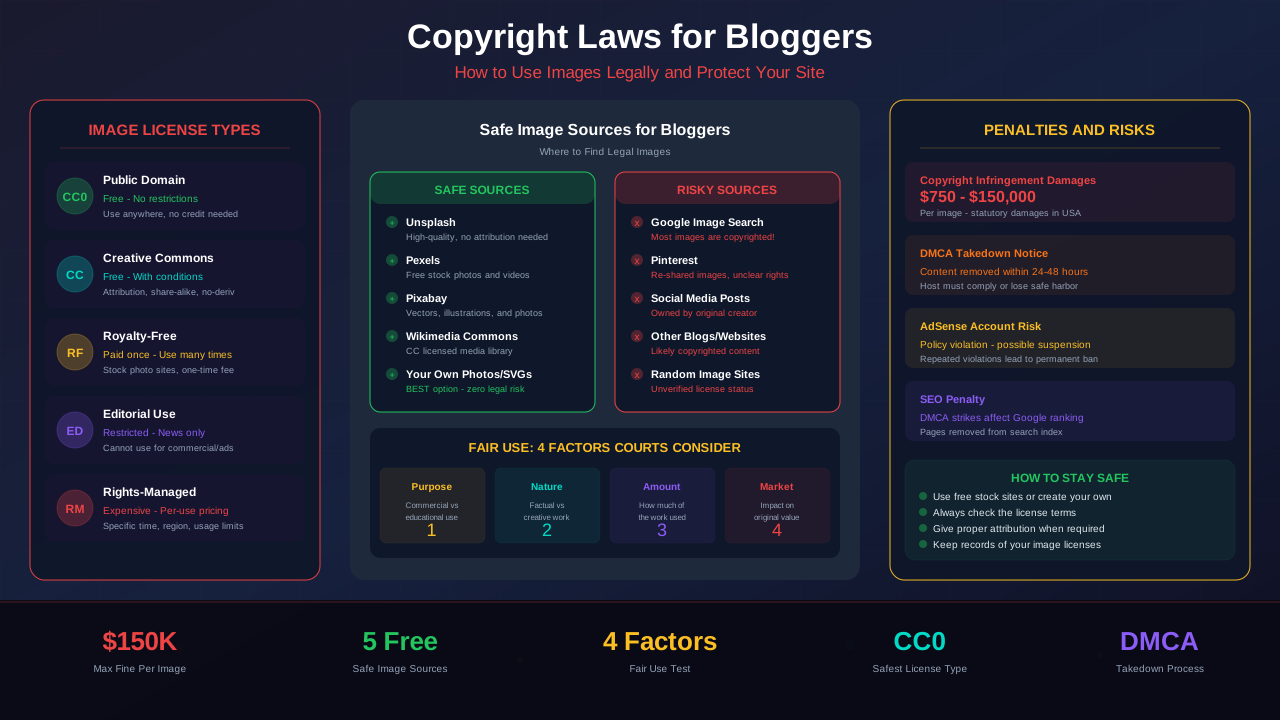
Without proper attribution, even images that are free to use can become legal liabilities. A photographer who licenses their work under Creative Commons BY can file a DMCA complaint if you use the image without credit. Some photographers actively monitor the web for unlicensed use and send demand letters ranging from $500 to $25,000 per image.
"Attribution is not optional when a license requires it. Failing to attribute properly is the same as violating the license terms entirely, which means you have no legal right to use the image."
— Creative Commons Legal Code, Section 3(a)(1)
Creative Commons License Types Explained
Creative Commons (CC) licenses are the most common open licenses you will encounter as a blogger. Each license has specific rules about attribution, commercial use, modification, and sharing. Understanding these licenses is essential for staying on the right side of copyright law.
CC0 — Public Domain Dedication
CC0 is the most permissive option. The creator waives all rights and places the work in the public domain. You can use CC0 images for any purpose, including commercial use, without attribution. However, it is still good practice to credit the creator when possible.
CC BY — Attribution
CC BY is the most common Creative Commons license. You can use, modify, and redistribute the image for any purpose, including commercial blogs. The only requirement is that you provide proper attribution to the creator.
CC BY-SA — Attribution ShareAlike
This license works like CC BY, but with an additional requirement: if you modify the image and share it, your derivative work must use the same CC BY-SA license. This is important if you crop, filter, or overlay text on the image.
CC BY-NC — Attribution NonCommercial
Warning for monetized bloggers: The NC (NonCommercial) restriction means you cannot use these images on blogs that earn money through ads, affiliates, or any other revenue stream. If your blog has AdSense ads, affiliate links, or sponsored content, a CC BY-NC image is off limits.
For more on this topic, see our guide on Terms & Conditions Generator Guide: Protect Your Blog Legally in 2026 →
CC BY-ND — Attribution NoDerivatives
You can share the image but cannot modify it in any way. This means no cropping, no filters, no text overlays, and no color adjustments. You must use the image exactly as the creator published it.
CC BY-NC-SA and CC BY-NC-ND
These combine the NonCommercial restriction with ShareAlike or NoDerivatives. Both are unsuitable for monetized blogs due to the NC clause.
How to Write Proper Image Attribution
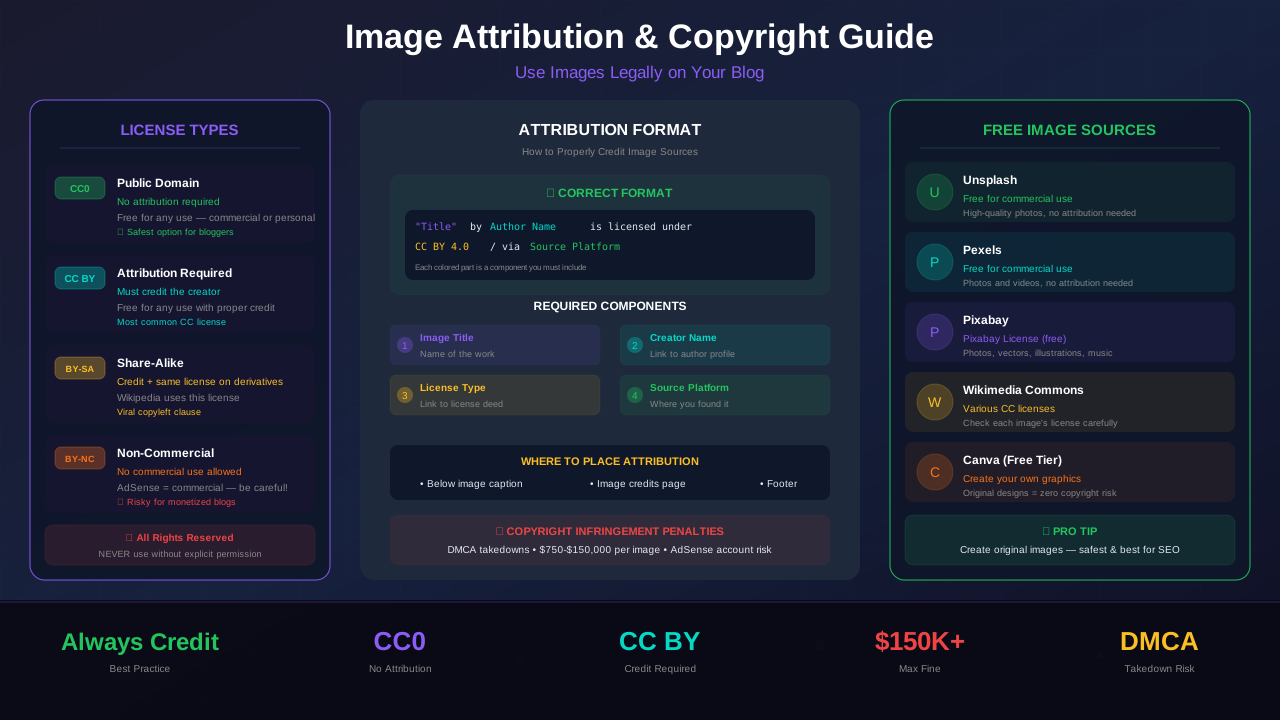
Proper attribution follows a specific format. The Creative Commons organization recommends including four elements, often called the TASL framework:
- T — Title: The name of the image, if available
- A — Author: The creator's name, linked to their profile when possible
- S — Source: A link to where you found the image
- L — License: The specific license, linked to the license deed
Attribution Format Examples
Here is the ideal attribution format for a Creative Commons image:
"Sunset Over the Mountains" by Jane Smith, licensed under CC BY 4.0.
Source: https://example.com/photo/12345
For an HTML blog post, structure it like this:
<figcaption>
  <a href="https://example.com/photo/12345">"Sunset Over the Mountains"</a>
  by <a href="https://example.com/user/janesmith">Jane Smith</a>,
  licensed under <a href="https://creativecommons.org/licenses/by/4.0/">CC BY 4.0</a>.
</figcaption>
If the image has no title, you can describe it briefly or omit the title field. If the creator's profile page is unavailable, just use their name as plain text.
Minimal Acceptable Attribution
At a minimum, your attribution must include the creator's name and the license type. But best practice is to include all four TASL elements. More detail protects you better in case of a dispute.
Where to Place Attribution on Your Blog
Attribution placement matters. It should be clearly associated with the image it references. Here are the most common and acceptable locations:
For more on this topic, see our guide on COPPA Compliance for Bloggers: How to Protect Kids and Your AdSense Account →
- Directly below the image: Use a
<figcaption>element inside a<figure>tag. This is the best practice. - In the image caption: Most CMS platforms like WordPress allow you to add captions to images.
- At the end of the article: Acceptable but less ideal. Group all attributions in a credits section.
- On a dedicated credits page: Some sites maintain a central image credits page. This is acceptable for CC licenses but not always sufficient.
What you should never do is hide attribution in the HTML source code, in the image alt text only, or in a place where readers cannot see it without inspecting the page.
Stock Photo License Requirements
Stock photo sites each have their own license terms. These vary significantly, and assuming they are all the same is a common mistake. Here is what you need to know about the most popular platforms.
Unsplash
Unsplash uses a custom license that is similar to CC0 but not identical. Photos can be used for free for commercial and non-commercial purposes. Attribution is not required but is appreciated. You cannot sell unmodified Unsplash photos or compile them into a competing service.
Pexels
Pexels uses a similar model to Unsplash. All photos are free for personal and commercial use. No attribution is required. You cannot sell unmodified photos or use identifiable people in a way that implies endorsement.
Pixabay
Pixabay changed its license in 2019 from CC0 to a custom Pixabay License. Images are free for commercial use without attribution, but you cannot redistribute them on other stock photo platforms or sell them as prints without significant modification.
Shutterstock, Adobe Stock, Getty Images
These are paid stock photo services with detailed license agreements. Standard licenses typically allow use on websites and blogs but have restrictions on print runs, merchandise, and templates. Always read the specific license for each image you purchase. Using these images without a valid license can result in legal action with damages of $1,000 to $150,000 per image.
"Stock photography companies employ automated reverse image search technology to detect unauthorized use. In 2024 alone, Getty Images sent over 100,000 demand letters to website owners using unlicensed images."
— Digital Media Law Project, Harvard University
When Attribution Is Required vs Optional
Understanding when attribution is legally required versus merely recommended helps you prioritize your compliance efforts.
Related reading: Copyright Laws for Bloggers: How to Use Images Legally →
Attribution Is Required When:
- The image uses any Creative Commons license with the BY element (CC BY, CC BY-SA, CC BY-NC, CC BY-ND, CC BY-NC-SA, CC BY-NC-ND)
- The license agreement or terms of service explicitly require credit
- You agreed to attribution as part of a custom permission arrangement
- The image is from Wikipedia or Wikimedia Commons (most use CC BY-SA)
- The photographer or artist has stated attribution requirements on their website
Attribution Is Optional (But Recommended) When:
- The image is released under CC0 or public domain
- You are using Unsplash, Pexels, or Pixabay images (their licenses do not require it)
- You have purchased a standard stock photo license that does not require credit
- You created the image yourself
Even when attribution is optional, providing credit builds goodwill and protects you if there is ever a dispute about the image's origin. It also makes your content more trustworthy for readers and advertisers.
Attribution for Modified or Derivative Images
When you modify an image, additional attribution rules apply. Any change you make to a licensed image — cropping, resizing, adding text overlays, applying filters, or combining it with other elements — creates a derivative work.
Rules for Derivative Works
- CC BY: You must credit the original creator and note that changes were made
- CC BY-SA: Credit the original, note changes, and license your derivative under CC BY-SA
- CC BY-ND: You cannot create derivatives at all. Any modification violates the license
- CC BY-NC: Credit the original, note changes, and do not use commercially
Here is an example of proper derivative attribution:
"Mountain Vista" by Alex Rivera, licensed under CC BY 4.0.
This image has been cropped and a text overlay has been added.
Original: https://example.com/photo/67890
The key phrase is indicating what changes were made. You do not need to detail every modification, but you must acknowledge that the image was altered from its original form.
Screenshot and Embed Attribution Rules
Bloggers frequently use screenshots and social media embeds. These have their own copyright considerations that many content creators overlook.
Screenshots
Taking a screenshot of a website, app, or software does not give you copyright over that content. The original creator still holds the rights. However, screenshots often fall under fair use when used for:
- Commentary and criticism (reviewing a product or website)
- News reporting (documenting an event or announcement)
- Education and tutorials (showing how to use software)
- Comparison (before and after, product reviews)
Even under fair use, you should credit the source. A simple attribution like "Screenshot from [Website Name]" with a link is sufficient.
Social Media Embeds
Embedding a tweet, Instagram post, or YouTube video using the platform's official embed code is generally safe. The platforms' terms of service grant permission for embedding. However, directly downloading and re-uploading social media images is not the same as embedding and may violate copyright.
See also: Sponsored Content Disclosure: Legal Requirements Every Blogger Must Know →
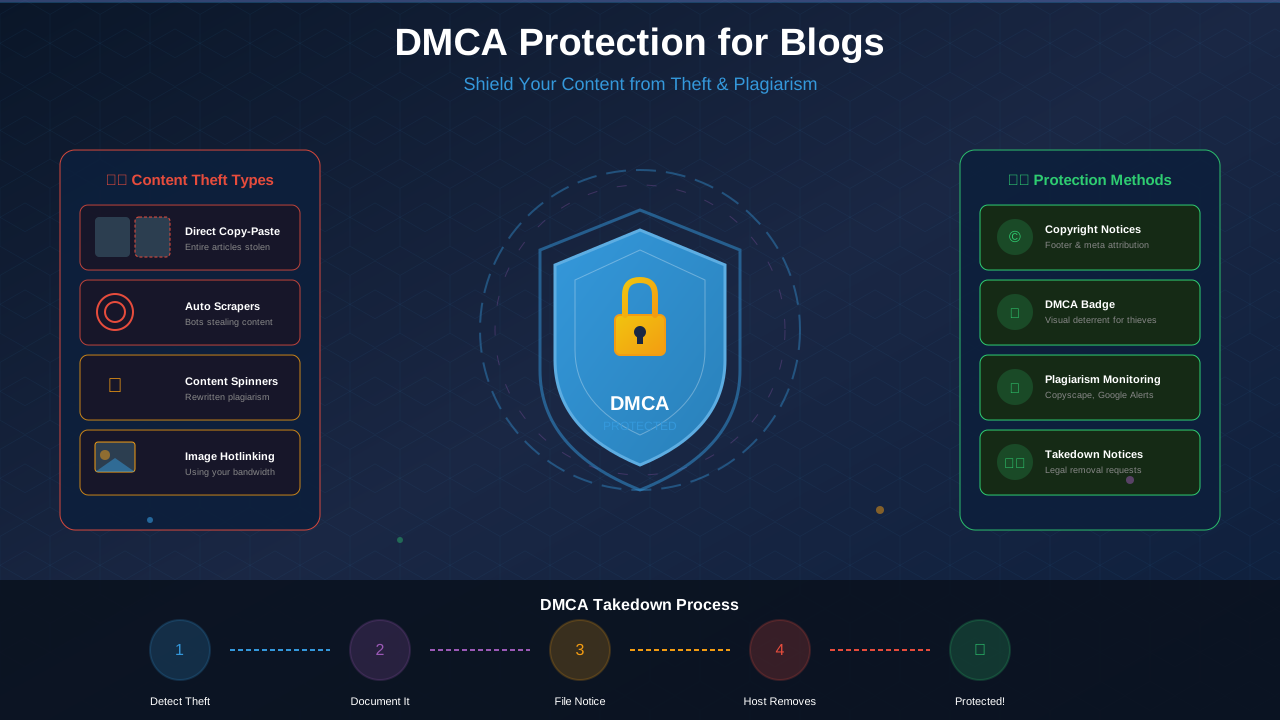
For more details on protecting your own content from unauthorized use, see our guide on DMCA protection for blogs.
What Happens When You Skip Attribution
Ignoring attribution requirements can trigger a cascade of problems for your blog and your income. Here is what can happen, from least to most severe:
Impact on AdSense Revenue
Google takes copyright seriously. Multiple DMCA complaints against your site can result in pages being removed from search results, which directly reduces your organic traffic and ad revenue. In extreme cases, Google may disable your AdSense account entirely. Make sure your blog has all the necessary disclaimer and legal pages to complement your attribution practices.
Tools for Tracking Image Sources and Licenses
Managing image attribution across dozens or hundreds of blog posts requires organization. These tools and practices help you stay on top of your image licensing.
Image Source Tracking Tools
- Google Reverse Image Search: Upload any image to find its original source and creator
- TinEye: A dedicated reverse image search engine that tracks where images appear online
- ImageCoast: Organizes your image library with license metadata
- Notion or Airtable: Create a custom database tracking image source, license, attribution text, and date added for every image on your site
- WordPress Media Library Notes: Use the description or caption fields to store license information for each uploaded image
Creating an Image Attribution Spreadsheet
For serious bloggers, maintaining a spreadsheet is the most reliable method. Track these columns for every image:
- Image filename
- Blog post URL where it is used
- Original source URL
- Creator name
- License type (CC BY, Unsplash License, purchased, etc.)
- Date downloaded
- Attribution text used
- Modifications made (if any)
This spreadsheet becomes invaluable if you ever receive a copyright inquiry. You can instantly prove where you sourced the image and that you complied with the license terms.
Best Practices for AdSense-Compliant Image Usage
If you monetize your blog through Google AdSense or similar ad networks, image compliance is directly tied to your revenue. Here are the best practices to follow, aligned with the FTC disclosure requirements and ad network policies.
Do:
- Use images from reputable stock photo sites with clear commercial licenses
- Create your own images, graphics, and infographics whenever possible
- Keep records of every image license and source
- Add attribution even when it is not strictly required
- Use the
<figure>and<figcaption>HTML elements for proper image markup - Respond immediately to any DMCA notice or attribution request
- Audit your existing posts periodically for image compliance
Do Not:
- Download images from Google Image Search without checking the license
- Use images with NonCommercial (NC) licenses on monetized blogs
- Assume that giving credit alone makes any image legal to use
- Ignore demand letters or DMCA takedown notices
- Use AI-generated images that may have been trained on copyrighted works without clear terms of use
- Remove watermarks or metadata from images
Regular Image Audits
Schedule a quarterly image audit for your blog. Go through every published post and verify that each image has a documented source and proper attribution. Remove or replace any images where the license is unclear. This proactive approach prevents problems before they start and keeps your legal compliance airtight.
Learn more in Earnings Disclaimer Template for Blogs: Free Copy-Paste Guide →
Frequently Asked Questions
Do I need to attribute images from Unsplash or Pexels?
No, attribution is not legally required by the Unsplash or Pexels licenses. However, providing credit is considered good practice and is appreciated by photographers. It also protects you if there is ever a dispute about the image's licensing status. When in doubt, attribute.
Can I use Creative Commons NC images on a blog that has AdSense ads?
No. The NonCommercial (NC) restriction in Creative Commons licenses prohibits use on websites that generate revenue. A blog with AdSense ads, affiliate links, or any other monetization is considered commercial. Using NC-licensed images on a monetized blog violates the license terms.
What is the correct format for image attribution?
The recommended format follows the TASL framework: Title of the image, Author name (linked to their profile), Source link, and License type (linked to the license). For example: "Sunset Over the Mountains" by Jane Smith, licensed under CC BY 4.0. Place this in a <figcaption> directly below the image.
Can I crop or resize a Creative Commons image?
It depends on the license. CC BY and CC BY-SA allow modifications, including cropping and resizing. CC BY-ND and CC BY-NC-ND do not allow any modifications. If the license permits derivatives, you must note that changes were made in your attribution.
What should I do if I receive a DMCA takedown notice?
Act immediately. Remove the image in question, review the claim, and respond to the notice within the required timeframe (usually 24 to 72 hours). If the claim is valid, replace the image with a properly licensed alternative. If you believe the claim is incorrect, you can file a counter-notice. For a detailed walkthrough, see our guide on DMCA protection for blogs and content theft.
Do screenshots require attribution?
While screenshots used for commentary, criticism, or education often fall under fair use, it is best practice to credit the source. A simple line like "Screenshot from [Website Name]" with a link to the source is sufficient. Never claim screenshots of other people's work as your own original content.
How do I attribute an image I found on social media?
If you are embedding the post using the platform's official embed feature, attribution is built in. If you are downloading and re-uploading the image, you need explicit permission from the creator. Credit the creator's name, the platform, and link to the original post. Remember that downloading and re-uploading social media images may violate both copyright law and the platform's terms of service.
Can I be sued even if I give attribution?
Yes. Attribution is not a substitute for a license. If an image is copyrighted and the creator has not granted permission to use it, adding a credit line does not make the use legal. You need both the right to use the image (through a license or permission) and proper attribution (if the license requires it).
How often should I audit my blog images for compliance?
At minimum, conduct a thorough image audit every quarter. If you publish content frequently, consider monthly reviews. Set up a system to document image sources at the time of publishing so your records stay current. A proactive approach is far cheaper than dealing with legal claims after the fact.