"Site under construction" is one of the most frustrating AdSense rejection reasons. Your site might look complete to you, but Google sees signs that it is not ready for ads. This guide explains exactly what triggers this rejection and how to fix it.
Many publishers receive this rejection even when they believe their site is finished. Understanding what Google looks for can help you resolve the issue quickly.
What You Will Learn:
- What triggers the "under construction" rejection
- Common issues that cause this error
- Step-by-step fixes for each issue
- Checklist before reapplying
- How to verify your site is ready
What This Rejection Means
When Google says your site is "under construction," they have found signs that your website is incomplete or not fully functional. This does not mean you literally have a "coming soon" page—it means something about your site suggests it is not ready for visitors.
Google's Perspective
Advertisers want their ads on professional, complete websites. Google rejects sites that appear unfinished because of several important reasons:
- Incomplete sites do not provide good user experience
- Advertisers do not want ads on unprofessional sites
- The site may change significantly after approval
- Revenue potential is uncertain
Common Triggers for This Rejection
1. Placeholder Content
Signs of template or placeholder content:
- "Lorem ipsum" text anywhere on site
- Default theme demo content
- "Your content here" or similar placeholders
- Sample images from theme
- "Example" or "test" posts
2. Empty or Sparse Pages
Pages that lack substance:
- Empty category pages
- About page with no real content
- Contact page with no working form
- Navigation items leading to empty pages
3. Missing Essential Pages
Required pages not present:
See also: AdSense Approval Checklist 2026: 15 Steps to Get Approved Fast →
- No About page
- No Contact page
- No Privacy Policy
- No Terms of Service
4. Very New Domain
Domain age concerns can trigger this rejection. Learn more about domain age requirements for AdSense:
- Domain registered very recently
- Very few pages indexed
- No organic traffic yet
5. Technical Issues
Site functionality problems:
- Broken links throughout site
- Pages returning errors
- Images not loading
- CSS/styling issues
6. "Coming Soon" Elements
Explicit under-construction signals:
- Coming soon page or banner
- Under construction notices
- Launch countdowns
- Beta labels
Step-by-Step Fix
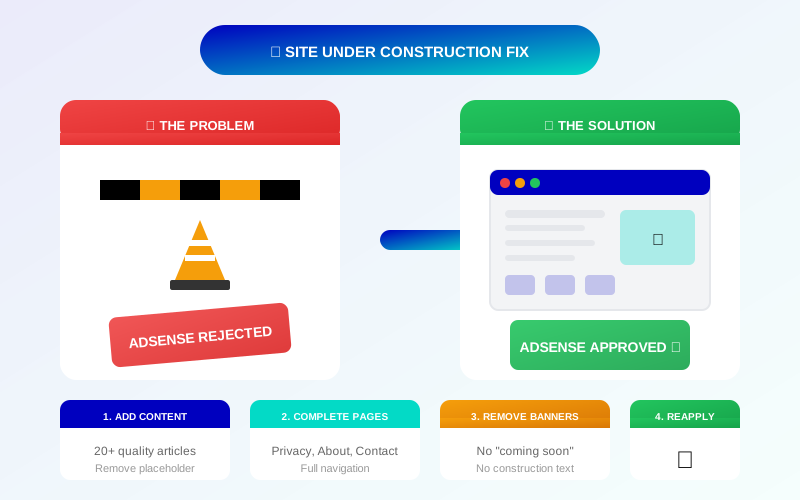
Step 1: Complete All Essential Pages
Ensure these pages exist and have real content:
See also: Google AdSense Best Practices 2026: What Works Now (and What Doesn't) →
- Homepage: Clear purpose, professional design
- About page: Real information about you/your site
- Contact page: Working contact method
- Privacy Policy: Complete, relevant policy
- Terms of Service: Appropriate terms
Step 2: Audit for Placeholders
Search your entire site for:
- "Lorem ipsum"
- "Sample"
- "Test"
- "Example"
- "Your text here"
- Any other placeholder text
Step 3: Check All Navigation
Click every menu item and link:
- Do all links work?
- Do pages have content?
- Are there empty categories?
- Do footer links work?
Step 4: Remove Under-Construction Signals
Eliminate any indication site is unfinished:
- Remove "coming soon" banners
- Remove beta/preview labels
- Remove launch countdown widgets
- Remove "under construction" notices
Step 5: Ensure Sufficient Content
Make sure you have enough published content. Learn how many articles you need for AdSense approval:
Learn more in AdSense YouTube vs Website: Which Earns More Money in 2026? →
- At least 15-25 quality articles
- Each article 800+ words
- Content published consistently
- Multiple categories if applicable
Step 6: Test Site Functionality
Verify everything works:
- Site loads on mobile and desktop
- All images display properly
- Forms submit correctly
- No JavaScript errors
Page-by-Page Checklist
Homepage
- ☐ Clear site purpose/tagline
- ☐ Professional design
- ☐ Working navigation
- ☐ Recent content visible
- ☐ No placeholder images
About Page
- ☐ Real information about author/site
- ☐ Professional photo (optional but helpful)
- ☐ Explains site purpose
- ☐ At least 200-300 words
Contact Page
- ☐ Working contact form OR email address
- ☐ Clear instructions for contact
- ☐ Tested and verified working
Blog/Content Pages
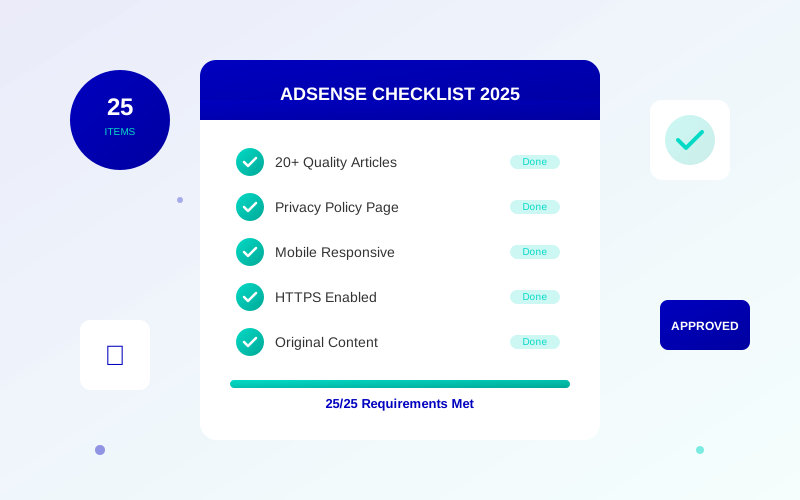
- ☐ At least 15-25 articles
- ☐ Each article 800+ words
- ☐ No empty categories
- ☐ Recent publishing activity
Legal Pages
- ☐ Privacy Policy present and complete
- ☐ Terms of Service present
- ☐ Linked from footer
Common Mistakes to Avoid
Hidden Placeholder Content
Check widgets, sidebars, and footers. Theme demo content often hides in these areas.
Theme Demo Pages
Many themes create demo pages during installation. Check for pages you did not create and delete them.
Draft or Scheduled Content
Published content matters. 50 drafts and 5 published articles looks like an under-construction site.
Learn more in Free vs Self-Hosted Blogs for AdSense: Which One Gets Approved? →
Broken Category Pages
If you have 10 categories but only 3 have posts, it looks incomplete. Either add content or remove empty categories.
Social Links to Empty Profiles
If social icons link to profiles with no content, it suggests the site is new and unestablished.
Verify Your Site Is Ready
The Fresh Eyes Test
Ask someone unfamiliar with your site to browse it. Ask them:
- Does it look finished?
- Is anything missing or broken?
- Does it look professional?
The Five-Second Test
Looking at your homepage for 5 seconds, can someone tell:
Learn more in AdSense vs Alternatives: Which Ad Network Pays You More? →
- What your site is about?
- That it is a real, active site?
- How to find content?
Technical Verification
- Run site through Google Search Console
- Check for crawl errors
- Verify mobile-friendliness with the Mobile-Friendly Test
- Test page load speed with PageSpeed Insights
Reapplying After Fixes
Wait Period
After making fixes, wait a few days before reapplying. This allows Google to recrawl your site and see the changes.
Request Review
When ready, submit a new AdSense review through your AdSense account. Be patient—reviews typically take 1-2 weeks.
Do Not Rush
Better to wait and submit a fully ready site than to rush and receive the same rejection. Multiple rejections do not help your case.
Frequently Asked Questions
How long should I wait before reapplying?
After making all fixes, wait 3-7 days. This gives Google time to recrawl your site. Reapplying immediately with no changes wastes time.
Can my domain being new cause this rejection?
Possibly. Very new domains with minimal content can appear under construction. Focus on building content and let the domain age naturally.
I cannot find any placeholder content. What now?
The issue might be empty pages, insufficient content volume, or technical problems. Review all pages thoroughly and ensure you have at least 15-25 quality articles.
Will adding more content fix this?
Often yes. Sparse sites look unfinished. Adding substantial, quality content demonstrates the site is active and complete.
How many times can I reapply?
There is no official limit, but make meaningful improvements between applications. Repeatedly applying with no changes can delay approval.