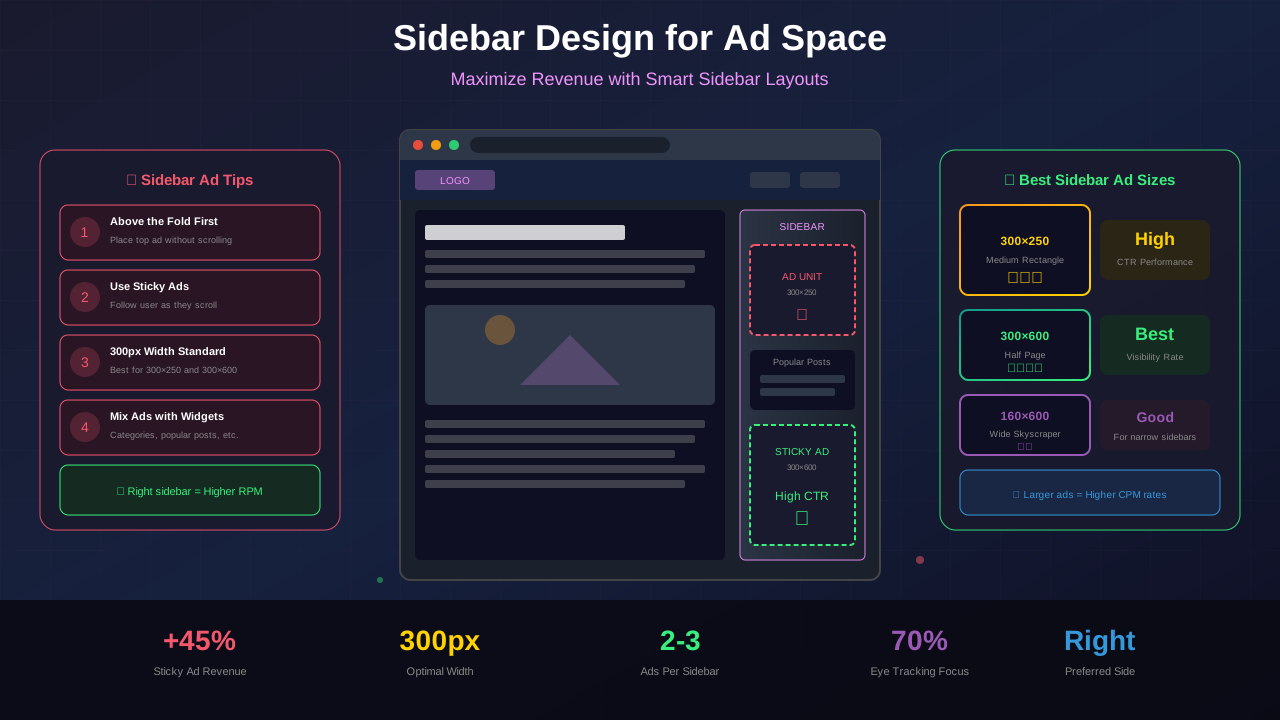
The sidebar is often overlooked in modern web design, yet it remains one of the best areas for ad placement on desktop. A well-designed sidebar can generate significant revenue while providing value to users. This guide shows you how to design sidebars that work.
With mobile-first design dominating discussions, many publishers neglect sidebar optimization. But desktop users still represent substantial traffic and revenue, making sidebar design crucial for monetization.
Why Sidebars Still Matter
While mobile browsing has grown, sidebars remain valuable for optimising user experience and ad revenue:
Desktop Revenue
Desktop users often:
- Spend more time on pages
- Have higher purchasing power
- Click on sidebar ads more frequently
- View more pages per session
High Viewability
Sidebar ads, especially sticky ones, maintain visibility as users scroll through content. This increases viewability metrics and ad value.
Non-Intrusive Placement
Unlike in-content ads that interrupt reading flow, sidebar ads sit alongside content. Research from Nielsen Norman Group confirms this often results in better user experience.
Optimal Sidebar Width
Width affects both UX and ad options:
Standard Widths
- 300px: Most common, accommodates 300x250 and 300x600 ads
- 336px: Fits larger 336x280 ad units
- 250px: Minimum practical width for ads
Recommended: 300px
The 300px width is ideal because:
See also: Content Formatting Tips That Boost CTR & Keep Readers on Your Blog →
- Supports the most popular ad sizes
- Provides enough space for widgets
- Does not steal too much from content area
- Works well with responsive breakpoints
Content Area Balance
Your content area should be at least twice the sidebar width. For a 300px sidebar:
- Content area: 600-800px minimum
- Total container: 900-1200px
Left vs Right Sidebar
Placement affects both UX and revenue:
Right Sidebar (Recommended)
Benefits:
- Content gets priority attention
- Natural reading flow (left to right)
- Standard convention users expect
- Ads visible without interfering with reading
Left Sidebar
Consider only if:
- Navigation is the sidebar's primary purpose
- Your audience expects it (documentation sites)
- You are not focusing on ad revenue
No Sidebar
Single-column layouts work for:
You might also find helpful: SEO-Friendly URL Design: Best Practices for Clean, Clickable URLs →
- Mobile-first designs
- Minimalist aesthetics
- In-content ad strategies
Sidebar Content Elements
Balance ads with useful content:
Essential Elements
- Search box: Help users find content
- Popular posts: Keep users on site
- Categories: Navigation assistance
- Newsletter signup: List building
- Social links: Community building
Ad Placement Zones
Position sidebar ads strategically while following above-the-fold design principles:
- Top of sidebar: High visibility, premium placement
- After first widget: Good viewability
- Sticky position: Remains visible during scroll
Content-to-Ad Ratio
Aim for 60% useful content, 40% ads in your sidebar. Pure ad sidebars feel spammy and reduce engagement.
Sticky Sidebar Implementation
Sticky sidebars keep content visible during scroll:
Benefits
- Higher ad viewability
- Better engagement metrics
- Increased ad revenue (often 20-40%)
- Keeps CTAs visible
Implementation Considerations
- Do not stick before user scrolls past header
- Stop before footer to prevent overlap
- Keep sticky content minimal and lightweight
- Test on various screen heights
What to Make Sticky
- Good: Ad unit, newsletter signup, key CTA
- Avoid: Entire sidebar, multiple ads, large widgets
AdSense Sticky Ad Rules
Google allows sticky sidebar ads with conditions:
See also: Ad Placement Strategies That Boost Revenue Without Hurting UX →
- Must not cover content
- Should not be deceptive
- Must have close button on mobile (if applicable)
Effective Design Patterns
Pattern 1: Content-First Sidebar
- Search box
- Popular posts widget
- Ad unit (300x250)
- Categories
- Newsletter signup
- Sticky ad unit (300x600)
Pattern 2: Minimal Revenue Focus
- Ad unit (300x250)
- Related posts
- Sticky newsletter + ad combo
Pattern 3: Community Building
- About/Author widget
- Newsletter signup (prominent)
- Social proof (followers count)
- Single ad unit
- Community links
Responsive Sidebar Behavior
Handle different screen sizes appropriately. Our responsive design guide covers these breakpoints in detail:
Desktop (1200px+)
Full sidebar visible with all content and ads.
Laptop (992-1199px)
Reduce sidebar width slightly or condense widgets.
Tablet (768-991px)
Options:
- Move sidebar below content
- Hide sidebar, add toggle
- Show reduced sidebar
Mobile (below 768px)
Hide sidebar completely. Move essential elements:
Learn more in Color Schemes for Professional Websites That Boost Revenue →
- Search to header
- Newsletter to end of post
- Popular posts to footer area
- Ads to in-content placements
Common Sidebar Mistakes
Too Many Ads
Stacking multiple ad units makes the sidebar look like an ad zone. Limit to 2-3 ad units maximum.
No Useful Content
Sidebars with only ads provide no value to users. Include helpful navigation and content elements.
Cluttered Design
Too many widgets creates visual chaos. Prioritize and limit to 5-6 total elements.
Ignoring Mobile
Forcing sidebar on mobile creates poor experience. Design mobile-specific layouts.
Static in Long Content
Non-sticky sidebars disappear as users scroll long posts. Consider sticky elements for long content.
You might also find helpful: Best WordPress Themes for AdSense: Top Picks for Maximum Revenue →
Sidebar Optimization Tips
Test Different Layouts
- A/B test widget order
- Compare ad sizes (300x250 vs 300x600)
- Test sticky vs non-sticky performance
Monitor Performance
- Track sidebar ad viewability
- Monitor widget click rates
- Check newsletter signup rates
- Compare desktop vs tablet metrics
Seasonal Adjustments
- Promote seasonal content in sidebar
- Adjust CTAs based on campaigns
- Consider removing low performers
Implementation Checklist
- ☐ Sidebar width is 300px for ad compatibility
- ☐ Content area remains dominant
- ☐ Mix of ads and useful content (60/40)
- ☐ At least one sticky element for long content
- ☐ Responsive behavior defined for all breakpoints
- ☐ Mobile sidebar hidden or repositioned
- ☐ Widget order prioritizes user value
- ☐ Load performance optimized
Frequently Asked Questions
Should I use a sidebar or focus on in-content ads only?
Both work. Sidebars are excellent for desktop revenue, while in-content ads work on all devices. Many successful publishers use both strategies.
How many ads can I put in my sidebar?
AdSense does not have a strict limit, but user experience matters. 2-3 ads is reasonable. Focus on quality placements over quantity.
Do sticky sidebars affect page speed?
Minimal impact with proper implementation. Use CSS position: sticky rather than JavaScript-based solutions for better performance. CSS-Tricks has excellent guides on modern sticky implementations.
What is the best ad size for sidebars?
The 300x250 (medium rectangle) and 300x600 (large skyscraper) are most popular. The 300x600 typically earns more due to size but requires sufficient sidebar space.
Should my sidebar be the same on all pages?
Consider page-specific sidebars. Blog posts might feature related articles, while category pages might show filtering options.