Call-to-action buttons are the pivotal conversion points on your website. Whether you want visitors to subscribe to your newsletter, download a resource, or explore more content, a well-designed CTA button dramatically increases the likelihood of them taking action.
This comprehensive guide covers the psychology, design principles, and best practices that transform ordinary buttons into conversion machines.
The Anatomy of an Effective CTA Button
Effective CTA buttons combine multiple elements working in harmony:
- Colour: Contrasts with surrounding elements to attract attention
- Size: Large enough to be noticed, appropriate for the context
- Shape: Rounded corners typically outperform sharp edges
- Text: Action-oriented, benefit-focused copy
- Whitespace: Breathing room to prevent crowding
- Position: Strategic placement within the user's visual flow
Colour Psychology for CTA Buttons
Colour choice significantly impacts button performance, but context matters more than universal rules:
The Contrast Principle
The most important colour rule: your CTA must contrast with surrounding elements. A blue button on a blue background will underperform regardless of how "trustworthy" blue is supposed to be.
💡 The Isolation Effect
Known as the Von Restorff effect, items that stand out are more likely to be remembered. Your primary CTA should be the most visually distinctive element on the page, even if it means breaking from your standard colour palette.
Button Sizing and Touch Targets
Button size affects both visibility and usability, especially on mobile devices.
See also: Content Formatting Tips That Boost CTR & Keep Readers on Your Blog →
Minimum Touch Target Sizes
Following accessibility guidelines and mobile-first design principles, minimum touch targets should be:
- Apple Guidelines: 44 × 44 pixels minimum
- Google Material Design: 48 × 48 pixels minimum
- WCAG Accessibility: 44 × 44 CSS pixels
Size Hierarchy
Use size to indicate action importance:
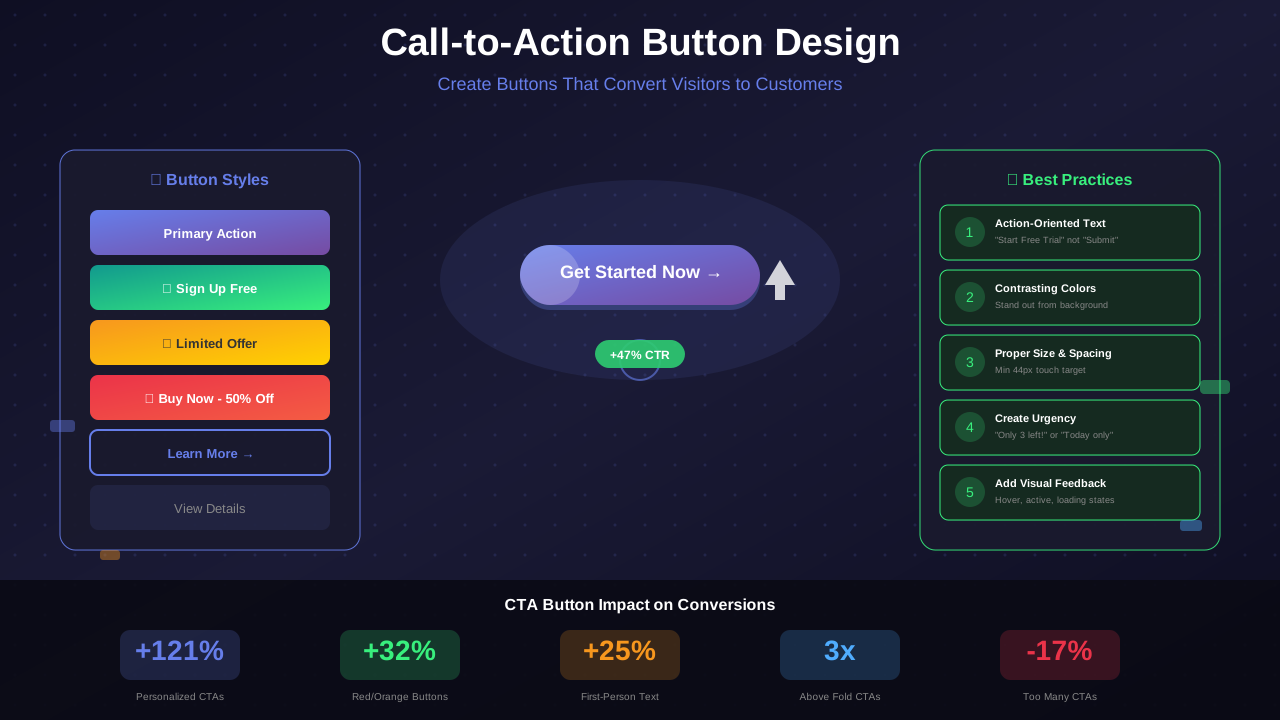
- Primary CTA: Largest button on the page (56px+ height)
- Secondary CTA: Slightly smaller, different styling (48px height)
- Tertiary Actions: Text links or ghost buttons (44px height)
Writing Compelling Button Copy
The words on your button directly impact click-through rates. Combined with proper typography choices, effective CTA copy follows specific patterns:
The Action-Benefit Formula
Combine what the user does with what they get:
You might also find helpful: SEO-Friendly URL Design: Best Practices for Clean, Clickable URLs →
- Weak: "Submit" or "Click Here"
- Better: "Download Now"
- Best: "Get My Free Guide"
First-Person vs Second-Person Copy
Testing shows first-person copy often outperforms second-person:
Power Words for CTAs
Incorporate these high-performing words into your button copy:
- Urgency: Now, Today, Instant, Limited
- Exclusivity: Free, Exclusive, Premium, Secret
- Action: Get, Grab, Claim, Unlock, Discover
- Safety: Try, Risk-Free, No Obligation, Cancel Anytime
✅ Button Copy Checklist
- ☑️ Starts with an action verb
- ☑️ Communicates the benefit or result
- ☑️ Uses first-person language ("My" not "Your")
- ☑️ Creates urgency without being pushy
- ☑️ Fits comfortably within the button (2-5 words)
Strategic Button Placement
Where you place CTAs significantly impacts their visibility and click rates:
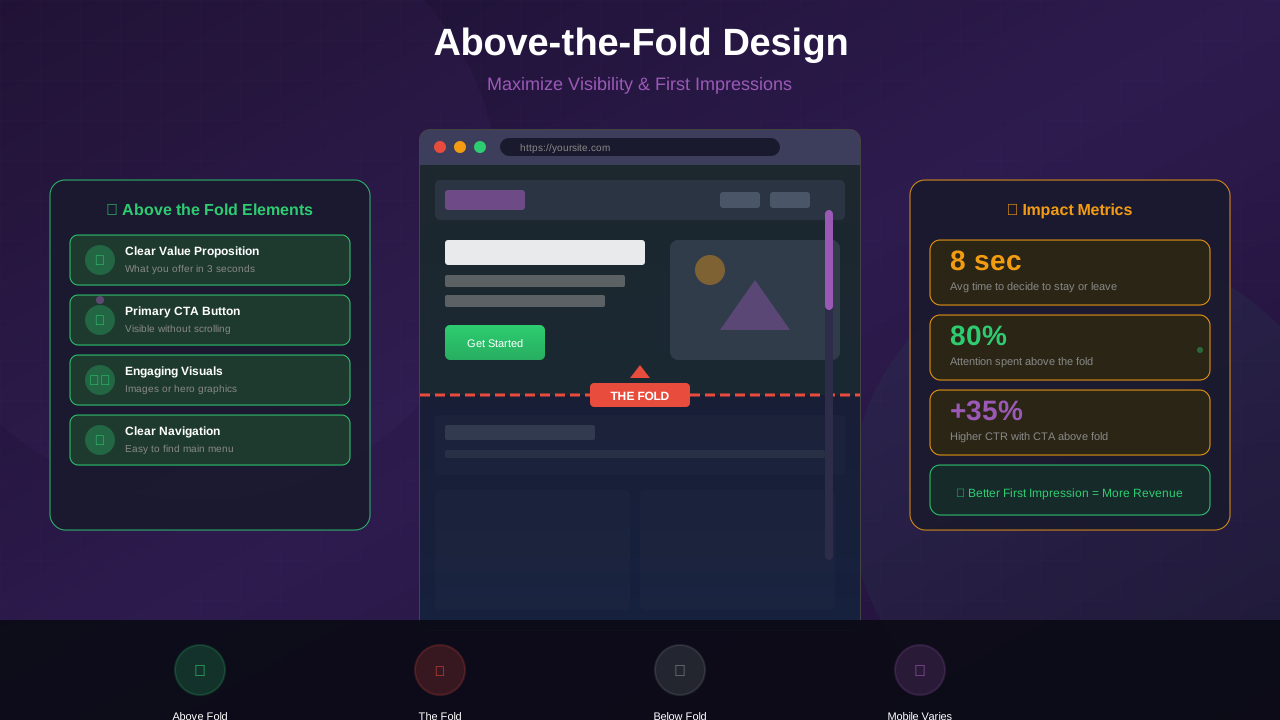
Above the Fold
Place primary CTAs within the initial viewport for immediate visibility. Understanding above-the-fold design principles helps you position CTAs effectively:
See also: Ad Placement Strategies That Boost Revenue Without Hurting UX →
- Capture visitors who know what they want immediately
- Works especially well for returning visitors
- Essential for mobile where scrolling may not occur
After Value Delivery
Position CTAs following compelling content that builds desire:
- After benefit explanations or testimonials
- Following feature demonstrations
- At the conclusion of persuasive copy
Natural Reading Patterns
Align buttons with how users scan pages:
- F-Pattern: Left-aligned content areas
- Z-Pattern: Landing pages with minimal copy
- Center: Full-width sections, after centered content
Button States and Feedback
Interactive feedback improves usability and perceived quality:
Essential Button States
- Default: Normal resting state
- Hover: Mouse over (desktop) - slight darkening or lift
- Focus: Keyboard navigation - visible outline
- Active/Pressed: Currently clicked - slight depression
- Loading: Processing - spinner or animation
- Disabled: Unavailable - reduced opacity
Hover Effect Best Practices
Effective hover states provide clear feedback without being distracting:
Learn more in Color Schemes for Professional Websites That Boost Revenue →
- Colour shift: 10-20% darker or lighter
- Subtle transform: scale(1.02) or translateY(-2px)
- Box-shadow addition for "lift" effect
- Transition duration: 150-200ms for smoothness
Mobile CTA Optimization
Mobile users require special CTA considerations:
Thumb-Friendly Placement
Position primary CTAs within easy thumb reach:
- Bottom half of the screen for one-handed use
- Center-aligned for ambidextrous access
- Avoid edges where accidental taps occur
Fixed/Sticky CTAs
For conversion-focused pages, consider sticky CTAs:
- Fixed bottom bar with primary action
- Appears after scrolling past initial CTA
- Include close/collapse option for user control
A/B Testing Your CTAs
Systematic testing reveals what works for your specific audience. Resources from Smashing Magazine and other design publications offer valuable testing insights:
You might also find helpful: Best WordPress Themes for AdSense: Top Picks for Maximum Revenue →
Elements to Test
- Colour: Different hues and saturation levels
- Copy: Wording, length, person (I vs You)
- Size: Button dimensions and padding
- Position: Location on page
- Quantity: Number of CTAs on page
Testing Best Practices
- Test one variable at a time for clear attribution
- Run tests for minimum 2 weeks or 1,000 conversions
- Ensure statistical significance before declaring winners
- Document all tests and results for future reference
- Implement winning variations and continue testing
Common CTA Button Mistakes to Avoid
- Generic Copy: "Submit" or "Click Here" tells nothing about the result
- Poor Contrast: Buttons that blend into the background
- Too Many CTAs: Choice paralysis from competing actions
- Tiny Touch Targets: Buttons too small for comfortable tapping
- Missing States: No hover or focus feedback
- Unclear Hierarchy: Multiple buttons of equal visual weight
Conclusion: Buttons That Convert
Effective CTA buttons combine visual design, persuasive copy, and strategic placement to guide visitors toward desired actions. Every element—from colour and size to wording and position—plays a role in conversion performance.
Start by auditing your current CTAs against the principles in this guide. Identify the weakest elements, implement improvements, and measure results. Continuous testing and refinement transform good buttons into great ones that consistently drive engagement and revenue.
Remember: the best CTA button is not universally defined—it is the one that works best for your specific audience, context, and goals.