Colors influence how visitors feel about your website and whether they click on ads. Understanding color psychology helps you design pages that boost engagement and revenue without feeling manipulative.
Studies show that color can increase brand recognition by up to 80% and influence purchasing decisions by 85%. For AdSense publishers, the right color choices mean more clicks, longer visits, and higher earnings.
What You Will Learn:
- How colors affect user behavior and emotions
- 8 colors that drive clicks and engagement
- Best color combinations for ad performance
- Colors to avoid on monetized websites
- Practical implementation strategies
Color Psychology Basics
Color psychology is the study of how colors affect human behavior and decision-making. On websites, colors guide attention, trigger emotions, and influence actions.
Why Colors Matter for Monetization
- Attention direction: Colors guide eyes to important elements
- Emotional response: Colors trigger feelings that drive behavior
- Brand perception: Colors shape how users see your site
- Action triggers: Certain colors encourage clicking
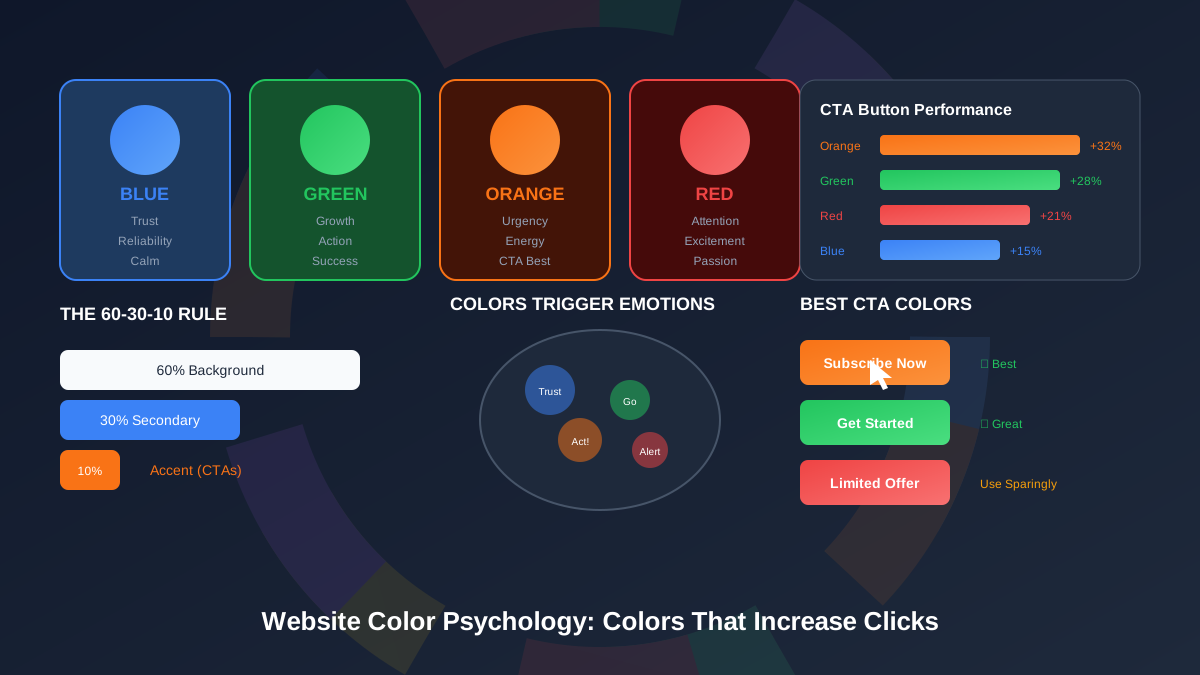
The 60-30-10 Rule
Professional designers use this ratio for balanced color schemes:
| Percentage | Purpose | Example |
|---|---|---|
| 60% | Dominant color (background) | White, light gray |
| 30% | Secondary color (sections) | Brand color |
| 10% | Accent color (CTAs, highlights) | Contrasting action color |
"Color is a power which directly influences the soul. Color is the keyboard, the eyes are the harmonies, the soul is the piano with many strings."
— Wassily Kandinsky, Artist and Color Theorist
Colors and Emotions
Each color triggers specific emotional responses. Understanding these helps you choose colors that support your goals.
Color-Emotion Chart
| Color | Primary Emotions | Best Used For |
|---|---|---|
| Blue | Trust, calm, security | Financial, tech, health sites |
| Green | Growth, health, wealth | Nature, finance, wellness |
| Orange | Energy, urgency, friendliness | CTAs, sales, entertainment |
| Red | Excitement, urgency, passion | Sales, food, alerts |
| Yellow | Optimism, warmth, attention | Highlights, caution, youth |
| Purple | Luxury, creativity, wisdom | Premium brands, beauty |
| Black | Elegance, power, sophistication | Luxury, fashion, tech |
| White | Cleanliness, simplicity, space | Backgrounds, minimalist design |
Blue: The Trust Builder
Blue is the most popular color on the web. It creates feelings of trust and reliability, making it ideal for professional sites.
Why Blue Works
- Associated with stability and dependability
- Creates calm, non-threatening feeling
- Works across cultures and demographics
- Easy on the eyes for long reading sessions
Blue Usage Guidelines
| Shade | Effect | Best For |
|---|---|---|
| Dark blue | Professional, authoritative | Headers, navigation |
| Medium blue | Friendly, approachable | Links, buttons |
| Light blue | Calm, open | Backgrounds, sections |
Blue for Ad Performance
Blue links are instantly recognizable as clickable. Using blue for important elements leverages this learned behavior:
See also: Content Formatting Tips That Boost CTR & Keep Readers on Your Blog →
- Blue text links get more clicks than other colors
- Blue buttons feel trustworthy
- Blue backgrounds make content feel credible
Green: Growth and Action
Green signals growth, success, and permission to proceed. It is excellent for action buttons and positive messages.
Green's Power
- Go signal: People associate green with "proceed"
- Money connection: Links to financial success
- Health association: Feels natural and safe
- Low eye strain: Easy to look at
Green for Conversions
| Use Case | Effectiveness | Why It Works |
|---|---|---|
| Subscribe buttons | Very high | Signals safe, positive action |
| Success messages | High | Confirms completion |
| Pricing pages | High | Suggests good value |
| Health content | Very high | Natural association |
"In our testing, green CTA buttons outperformed red ones by 21% for sign-up conversions. The color felt less aggressive and more inviting."
— HubSpot A/B Testing Research
Orange: The Urgency Creator
Orange combines the energy of red with the friendliness of yellow. It is one of the best colors for call-to-action buttons.
Orange Psychology
- Creates sense of urgency without alarm
- Feels energetic and enthusiastic
- Stands out against most backgrounds
- Associated with value and affordability
Where to Use Orange
- CTA buttons: "Buy Now," "Subscribe," "Download"
- Limited offers: Sale announcements, deadlines
- Highlights: Drawing attention to key points
- Sidebar elements: Newsletter signups, promotions
Orange Best Practices
| Do | Do Not |
|---|---|
| Use for primary CTAs | Overuse throughout the page |
| Pair with dark backgrounds | Use on orange backgrounds |
| Make buttons large enough | Use for warning messages |
| Test different shades | Assume one shade fits all |
Red: Attention and Excitement
Red is the most attention-grabbing color. Use it sparingly for maximum impact.
Red's Effects
- Increases heart rate: Creates physical excitement
- Demands attention: Impossible to ignore
- Creates urgency: "Act now" feeling
- Stimulates appetite: Why food brands use it
When to Use Red
| Good Uses | Bad Uses |
|---|---|
| Sale announcements | Large background areas |
| Error messages | Regular text |
| Countdown timers | Navigation elements |
| Important warnings | Entire page themes |
Red Warning
Too much red creates anxiety and can drive visitors away. Use it as an accent, not a primary color. The 10% accent rule applies especially to red.
You might also find helpful: SEO-Friendly URL Design: Best Practices for Clean, Clickable URLs →
More Effective Colors
Yellow: The Attention Grabber
Yellow is the most visible color. It grabs attention faster than any other.
- Best for: Highlights, warnings, sale tags
- Avoid: Large text blocks, backgrounds
- Pair with: Black text for readability
Purple: Luxury and Creativity
Purple suggests premium quality and imagination.
- Best for: Beauty, creative, premium brands
- Avoid: Budget-focused sites
- Pair with: Gold accents for luxury feel
Black: Elegance and Power
Black creates sophistication and contrast.
- Best for: Luxury brands, fashion, tech
- Avoid: Light text on black (hard to read)
- Pair with: White for clean contrast
White: Space and Clarity
White is not just absence of color—it is a powerful design tool.
- Best for: Backgrounds, creating breathing room
- Benefit: Makes other colors pop
- Effect: Clean, modern, trustworthy
Colors for Ad Performance
Strategic color choices can improve ad click-through rates without violating policies.
See also: Ad Placement Strategies That Boost Revenue Without Hurting UX →
Ad Background Colors
| Background | Effect on Ads | Recommendation |
|---|---|---|
| White/Light | Ads blend naturally | Best for content sites |
| Dark | Ads stand out more | Test carefully |
| Colored | May clash with ads | Use neutral zones |
Colors Around Ads
The colors surrounding ads affect click rates:
- Neutral backgrounds: Let ads attract natural attention
- Contrasting borders: Can highlight without violating policy
- White space: Gives ads room to breathe
AdSense Policy Reminder
Important: Do not use colors to trick users into clicking ads. Google prohibits:
- Making ads look like navigation
- Disguising ads as content
- Using deceptive colors around ads
"Publishers may not implement Google ads in a manner that disguises or obscures the ads."
— Google AdSense Program Policies
Implementation Tips
Here is how to apply color psychology to your website effectively.
Step-by-Step Process
-
Define your brand feeling:
What emotions should your site evoke?
Learn more in Color Schemes for Professional Websites That Boost Revenue →
-
Choose a primary color:
This will be your main brand color
-
Select complementary colors:
Use color wheel for harmonious combinations
-
Pick an accent color:
This goes on CTAs and important elements
-
Test and measure:
A/B test different color variations
Color Combination Examples
| Niche | Primary | Secondary | Accent |
|---|---|---|---|
| Finance blog | Dark blue | Light gray | Green |
| Health site | Green | White | Blue |
| Tech blog | Blue | Dark gray | Orange |
| Food blog | White | Warm brown | Red/Orange |
| Lifestyle | Light pink | White | Gold |
Testing Your Colors
- A/B test buttons: Try different CTA colors
- Check contrast: Use accessibility tools
- Get feedback: Ask users about their impressions
- Monitor metrics: Track click rates and time on page
Tools for Color Selection
| Tool | Purpose | Price |
|---|---|---|
| Coolors.co | Generate color palettes | Free |
| Adobe Color | Color wheel and themes | Free |
| Contrast Checker | Accessibility testing | Free |
| Canva Color Palette | Extract colors from images | Free |
Common Color Mistakes
Avoid these common errors that hurt user experience and revenue.
You might also find helpful: Best WordPress Themes for AdSense: Top Picks for Maximum Revenue →
Mistakes to Avoid
- Too many colors: Stick to 3-4 maximum
- Poor contrast: Light gray on white is hard to read
- Ignoring accessibility: 8% of men are color blind
- Trend chasing: Trends fade; timeless works
- Forgetting mobile: Colors look different on screens
For more design guidance, see our complete website design guide.
Frequently Asked Questions
What is the best color for CTA buttons?
Orange and green consistently perform well for CTA buttons. However, the "best" color depends on your overall design. The key is contrast—your CTA should stand out from surrounding elements. Test different colors with your specific audience to find what works best for your site.
Should I match my site colors to AdSense ads?
No, do not try to match or blend ads with your site in ways that might confuse users. Google prohibits making ads look like content. Instead, use clean design with good white space around ads. Let ads be clearly recognizable as ads—this actually builds trust and performs better long-term.
How do colors affect mobile users differently?
Colors can appear differently on various mobile screens. Bright colors may seem more intense, and subtle differences may not show. Always test your color choices on multiple devices. Mobile users also have smaller tap targets, so button colors need to clearly indicate clickability.
Can I use black backgrounds for my blog?
Dark themes are popular but challenging for long-form content. Reading light text on dark backgrounds causes more eye strain for extended periods. If you use a dark theme, ensure excellent contrast and consider offering a light mode option. Most successful content sites use light backgrounds.
How often should I update my color scheme?
Major color changes should be rare—your brand colors build recognition over time. However, you can test accent colors for CTAs quarterly. If metrics show declining engagement, test new accent colors before changing your primary palette. Always make changes based on data, not just trends.