Internal linking is one of the most powerful yet underutilized SEO tactics. By strategically connecting your pages, you can boost rankings for key content, help Google discover and understand your site, and keep visitors engaged longer—all without spending a penny on external link building.
This comprehensive guide covers everything you need to know about internal linking: from basic principles to advanced strategies that can transform your site's SEO performance.
What You Will Learn:
- Why internal linking matters for SEO
- How to structure internal links effectively
- Anchor text best practices
- The pillar-cluster linking model
- Tools and techniques for optimization
Why Internal Linking Matters
Internal links provide multiple benefits for SEO and user experience:
Helps Google Discover Pages
Google's crawlers follow links to discover new pages. Pages without internal links may never get indexed, no matter how good the content is. Combine internal linking with a proper XML sitemap for maximum discoverability.
Distributes Page Authority
Links pass "link equity" (ranking power) between pages. Strategic internal linking channels authority from high-performing pages to pages you want to rank better.
Establishes Site Architecture
Internal links tell Google which pages are most important and how topics relate to each other. This helps Google understand your site's topical focus.
Keeps Visitors Engaged
Good internal links reduce bounce rate by guiding visitors to related content. More page views per session improve engagement metrics and ad revenue.
"Internal links are how Google crawls, understands, and ranks websites. They're one of the most overlooked opportunities in SEO."
— Google Search Central
Types of Internal Links
Understanding different link types helps you optimize each:
See also: How to Fix Mixed Content Errors: Complete Guide for Blog Owners →
Navigational Links
Found in menus, headers, footers, and sidebars. These define your site structure but have less SEO impact because they appear on every page.
Contextual Links
Links within your content that connect to related articles. These are the most valuable for SEO because they are unique to each page and highly relevant.
Footer and Sidebar Links
Category links, popular posts, and related articles in these areas. Useful but less impactful than contextual links.
Image Links
Linked images pass authority too. The alt text serves as the anchor text for image links.
Optimal Internal Link Structure
Structure your internal links strategically:
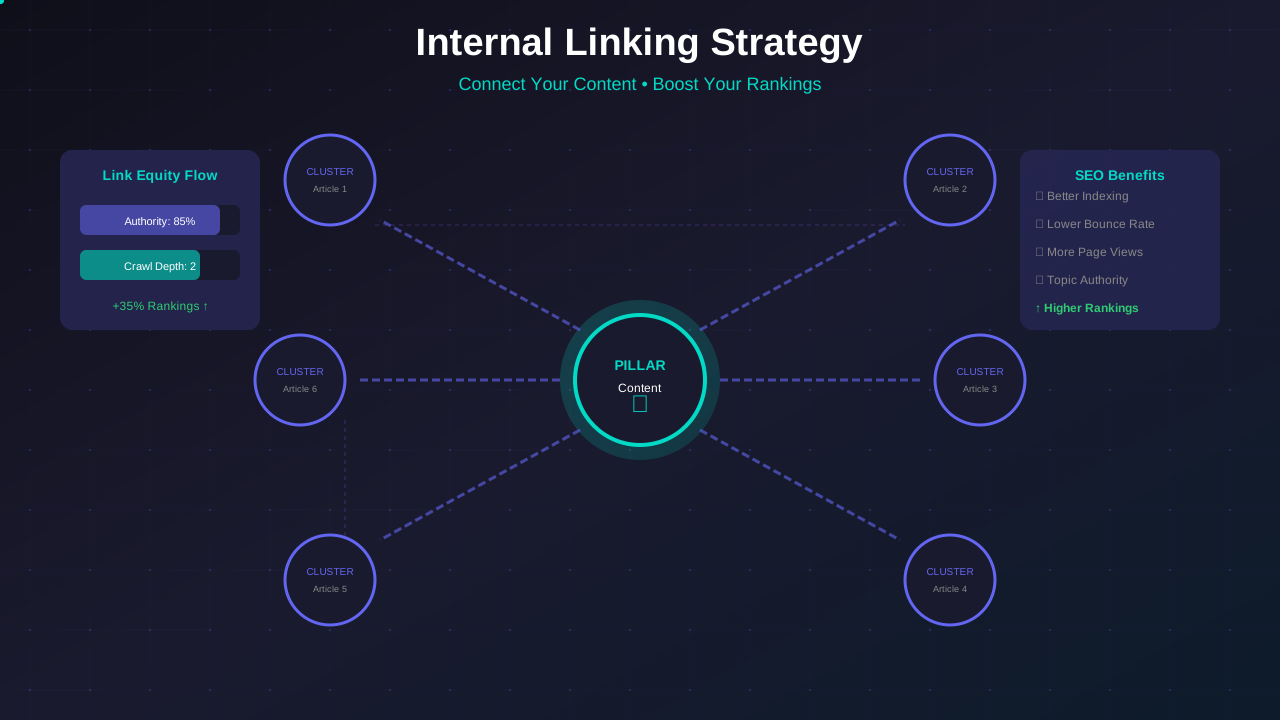
The Pillar-Cluster Model
The most effective modern internal linking structure:
You might also find helpful: URL Structure Best Practices: Clean URLs That Boost SEO & AdSense Revenue →
- Pillar pages: Comprehensive guides on broad topics
- Cluster pages: Detailed articles on specific subtopics
- Linking pattern: Clusters link to pillar; pillar links to all clusters
Link Depth
Important pages should be reachable in 3 clicks or less from the homepage:
- 1 click: Main category pages
- 2 clicks: Subcategory or popular articles
- 3 clicks: Individual posts
No Orphan Pages
Every page should have at least one internal link pointing to it. Orphan pages are hard for Google to discover and rank.
Anchor Text Best Practices
The clickable text in links matters for SEO:
Be Descriptive
Anchor text should indicate what the linked page is about:
- Bad: "click here"
- Bad: "read more"
- Good: "learn about Core Web Vitals optimization"
- Good: "complete guide to AdSense approval"
Use Natural Variations
Do not use the exact same anchor text for every link to a page. Vary your anchor text naturally:
- "keyword research guide"
- "how to research keywords"
- "finding the right keywords"
Include Keywords Naturally
Anchor text can include target keywords, but it should read naturally within your content. Do not force keyword-stuffed anchors.
You might also find helpful: Structured Data Testing Guide: Validate Schema Markup Like a Pro →
"The anchor text helps us understand what the page you're linking to is about. Make it descriptive but natural."
— Google SEO Starter Guide
How Many Internal Links Should You Use?
Balance is important:
General Guidelines
- 2-5 internal links per 1,000 words
- At least 1 link in the first few paragraphs
- More links in longer, comprehensive content
- Quality over quantity—link when genuinely helpful
Avoid Over-Linking
- Do not link every possible keyword
- Avoid linking the same page multiple times
- Do not interrupt reading flow with excessive links
Where to Place Links
- Early: Include 1-2 links in the introduction or first section
- Throughout: Distribute links naturally across the content
- End: Add a "Related Articles" section
Strategic Internal Linking Tactics
Advanced strategies for maximum impact:
Link to Important Pages More Often
Pages you want to rank better should receive more internal links. Audit your site to ensure priority pages have adequate internal links.
Link From High-Authority Pages
Links from your most popular pages pass more authority. Identify your best-performing pages and add strategic links from them.
Update Old Content With New Links
When you publish new content, go back and add links from relevant older articles. This helps new content get discovered and ranked faster.
For more on this topic, see our guide on Canonical Tags & Duplicate Content: The Complete SEO Fix Guide →
Create Hub Pages
Create resource pages that link to all content on a topic. These hub pages can become highly authoritative and help all linked pages rank better.
Common Internal Linking Mistakes
Avoid these frequent errors:
Orphan Pages
Pages with no internal links pointing to them are invisible to Google. Regularly audit for orphan content.
Broken Internal Links
Links to deleted or moved pages hurt user experience and waste link equity. Fix or remove broken links, and ensure you have an optimized 404 page for any links you cannot redirect.
Over-Optimized Anchors
Using exact-match keyword anchors every time looks manipulative. Vary your anchor text naturally.
Linking Only From Navigation
Navigation links alone are not enough. Contextual links within content are more valuable for SEO.
Learn more in HTTPS & SSL Security: Essential Guide for AdSense Sites →
Deep Link Chains
Important pages buried 5+ clicks from the homepage lose authority. Keep important content accessible.
Auditing Your Internal Links
Regular audits identify opportunities:
Tools for Auditing
Ensure your robots.txt configuration allows crawlers to access all your linked pages:
- Google Search Console: Internal Links report
- Screaming Frog: Comprehensive site crawl
- Ahrefs Site Audit: Link analysis features
- Link Whisper (WordPress): Internal link suggestions
What to Look For
- Pages with few or no internal links
- Broken internal links
- Pages you want to rank that lack links
- Opportunities to link from popular content
Creating an Internal Linking Process
- Audit internal links quarterly
- When publishing new content, add 3-5 internal links
- Add links to new content from 2-3 existing articles
- Fix broken links as discovered
Internal Linking Checklist
Use this for every article:
- ☐ Include at least 1 internal link in the introduction
- ☐ Add 2-5 contextual links per 1,000 words
- ☐ Link to the relevant pillar page
- ☐ Use descriptive, varied anchor text
- ☐ Add a related articles section
- ☐ After publishing, add links from 2-3 existing articles
- ☐ Verify no broken internal links
Frequently Asked Questions
Do internal links help with Google rankings?
Yes. Internal links help Google discover, understand, and rank your pages. Pages with more relevant internal links typically rank better than orphan pages.
Should I use nofollow on internal links?
Generally no. Internal links should pass link equity freely within your site. Use nofollow only for links to login pages or other pages you truly do not want indexed.
How do I find pages that need more internal links?
Use Google Search Console's Internal Links report or crawl your site with Screaming Frog. Look for pages with fewer than 5 incoming internal links.
Can too many internal links hurt SEO?
Excessive linking can dilute the value per link and harm user experience. Stick to 2-5 links per 1,000 words and only link when genuinely relevant.
Should I link to the same page multiple times in one article?
Generally no. One link is sufficient. Google uses the first link's anchor text and additional links to the same page add little value.