Every website has broken links and missing pages. What separates successful monetised sites from struggling ones is how they handle these errors. A well-optimised 404 page transforms potential bounce into engagement, keeping visitors on your site and protecting your AdSense revenue.
This comprehensive guide covers everything from basic 404 design principles to advanced strategies for turning error pages into conversion opportunities.
Why 404 Pages Matter for Monetised Websites
404 errors occur when visitors attempt to access pages that do not exist. This happens more frequently than most publishers realise:
- Deleted Content: Old articles removed but still linked externally
- URL Typos: Visitors or linking sites making typing errors
- Broken Links: Internal links pointing to moved content—having a solid internal linking strategy helps prevent these issues (use tools like Screaming Frog to find these)
- Expired Campaigns: Landing pages removed after promotions end
- CMS Changes: URL structure modifications during site updates
The Revenue Cost of Poor 404 Pages
A default, unhelpful 404 page creates immediate visitor abandonment:
Essential Elements of an Optimised 404 Page
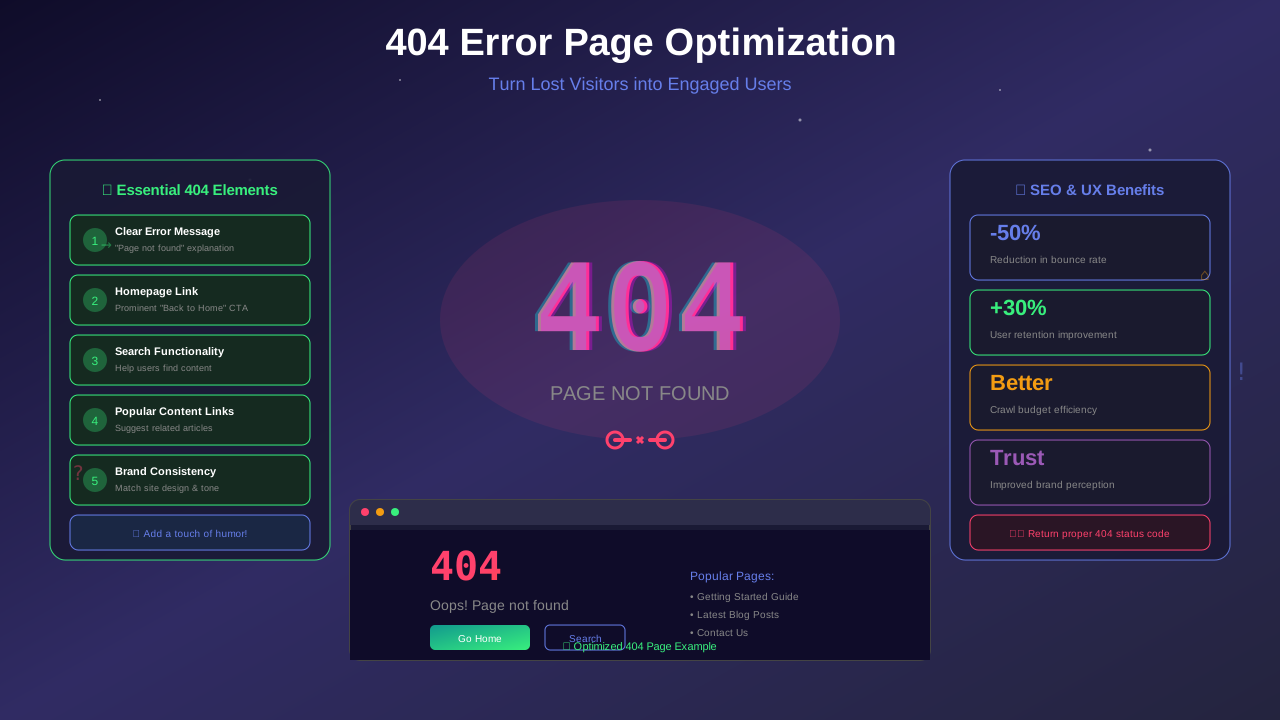
Every effective 404 page includes these core components:
1. Clear Error Message
Users should immediately understand what happened without technical jargon:
See also: How to Fix Mixed Content Errors: Complete Guide for Blog Owners →
- Good: "Oops! This page seems to have wandered off."
- Bad: "Error 404: HTTP Status Code Not Found"
2. Search Functionality
A prominent search box helps visitors find what they originally sought:
- Position search prominently in the centre of the page
- Include placeholder text suggesting search action
- Ensure search actually works and returns relevant results
3. Navigation to Key Pages
Provide quick links to your most valuable content:
- Homepage link (essential)
- Category pages or main sections
- Popular or featured articles
- Contact page for user support
4. Consistent Branding
The 404 page should feel like part of your site, not a system error:
You might also find helpful: URL Structure Best Practices: Clean URLs That Boost SEO & AdSense Revenue →
- Use your site's colour scheme and typography
- Include your logo and navigation header
- Match the overall design aesthetic
- Keep footer and standard site elements
💡 Pro Tip
Include your main navigation on 404 pages. Studies show visitors are 3x more likely to continue browsing when familiar navigation elements are present versus a standalone error page.
SEO Considerations for 404 Pages
Proper 404 handling affects your search engine performance significantly:
Return Correct HTTP Status Codes
Ensure your server returns a proper 404 status code, not 200 (OK). Proper HTTP configuration is also essential for page speed optimization:
You might also find helpful: Structured Data Testing Guide: Validate Schema Markup Like a Pro →
- 404 Not Found: Standard response for missing pages
- 410 Gone: For permanently removed content
- 301 Redirect: When content has moved to a new URL
Avoid Soft 404s
Soft 404s occur when your server returns a 200 status but displays "page not found" content. This confuses search engines and wastes crawl budget:
- Check status codes using browser developer tools
- Test with Google Search Console URL Inspection
- Configure server to return proper 404 headers
Monitor 404 Errors in Search Console
Regularly review crawl errors in Google Search Console to identify and fix broken links. A properly configured XML sitemap can help Google understand which pages are valid:
- Navigate to Coverage > Excluded
- Review "Not found (404)" entries
- Prioritise high-traffic or frequently crawled pages
- Implement 301 redirects for valuable content
- Update internal links pointing to missing pages
AdSense on 404 Pages: Policy and Best Practices
You can display AdSense ads on 404 pages, but follow these guidelines:
For more on this topic, see our guide on Canonical Tags & Duplicate Content: The Complete SEO Fix Guide →
AdSense Policy Requirements
- The 404 page must provide genuine navigation value
- Ads must not be the primary focus of the page
- Users must have clear paths to actual content
- Do not artificially generate 404 errors for ad impressions
Recommended Ad Placement
- Limit to 1-2 ad units maximum on 404 pages
- Position ads below helpful content and navigation
- Ensure navigation elements are more prominent than ads
- Consider using responsive ad units that adapt to page context
⚠️ Warning
Never design 404 pages primarily for ad revenue. Google's quality raters and algorithms can detect pages that prioritise monetisation over user experience. This can negatively impact your AdSense account standing.
Creative 404 Page Strategies
The Helpful Approach
Focus on solving the user's problem:
- Suggest related content based on the requested URL
- Display recent popular articles
- Include a FAQ section about common pages
- Offer to email the user when content is found
The Engaging Approach
Use creativity to turn frustration into delight:
Learn more in HTTPS & SSL Security: Essential Guide for AdSense Sites →
- Custom illustrations or animations
- Humorous messages that match your brand voice
- Interactive elements (games, quizzes)
- Easter eggs that reward exploration
The Conversion Approach
Use 404 pages as conversion opportunities:
- Newsletter signup with compelling offer
- Social media follow buttons
- Free resource or guide download
- Contest or giveaway entry
Implementation Guide
WordPress 404 Page Setup
- Create a 404.php file in your theme folder
- Include get_header() and get_footer() for consistent design
- Add search form using get_search_form()
- Display recent posts with wp_get_recent_posts()
- Include category links for easy navigation
Next.js 404 Page Setup
// pages/404.tsx or app/not-found.tsx
export default function NotFound() {
  return (
    <div className="min-h-screen flex items-center justify-center">
      <div className="text-center">
        <h1>Page Not Found</h1>
        <p>We could not find what you were looking for.</p>
        <Link href="/">Return Home</Link>
      </div>
    </div>
  );
}
Static Site 404 Setup
Most hosts support custom 404 pages:
- Vercel: Create pages/404.js or 404.html in public
- Netlify: Create 404.html in publish directory
- GitHub Pages: Create 404.html in repository root
- Apache: Add ErrorDocument 404 /404.html to .htaccess
Measuring 404 Page Success
Track these metrics to evaluate your 404 page performance:
Conclusion
An optimised 404 page is not just about damage control—it is a genuine opportunity to demonstrate your site's value and retain visitors who might otherwise leave. By implementing helpful navigation, maintaining consistent branding, and following SEO best practices, you transform error pages from revenue-losing dead ends into engagement-building touchpoints.
Take time to audit your current 404 page, implement the strategies outlined in this guide, and monitor the results. The improvement in bounce rates and maintained session lengths will directly impact your AdSense revenue while creating a better experience for your visitors.