The difference between blog posts that rank on page one and those that disappear into obscurity often comes down to structure. While content quality matters, how you organize and present information plays an equally important role in search rankings and reader engagement.
In this guide, you will learn the exact blog post structure used by top-ranking content across industries. This framework works whether you are writing a how-to guide, a listicle, or an in-depth analysis.
What You Will Learn:
- The anatomy of a high-ranking blog post
- How to structure each section for SEO
- Formatting techniques that improve rankings
- Templates for different content types
- Common structure mistakes to avoid
Why Structure Matters for SEO
Google's algorithms evaluate content structure in several ways:
User Experience Signals
Well-structured content keeps readers on the page longer. Google tracks time on page, scroll depth, and bounce rate—all influenced by structure.
Semantic Understanding
Proper use of headings helps Google understand your content's hierarchy and topic coverage. This affects how and where your content appears in search results.
Featured Snippet Eligibility
Structured content with clear definitions, lists, and step-by-step sections is more likely to win featured snippets (position zero).
"The structure of your content helps us understand what the page is about and how to rank it for different queries."
— Google Search Central Documentation
The Complete Blog Post Framework
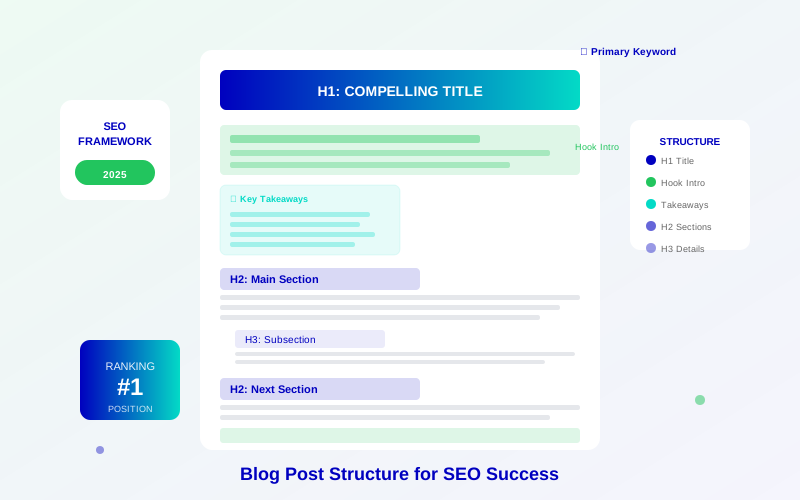
Every high-ranking blog post follows this proven structure:
For more on this topic, see our guide on Blog Traffic Growth Strategies: 12 Proven Ways to Get More Readers in 2026 →
1. Compelling Title (H1)
Your title is the first and most important element:
- Include your primary keyword near the beginning
- Keep it under 60 characters for full display in search results
- Add a number, power word, or unique angle
- Make a clear promise of value
2. Hook Introduction (150-200 words)
Your introduction should:
- Hook the reader with a relatable problem or question
- Include your primary keyword in the first paragraph
- Establish credibility and authority
- Preview what the reader will learn
3. Key Takeaways Box
Add a summary box early in the article:
- Lists 4-6 main points covered
- Helps readers decide if the article is for them
- Often gets picked up as featured snippets
- Improves engagement for scanners
4. Table of Contents
Include a clickable table of contents:
- Helps readers navigate long content
- Creates anchor links Google uses for sitelinks
- Improves user experience metrics
- Shows content comprehensiveness
5. Body Sections (H2/H3 Headings)
Structure your main content with clear hierarchy:
Learn more in SEO Content Writing Guide: How to Write Articles That Rank and Convert →
- H2 headings for main topics
- H3 headings for subtopics
- Each section should answer a specific question
- Keep paragraphs short (2-4 sentences)
6. Visual Elements
Break up text with relevant visuals:
- Custom images or graphics
- Screenshots when demonstrating processes
- Comparison tables for data
- Infographics for complex concepts
7. Expert Quotes and Citations
Add credibility with authoritative sources:
- Quote industry experts
- Cite official documentation
- Reference statistics with sources
- Include 3-4 quotes throughout
8. Conclusion Section
Wrap up your content effectively:
- Summarize key points
- Include a clear call to action
- Link to related content
- Encourage comments or sharing
9. FAQ Section
Add a frequently asked questions section:
- Answer 3-5 related questions
- Use actual questions people ask
- Keep answers concise (50-100 words)
- Use FAQ schema markup
Mastering Heading Hierarchy
Proper heading structure is critical for SEO. As Yoast SEO emphasizes, headings help both readers and search engines understand your content:
For more on this topic, see our guide on Content Localization Strategy: Reach Global Audiences & Boost Revenue →
The Rules
- H1: Only one per page (your title)
- H2: Main sections (6-10 per article)
- H3: Subsections under H2s
- H4: Rarely needed, use sparingly
Heading Best Practices
- Include keywords naturally in headings
- Make headings descriptive and specific
- Use question format when appropriate
- Never skip heading levels (H2 to H4)
"Your H2 headings should be mini-titles that could stand alone as search results. Each should clearly indicate what that section covers."
— SEO Content Expert
Paragraph and Text Formatting
How you format text affects both readability and SEO:
Paragraph Guidelines
- Keep paragraphs to 2-4 sentences
- One idea per paragraph
- Start with the most important information
- Use transition words between paragraphs
Text Formatting
- Bold: Key terms and important points
- Italics: Emphasis and technical terms
- Bullet points for lists of items
- Numbered lists for sequences or steps
Readability Targets
- Reading level: Grade 7-9
- Average sentence length: 15-20 words
- Avoid jargon unless defining it
- Use active voice predominantly
Structure Templates by Content Type
Different content types require different structures:
How-To Article Structure
- Title: "How to [Achieve Result]: [Number] Steps/Methods"
- Introduction: Problem + Solution Preview
- What You Will Need (if applicable)
- Step-by-Step Instructions (H2 for each step)
- Tips and Best Practices
- Common Mistakes to Avoid
- Conclusion + Next Steps
- FAQs
Listicle Structure
- Title: "[Number] Best/Top/Essential [Topic]"
- Introduction: Why this list matters
- How We Selected Items (adds E-E-A-T)
- Numbered Items (H2 for each)
- Comparison Table
- How to Choose
- Conclusion
- FAQs
Ultimate Guide Structure
- Title: "The Ultimate/Complete Guide to [Topic]"
- Introduction: Why this guide exists
- Key Takeaways Box
- Table of Contents
- Foundation/Basics Section
- Intermediate Concepts
- Advanced Strategies
- Tools and Resources
- Common Mistakes
- Conclusion
- FAQs
Internal Linking Within Structure
Strategic internal linking improves both SEO and user experience. According to Moz, internal links help distribute page authority and guide users through your content:
Link Placement
- Include 3-5 internal links per 1,000 words
- Link within the first 200 words
- Add contextual links throughout body sections
- Create a "Related Articles" section at the end
Anchor Text Best Practices
When linking to related content, consider targeting long-tail keywords in your anchor text for better SEO impact.
Related reading: AI Content and AdSense: How to Use AI Safely Without Getting Banned →
- Use descriptive, keyword-rich anchor text
- Avoid generic phrases like "click here"
- Vary anchor text across different links
- Make links naturally fit within sentences
Common Structure Mistakes to Avoid
These structural errors hurt rankings and engagement:
Wall of Text
Long paragraphs without breaks cause readers to leave. Break up text with headings, lists, and images every 100-200 words.
Missing H2 Headings
Jumping from H1 to H3 or skipping headings confuses Google about your content hierarchy.
No Introduction Hook
Starting with background information instead of engaging the reader leads to high bounce rates.
Missing Visual Breaks
Text-only content is harder to consume. Add images, tables, or callout boxes every 300-400 words.
Learn more in Featured Snippets Optimization: Boost Traffic and Revenue Fast →
Weak Conclusions
Abrupt endings without summarizing key points or providing next steps waste the relationship you built with readers.
Blog Post Structure SEO Checklist
Use this checklist before publishing:
- ☐ Compelling H1 with primary keyword
- ☐ Hook introduction (150-200 words)
- ☐ Key takeaways box early in article
- ☐ Table of contents with anchor links
- ☐ H2 headings for main sections (6-10)
- ☐ H3 subheadings where needed
- ☐ Short paragraphs (2-4 sentences)
- ☐ Bullet/numbered lists throughout
- ☐ Images/visuals every 300-400 words
- ☐ Expert quotes (3-4 throughout)
- ☐ Internal links (3-5 per 1,000 words)
- ☐ Strong conclusion with CTA
- ☐ FAQ section with schema
Frequently Asked Questions
How long should a blog post be for SEO?
Length depends on the topic, but most high-ranking content is 1,500-2,500 words. Comprehensive guides can be 3,000-5,000 words. Focus on covering the topic thoroughly rather than hitting a specific word count.
Should every blog post have the same structure?
No. Adapt the structure to fit your content type. A how-to article needs step-by-step sections, while a comparison post needs side-by-side analysis. The core elements (introduction, body, conclusion, FAQs) should always be present.
How many H2 headings should I use?
For a 1,500-word article, aim for 6-8 H2 headings. For longer content, 10-15 is appropriate. Each H2 should introduce a distinct topic or section.
Do I need a table of contents?
For articles over 1,500 words, yes. Tables of contents improve user experience, help Google understand your content structure, and can generate sitelinks in search results.
Where should I place my most important information?
Put critical information early in the article and at the beginning of each section. Many readers scan content, so front-loading value ensures they get key information even if they do not read everything.