Structured data helps Google understand your content better. When Google understands your pages, it can show rich results. Rich results mean more clicks, more traffic, and more AdSense revenue.
What You'll Learn:
- What structured data and schema markup are
- Why they matter for bloggers
- How to add JSON-LD to your blog
- Common schema types for blogs
- Testing and validation tools
What Is Structured Data?
Structured data is code you add to your pages. It tells search engines what your content is about. Think of it as labels for your content.
Without structured data, Google has to guess what your page covers. With it, Google knows exactly what it's reading. This matters because Google shows richer results for pages with structured data.
According to Google's documentation, structured data helps your content appear in special search features like rich snippets, knowledge panels, and carousels.
Schema Markup vs Structured Data
People often use these terms together. But they're slightly different. Structured data is the concept. Schema markup is the vocabulary you use.
Schema.org provides the vocabulary. You can write it in three formats: JSON-LD, Microdata, or RDFa. Google recommends JSON-LD because it's easiest to use.
"Google recommends JSON-LD for structured data whenever possible."
— Google Search Central Documentation
Why Bloggers Need Schema Markup
Schema markup gives your blog posts a competitive edge. Here's how it helps:
| Benefit | How It Helps | Impact on Revenue |
|---|---|---|
| Rich Snippets | Star ratings, images in search | +25-30% click-through rate |
| FAQ Results | Expandable questions in search | +15-20% organic traffic |
| How-To Results | Step-by-step in search | +20% engagement |
| Breadcrumbs | Better navigation in search | +10% click rate |
| Article Schema | Author, date, image in search | Better E-E-A-T signals |
Common Schema Types for Bloggers
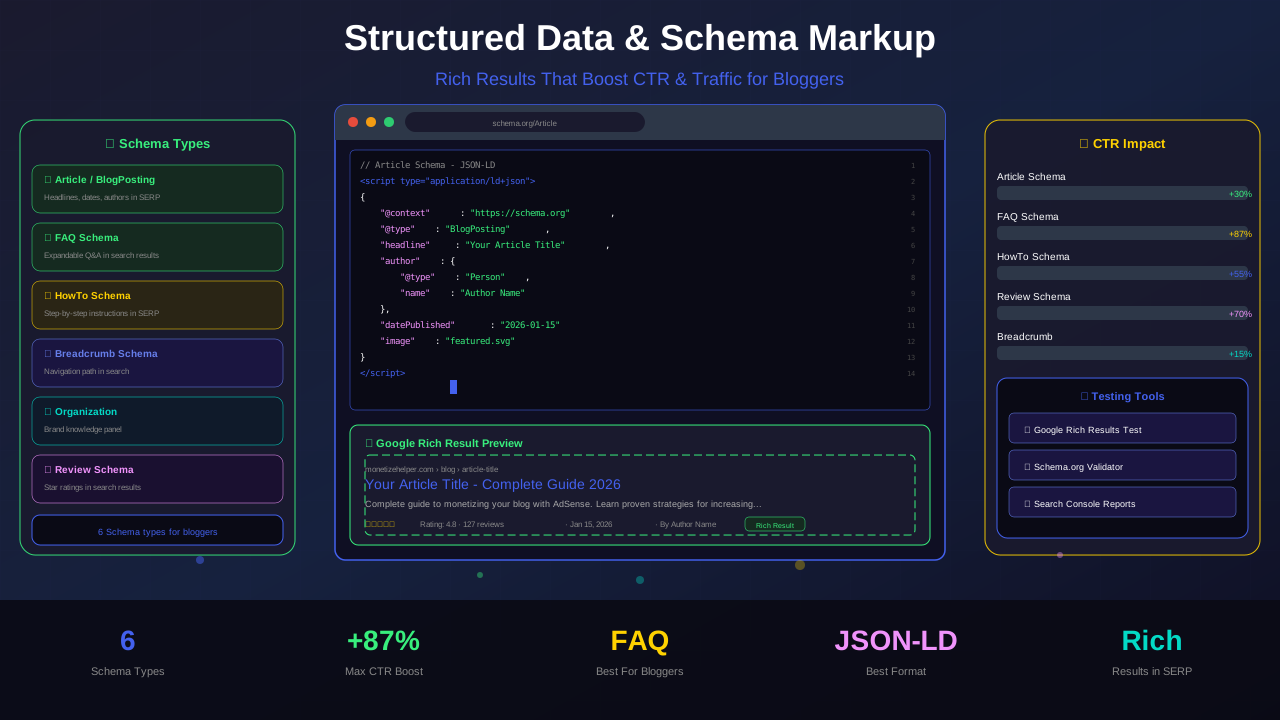
Not all schema types apply to blogs. Focus on these six types that matter most.
1. Article Schema
This is the most important schema for bloggers. It tells Google your page is an article. Include the headline, author, date, and featured image.
See also: How to Fix Mixed Content Errors: Complete Guide for Blog Owners →
2. FAQ Schema
Add FAQ schema when your post answers common questions. Google may show these questions directly in search results. This gives you more space on the page.
3. How-To Schema
Use this for tutorial-style posts. Google can show your steps directly in search. This works great with how-to content guides.
4. Breadcrumb Schema
Breadcrumbs show your site structure in search results. This helps users understand where they are. It also helps Google understand your content hierarchy.
5. Organization Schema
This tells Google about your website or company. Include your name, logo, and social profiles. It helps build E-E-A-T.
6. Person Schema
Use this for author pages. It helps Google connect your content to your identity. This builds author authority.
How to Add JSON-LD Schema
JSON-LD is the easiest way to add schema markup. You place it in a script tag. It doesn't affect how your page looks. Google reads it separately.
Here's what Article schema looks like in JSON-LD:
You might also find helpful: URL Structure Best Practices: Clean URLs That Boost SEO & AdSense Revenue →
The code goes in your page's head section. Most blogging platforms and frameworks make this easy. Next.js, WordPress, and other tools have plugins or components for this.
Article Schema Fields
Include these fields in your Article schema for the best results:
| Field | Required? | Description |
|---|---|---|
| @type | Yes | Set to "Article" or "BlogPosting" |
| headline | Yes | Your article title (max 110 characters) |
| image | Yes | Featured image URL |
| datePublished | Yes | ISO 8601 format date |
| dateModified | Recommended | Last updated date |
| author | Recommended | Author name and URL |
| publisher | Recommended | Organization with logo |
| description | Recommended | Article summary |
Adding FAQ Schema to Blog Posts
FAQ schema is one of the most powerful schema types for bloggers. When Google shows your FAQ in search, you take up more space on the results page.
Each FAQ item needs a question and an answer. Keep answers concise but helpful. You can include links in your answers too.
"Pages with FAQ rich results can see up to a 30% increase in click-through rate compared to standard search results."
— Search Engine Journal
The key rules for FAQ schema are simple. Only use it for pages that actually answer questions. Don't use it for product pages or contact forms. Your FAQ content should match what's visible on the page.
Testing Your Structured Data
Always test your schema before publishing. Errors in your code can prevent rich results from showing. Google provides free tools for this.
You might also find helpful: Structured Data Testing Guide: Validate Schema Markup Like a Pro →
Google Rich Results Test
This tool at search.google.com/test/rich-results checks if your page can show rich results. It validates your schema code and shows you any errors.
Schema Markup Validator
The Schema.org validator checks your code against the full schema.org vocabulary. It catches issues the Rich Results Test might miss.
Google Search Console
After publishing, check Search Console for schema issues. It shows errors across your entire site, not just one page. Fix errors quickly to keep your rich results.
Common Schema Mistakes to Avoid
Many bloggers make mistakes with schema markup. Here are the biggest ones:
1. Marking Up Hidden Content
Your schema data must match visible page content. If your FAQ schema has questions that aren't on the page, Google will ignore it.
2. Using Wrong Schema Types
Don't use Product schema for blog posts. Don't use FAQ schema for pages without questions. Use the right type for each page.
3. Missing Required Fields
Each schema type has required fields. Article schema needs a headline and image. FAQ schema needs both question and answer. Missing fields cause errors.
For more on this topic, see our guide on Canonical Tags & Duplicate Content: The Complete SEO Fix Guide →
4. Duplicate Schema
Having the same schema type twice on one page confuses Google. Make sure plugins and custom code don't create duplicates.
5. Not Updating Schema
When you update an article, update the schema too. Change the dateModified field. Keep all data current.
Schema Markup and AdSense Revenue
Schema markup doesn't directly affect your ads. But it indirectly boosts your AdSense revenue. Here's how:
Rich results get more clicks. More clicks mean more traffic. More traffic means more ad impressions. More impressions mean more revenue.
Sites with proper schema see up to 30% more organic clicks. If your blog gets 10,000 monthly visits, that's 3,000 extra visits. At a $5 RPM, that's $15 more per month from schema alone.
Better yet, rich results attract higher-quality traffic. Users who click rich results tend to stay longer. They read more pages. They see more ads. This is why technical SEO matters for AdSense publishers.
Schema Markup in Next.js
If you use Next.js for your blog, adding schema is straightforward. You can create a reusable component that generates JSON-LD for every page.
Learn more in HTTPS & SSL Security: Essential Guide for AdSense Sites →
Place the JSON-LD in your page's head using Next.js Script component or a metadata export. Each page gets its own schema based on the content type.
For blog posts, generate Article schema automatically from your post data. Pull the title, date, author, and image from your article metadata. This ensures every post has proper schema without manual work.
"Automating schema markup ensures consistency across your entire blog. Manual implementation leads to errors and missed pages."
— Zainab Mohammed, Technical SEO Expert
Frequently Asked Questions
Does schema markup help with SEO rankings?
Schema markup is not a direct ranking factor. But it helps you get rich results, which increase your click-through rate. Higher CTR can lead to better rankings over time.
Is JSON-LD the only format for structured data?
No. You can also use Microdata and RDFa. But Google recommends JSON-LD because it's easier to add and maintain. Most SEO tools support JSON-LD.
Can schema markup hurt my site?
Only if you use it incorrectly. Don't add schema for content that doesn't exist on the page. Don't use misleading schema types. Follow Google's guidelines to stay safe.
How long until rich results appear?
It can take days to weeks after Google re-crawls your pages. There's no guarantee Google will show rich results. But valid schema gives you the best chance.
Do I need schema on every page?
Not every page needs schema. Focus on blog posts (Article schema), FAQ pages (FAQ schema), and your homepage (Organization schema). These give the biggest return.
Conclusion
Structured data and schema markup help Google understand your blog better. When Google understands your content, it can show rich results that attract more clicks.
Start with Article schema on all blog posts. Add FAQ schema where you answer common questions. Test everything before publishing. Monitor your results in Search Console.
The extra effort pays off with more traffic and higher AdSense revenue. Every click from a rich result is a click your competitors missed.