
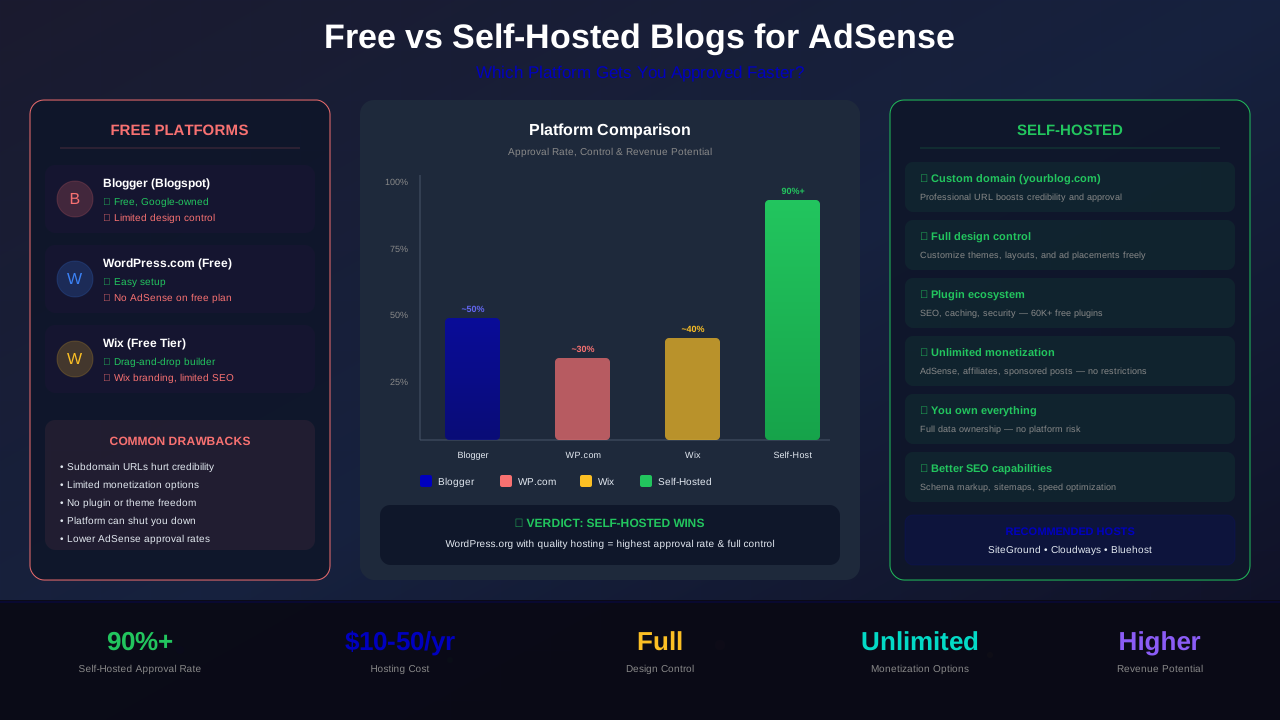
Choosing between a free blog platform and a self-hosted website is one of the most critical decisions you will make on your path to AdSense approval. The platform you pick directly affects whether Google approves your application, how much control you have over ad placements, and ultimately how much revenue you can earn. In this comprehensive guide, we break down every major option so you can make the right choice from day one.
Many aspiring publishers start with a free blog because it costs nothing upfront. But is that zero-dollar price tag actually costing you AdSense approval? We have seen thousands of applications, and the data tells a clear story. Let us walk you through everything you need to know.
What You Will Learn:
- Which free platforms Google actually accepts for AdSense
- Why self-hosted blogs have significantly higher approval rates
- A full cost comparison between free and self-hosted options
- Step-by-step migration tips if you are currently on a free platform
- Custom domain requirements and why they matter
- How to set up a self-hosted blog optimized for AdSense
Understanding the Difference: Free vs Self-Hosted
Before diving into AdSense specifics, it is important to understand the fundamental differences between free and self-hosted blogging platforms. These differences affect everything from approval chances to long-term revenue potential.
What Is a Free Blog Platform?
A free blog platform is a service where someone else owns and operates the server infrastructure. You create an account, pick a template, and start publishing. Examples include Blogger (owned by Google), WordPress.com (free tier), Wix (free tier), Weebly, and Medium. Your site typically lives on a subdomain like yourblog.blogspot.com or yourblog.wordpress.com.
What Is a Self-Hosted Blog?
A self-hosted blog means you rent server space (hosting) from a provider and install your own blogging software — most commonly WordPress.org. You own the domain (like yourblog.com), you control the files, and you have complete freedom over design, functionality, and monetization. You are responsible for updates, security, and backups, but you also have total control.
Free Blog Platforms: A Detailed Breakdown
Not all free platforms are created equal when it comes to AdSense compatibility. Let us examine each major option and what Google thinks about them.
Blogger (Blogspot)
Blogger is the most AdSense-friendly free platform — and for good reason. It is owned by Google. You can apply for AdSense directly from your Blogger dashboard, and Google has a built-in integration that makes setup seamless. Blogger allows you to use a blogspot.com subdomain or connect a custom domain.
However, Blogger has significant limitations. The themes are dated, customization is minimal compared to WordPress, and Google has a history of abandoning products (remember Google+). While Blogger still works, it does not give you the professional look that helps with both AdSense approval and reader trust.
WordPress.com (Free Tier)
WordPress.com's free tier does not allow you to run AdSense ads. You are stuck with WordPress.com's own advertising (WordAds), which displays ads on your site that benefit WordPress.com — not you. To use AdSense on WordPress.com, you need at least the Business plan ($33/month), which defeats the purpose of using a "free" platform.
Wix (Free Tier)
Wix's free tier displays Wix-branded ads on your site and uses a subdomain like username.wixsite.com/blogname. Google's AdSense policies require that you own the site and have control over the content. With Wix free, you technically do not meet these requirements fully, and approval is very unlikely.
See also: AdSense Approval Checklist 2026: 15 Steps to Get Approved Fast →
Medium and Other Platforms
Platforms like Medium, Tumblr, and Substack do not support AdSense at all. These platforms have their own monetization models. If your goal is AdSense revenue, these are not viable options.
"The number one reason I see free blog AdSense applications get rejected is insufficient control. Google wants to see that you own your platform, control your content, and can place ad code wherever needed. Free platforms inherently limit all three."
— Kelvin Orjika, Monetize Helper
Why Self-Hosted Blogs Win for AdSense
Self-hosted WordPress dominates the blogging world for a reason: it gives you complete control. When it comes to AdSense approval, this control translates directly into higher acceptance rates. Here is why.
Custom Domain Authority
A custom domain like yourblog.com signals professionalism and commitment to Google. It shows you have invested money in your project, which correlates with higher content quality and long-term commitment. As we explain in our domain age and AdSense approval guide, your domain is one of the first things Google evaluates.
Full Code and Ad Placement Control
With a self-hosted blog, you can place AdSense ad code anywhere on your site — in the header, between paragraphs, in the sidebar, or in the footer. You are not restricted by platform limitations. This matters because Google's requirements checklist expects you to be able to paste their verification code in your site's <head> section, which some free platforms do not allow.
Professional Themes and Design
Self-hosted WordPress gives you access to thousands of professional themes, many designed specifically for AdSense publishers. A professional, clean design with proper navigation, about pages, and contact information all contribute to passing Google's site quality review.
Essential Pages and Legal Compliance
AdSense requires specific pages on your site: Privacy Policy, Terms of Service, About, Contact, and a proper sitemap. While some free platforms let you create these, self-hosted WordPress makes it significantly easier with dedicated page templates and plugins that auto-generate legal pages. Review our AdSense content policies guide for the full list of required pages.
See also: Google AdSense Best Practices 2026: What Works Now (and What Doesn't) →
SEO and Performance Optimization
Self-hosted blogs let you install SEO plugins like Yoast or Rank Math, caching plugins for speed, and image optimization tools. These all contribute to better search rankings, more organic traffic, and a higher-quality site in Google's eyes. Free platforms give you little to no control over technical SEO.
Complete Cost Comparison
The biggest objection to self-hosting is cost. Let us break down the real numbers so you can make an informed decision.
Free Blog Platforms
- Blogger: $0/year (optional custom domain: $10-15/year)
- WordPress.com Free: $0/year (no AdSense allowed)
- WordPress.com Business: $396/year (AdSense allowed)
- Wix Free: $0/year (very limited, Wix branding)
- Wix Business: $204/year (AdSense possible)
Self-Hosted WordPress
- Domain registration: $10-15/year
- Shared hosting (Hostinger, Bluehost): $25-80/year
- WordPress software: $0 (open source)
- Free theme and plugins: $0
- Total first year: $35-95/year
When you compare the numbers, self-hosted WordPress is actually cheaper than the paid tiers of WordPress.com or Wix that allow AdSense — and it gives you far more control. Even compared to free Blogger, the $35-95 annual investment pays for itself quickly once you start earning ad revenue.
Which Platforms Does Google Accept for AdSense?
Google's official documentation does not ban specific platforms, but it does require that your site meets certain technical criteria. In practice, here is what works and what does not.
Accepted Platforms
- Self-hosted WordPress (WordPress.org): Fully accepted. The gold standard for AdSense publishers.
- Blogger/Blogspot: Accepted, with built-in AdSense integration.
- Custom-built websites: Accepted, as long as they meet all content and technical requirements.
- Wix, Squarespace, Weebly (paid plans with custom domains): Accepted, though with some placement limitations.
Not Accepted or Severely Limited
- WordPress.com Free: Not accepted — you cannot add custom ad code.
- Wix Free: Not accepted — subdomain and Wix ads prevent approval.
- Medium: Not compatible with AdSense.
- Tumblr: Extremely limited ad support, not practical for AdSense.
- Substack: Not compatible — newsletter-focused platform.
"We have tested AdSense applications across dozens of platforms over the years. Self-hosted WordPress with a custom domain consistently achieves the highest approval rates — typically 2-3x higher than free subdomain blogs with identical content quality."
— Monetize Helper Research, 2025 Publisher Survey
Custom Domain Requirements for AdSense
One of the most important factors in AdSense approval is your domain. Google has specific expectations, and understanding them can make or break your application.
Why Custom Domains Matter
A custom domain (like yourblog.com) signals ownership and permanence. Subdomains on free platforms (like yourblog.blogspot.com) signal that you may not be a serious publisher. While Blogger subdomains can still get approved, almost every other free subdomain will be rejected.
Learn more in AdSense YouTube vs Website: Which Earns More Money in 2026? →
Domain Tips for AdSense Success
- Choose a .com, .net, or .org extension — these are the most trusted by Google and users alike.
- Avoid hyphens and numbers in your domain name when possible.
- Register your domain for at least 2 years — this signals long-term commitment.
- Set up professional email (e.g., contact@yourblog.com) to reinforce legitimacy.
- Ensure your WHOIS information is accurate — Google may check this during review.
For a deeper dive into how domain age affects your application, read our complete domain age and AdSense guide.
Setting Up a Self-Hosted Blog for AdSense
If you have decided that self-hosted is the way to go (and we strongly recommend it), here is a streamlined setup process designed specifically for AdSense approval.
Step 1: Choose a Hosting Provider
For new bloggers, shared hosting is perfectly fine. Recommended options include Hostinger ($2-3/month), Bluehost ($3-4/month), SiteGround ($4-5/month), and Cloudways ($11/month for cloud hosting). All of these include one-click WordPress installation.
Step 2: Register Your Domain
Most hosting providers offer a free domain for the first year. Alternatively, register through Namecheap or Google Domains (now Squarespace Domains) for $10-15/year. Choose a name that reflects your niche and is easy to remember.
Step 3: Install WordPress and a Clean Theme
Use your host's one-click installer to set up WordPress. Then install a lightweight, AdSense-friendly theme. Free options like Astra, GeneratePress, or Flavor are excellent starting points. Avoid heavy, cluttered themes that slow down your site.
Step 4: Create Essential Pages
Before applying for AdSense, ensure you have all of these pages in place:
- About page — explain who you are and what your site offers
- Contact page — include a working contact form
- Privacy Policy — required by AdSense; mention Google AdSense and cookies
- Terms of Service / Disclaimer — establishes legal boundaries
- Sitemap — submit to Google Search Console for indexing
Step 5: Publish Quality Content
Aim for a minimum of 15-25 well-written articles before applying. Each post should be at least 800-1500 words of original, helpful content. Focus on your niche and avoid thin, duplicate, or AI-generated filler content. Check our guide on getting AdSense approval for new websites for the full content strategy.
Learn more in AdSense vs Alternatives: Which Ad Network Pays You More? →
Step 6: Apply for AdSense
Once your site has quality content, essential pages, and has been live for at least 2-4 weeks, submit your application. Google typically reviews applications within 2-14 days, though some can take longer.
Migrating from Free to Self-Hosted
Already have content on a free platform? Migrating is easier than you might think. Here is how to move without losing your work or search rankings.
Migrating from Blogger to WordPress
- Export your Blogger content: Go to Blogger Dashboard → Settings → Manage Blog → Back up content. Download the XML file.
- Set up your self-hosted WordPress site with hosting and a custom domain (as described above).
- Import content: In WordPress, go to Tools → Import → Blogger. Upload your XML file.
- Set up redirects: Install a redirect plugin and create 301 redirects from old Blogger URLs to new WordPress URLs.
- Update internal links: Use the Better Search Replace plugin to update old Blogspot URLs to your new domain.
- Submit new sitemap: Update Google Search Console with your new domain and submit a fresh sitemap.
Migrating from WordPress.com to WordPress.org
- Export content: In WordPress.com, go to Tools → Export → Export All.
- Set up self-hosted WordPress on your chosen hosting provider.
- Import content: Use the built-in WordPress importer (Tools → Import → WordPress).
- Set up redirects: WordPress.com offers a paid Site Redirect feature ($13/year) that redirects all traffic to your new domain for two years.
- Re-upload media: Some images may not transfer. Use the Import External Images plugin to fix broken media.
Migration Best Practices
- Do not delete your old site immediately — keep it live with redirects for at least 6 months.
- Check all posts after migration for formatting issues, broken images, and missing content.
- Wait 2-4 weeks after migration before applying for AdSense. Google needs time to re-crawl and re-index your content on the new domain.
- Monitor Google Search Console for crawl errors and fix them promptly.
The Blogger Exception: When Free Works
We want to be fair — Blogger is a legitimate path to AdSense approval, especially if you are on a tight budget. Here is when using Blogger makes sense:
- You genuinely cannot afford $3-5/month for hosting
- You are testing a niche before committing financially
- You want the fastest path to AdSense integration (built-in feature)
- You are comfortable with limited design customization
If you do go the Blogger route, we strongly recommend connecting a custom domain ($10-15/year). This small investment dramatically improves your site's perceived professionalism and can improve your approval odds. Many successful AdSense publishers started on Blogger before eventually migrating to self-hosted WordPress as their revenue grew.
What Actually Affects Your Approval Rate
While platform choice matters significantly, it is only one piece of the puzzle. Here are all the factors that determine whether your AdSense application gets approved, regardless of platform:
Content Quality (Most Important)
Google prioritizes original, valuable content above all else. Thin posts, copied content, and low-effort articles will get you rejected on any platform. Aim for comprehensive, well-researched posts that genuinely help your readers. For detailed guidance, see our content policies guide.
Site Navigation and User Experience
Your site needs clear navigation menus, a logical category structure, and easy-to-find content. Users (and Google's reviewers) should be able to find what they are looking for within 2-3 clicks.
See also: Multiple AdSense Accounts: Rules, Risks & What Google Allows →
Traffic and Engagement
While there is no official minimum traffic requirement, sites with some organic traffic tend to get approved faster. This signals to Google that real people find your content valuable.
Technical Health
- Fast loading times (under 3 seconds)
- Mobile-responsive design
- SSL certificate (HTTPS)
- No broken links or 404 errors
- Clean, crawlable site structure
Frequently Asked Questions
Can I get AdSense approved with a free Blogger blog?
Yes, Blogger is the one free platform where AdSense approval is genuinely possible — and relatively common. Since Google owns Blogger, the integration is seamless. However, we recommend adding a custom domain (about $10-15/year) to improve your chances significantly. You still need quality content, essential pages, and sufficient posts to get approved.
Can I use AdSense on WordPress.com?
Only on the Business plan ($33/month) or higher. The free and Personal plans do not allow you to add custom JavaScript code, which means you cannot paste the AdSense verification snippet. If you are going to pay $33/month for WordPress.com Business, self-hosted WordPress at $3-5/month is a much better investment.
How long should I wait after setting up my blog to apply for AdSense?
We recommend waiting at least 2-4 weeks after your site goes live, with a minimum of 15-25 quality articles published. In some countries like India and China, your domain must be at least 6 months old. Read our new websites AdSense approval guide for country-specific timelines.
Is it worth paying for hosting just for AdSense?
Absolutely. With shared hosting starting at $25-35/year, you only need to earn about $3/month from AdSense to break even — and most approved sites earn significantly more than that within a few months. The investment pays for itself quickly, and you gain full control over your site's future.
Can I migrate my blog without losing my AdSense approval?
If you already have AdSense approval, you can add your new domain as an additional site in your AdSense account. You do not lose your existing approval. However, the new domain will need to be reviewed and approved separately. Set up proper 301 redirects to preserve your search rankings during the migration.
What if I cannot afford hosting right now?
Start with Blogger and a custom domain ($10-15/year). Create excellent content, apply for AdSense, and use your initial earnings to fund the migration to self-hosted WordPress. Many successful publishers have followed this exact path. The key is to start creating quality content now, regardless of your platform.
Does my hosting provider affect AdSense approval?
Not directly, but indirectly it matters. Cheap, unreliable hosting that causes frequent downtime or slow loading speeds can hurt your application. Google's crawlers need to access your site consistently. Choose a reputable hosting provider with good uptime guarantees (99.9% or higher).
![Domain Age for AdSense: How Old Should Your Website Be? [2025 Guide]](/images/articles/domain-age-adsense-approval.svg)