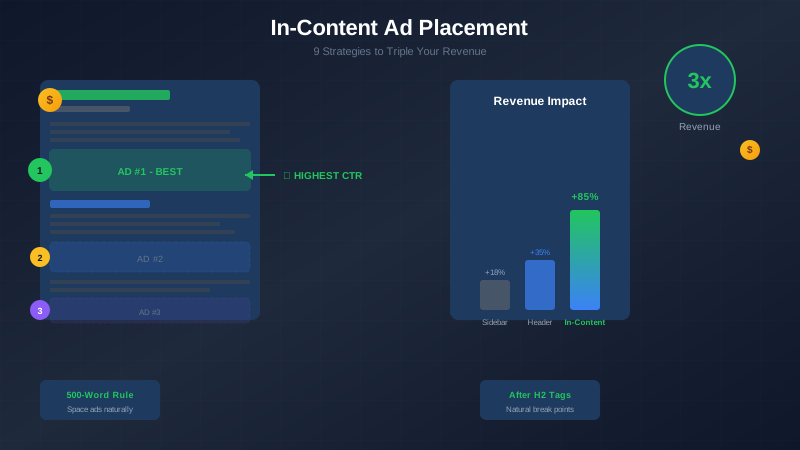
In-content ads—ads placed within your article text—can generate 3-5x more revenue than sidebar ads. But placement matters. Put them in the wrong spots, and readers leave. Put them in the right spots, and your RPM soars.
This guide reveals the exact placement strategies that top publishers use to maximize in-content ad revenue. You will learn where to place ads, how many to use, and which spots to avoid.
What You Will Learn:
- What makes in-content ads so effective
- 9 proven placement strategies with examples
- Best practices for different content types
- Common mistakes that kill revenue
- How to test and optimize placements
What Are In-Content Ads?
In-content ads are advertisement units placed directly within your article body—between paragraphs, after headings, or within the natural reading flow. Unlike sidebar or header ads that sit outside the content, in-content ads appear exactly where readers are focused.
Think of a magazine article. The ads that catch your eye are not the ones in the margins—they are the full-page or half-page ads between sections of the story. In-content web ads work the same way.
Types of In-Content Ad Units
| Ad Type | Best For | Average RPM Boost |
|---|---|---|
| Native In-Article | Long-form content | +40-60% |
| Display Rectangle (300x250) | All content types | +30-50% |
| Responsive In-Content | Mobile-heavy traffic | +35-55% |
| In-Feed/In-Article | Listicles, galleries | +45-70% |
"In-article ad units blend into your content naturally, giving users a better ad experience while helping you earn more from your valuable content."
— Google AdSense Help Documentation
Why In-Content Ads Work Better
In-content ads outperform other placements for several key reasons:
1. Higher Viewability
Readers scroll through content. They often ignore sidebars completely (a phenomenon called "banner blindness"). In-content ads appear exactly where eyes are focused.
2. Better Engagement
Because in-content ads blend with the reading experience, readers actually notice them. Click-through rates are typically 2-5x higher than sidebar placements.
3. Mobile Optimization
On mobile devices, sidebars disappear. In-content ads remain visible throughout the reading experience. With over 60% of traffic coming from mobile, this matters enormously.
4. Natural Reading Flow
Well-placed in-content ads appear at natural pause points—where readers naturally stop to digest information. This makes ads feel less intrusive.
Viewability Comparison
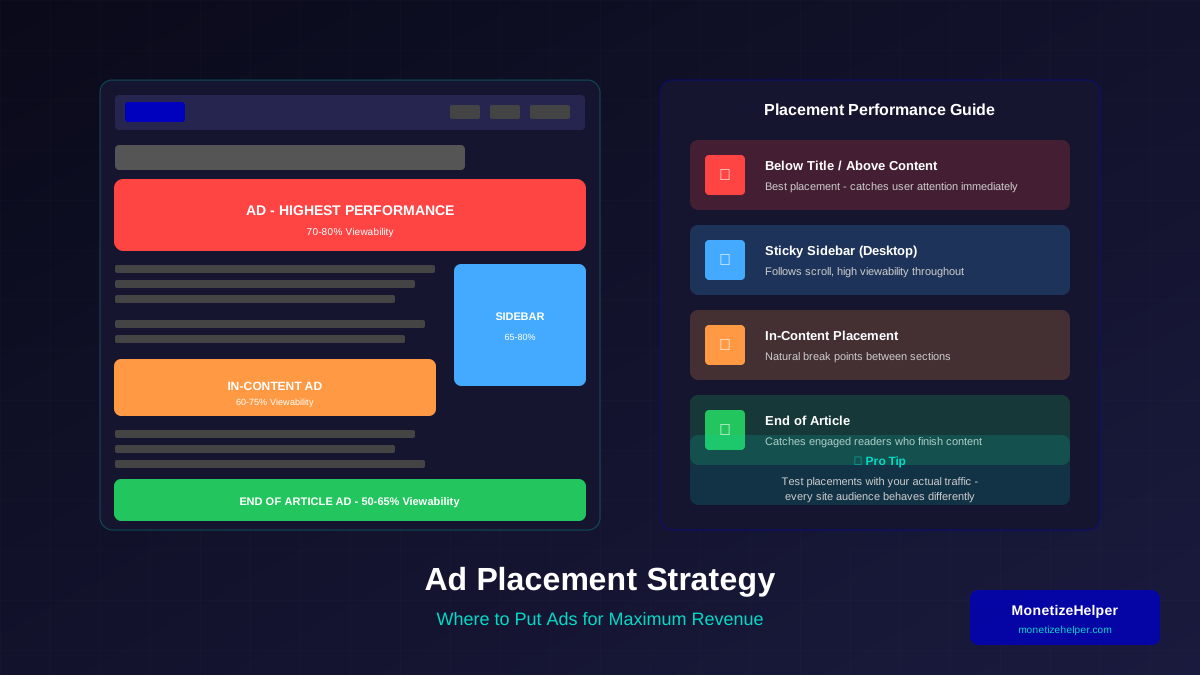
| Ad Position | Average Viewability | Average CTR | Revenue Impact |
|---|---|---|---|
| Sidebar (Right) | 30-40% | 0.1-0.3% | Baseline |
| Header Banner | 50-60% | 0.2-0.4% | +20% |
| In-Content (Top) | 70-85% | 0.5-1.2% | +80% |
| In-Content (Middle) | 60-75% | 0.4-0.9% | +60% |
| In-Content (End) | 40-55% | 0.3-0.6% | +30% |
"Ads that appear within content areas where users are actively engaged tend to receive higher viewability scores and better performance metrics."
For more on this topic, see our guide on Ezoic vs Mediavine: Which Ad Network Pays More in 2026? →
— Interactive Advertising Bureau (IAB)
9 Best Placement Strategies
These strategies are based on data from thousands of publishers. Implement them to maximize your in-content ad revenue.
Strategy 1: The First Paragraph Rule
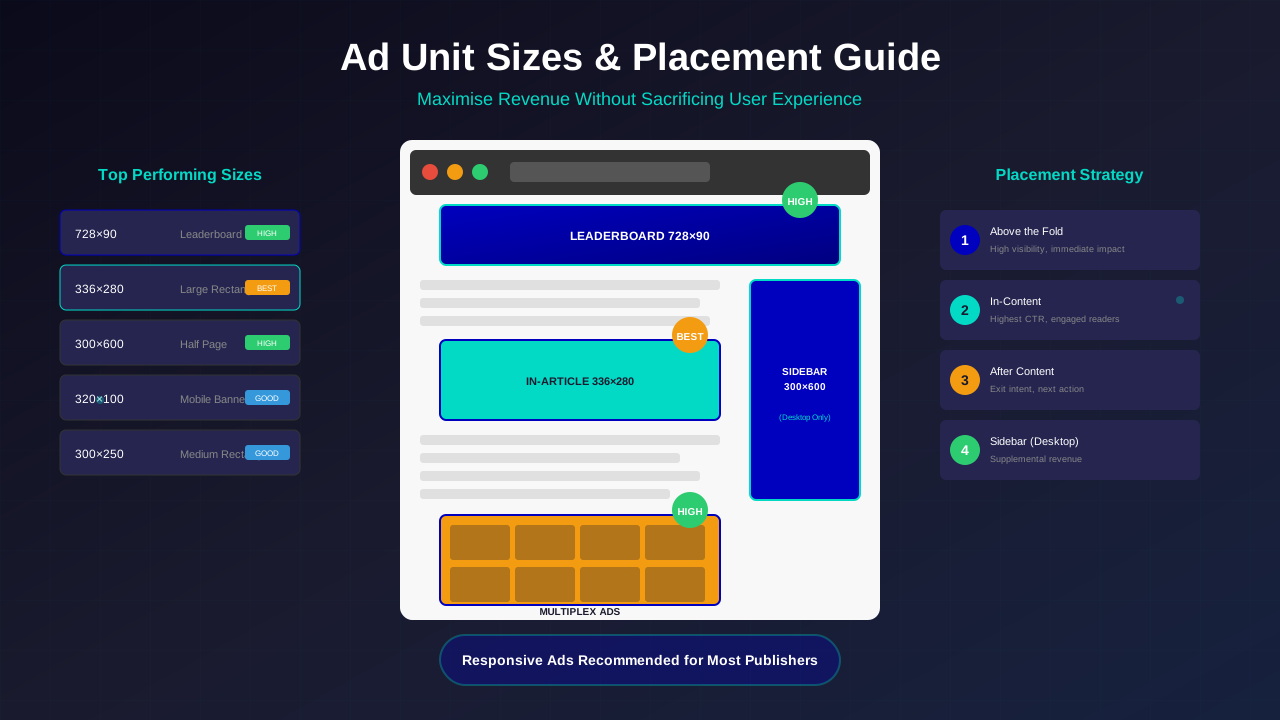
Place your first in-content ad after the first 2-3 paragraphs. This is premium real estate because:
- Readers are most engaged at the start
- Viewability is highest in the first 500 pixels
- It appears "above the fold" on most devices
Implementation:
<p>Your introduction paragraph...</p>
<p>Second paragraph with hook...</p>

<!-- FIRST IN-CONTENT AD -->
<div class="ad-container">
  <ins class="adsbygoogle" data-ad-slot="123456"></ins>
</div>

<h2>First Major Section</h2>
<p>Continue your content...</p>
Tip: Do NOT place an ad before any content. Google frowns on ads that push content below the fold.
Strategy 2: After Every H2 Heading
H2 headings signal natural content breaks. Readers pause at headings to orient themselves. This pause creates an ideal ad placement opportunity.
Best Practice:
- Wait for 300-400 words between ads minimum
- Place ad after the H2, not before
- Ensure at least 2 paragraphs follow the ad
Strategy 3: The 500-Word Interval
For longer articles (1500+ words), space in-content ads every 500-700 words. This creates a predictable rhythm without overwhelming readers.
| Article Length | Recommended In-Content Ads | Spacing |
|---|---|---|
| 500-800 words | 1-2 ads | After intro, middle |
| 800-1500 words | 2-3 ads | Every 400-500 words |
| 1500-2500 words | 3-4 ads | Every 500-600 words |
| 2500+ words | 4-5 ads | Every 600-700 words |
Strategy 4: Before "How-To" Steps
If your article contains step-by-step instructions, place an ad before the first step. Readers often scroll quickly to find instructions—an ad catches them right before they get the answer they came for.
Related reading: AdThrive Requirements Guide: What You Need to Join Raptive in 2026 →
<h2>How to Implement Lazy Loading</h2>
<p>Brief intro about what they'll learn...</p>

<!-- AD BEFORE STEPS -->
<div class="ad-container"><!-- Ad code --></div>

<h3>Step 1: Add the Loading Attribute</h3>
<p>Instructions...</p>
Strategy 5: After Tables and Charts
Data visualizations create natural pause points. Readers stop to process information. Place an ad immediately after tables, charts, or comparison boxes.
Why it works: The reader just absorbed data. They need a mental break. An ad fills that pause naturally.
Strategy 6: The "Read More" Break
For articles that require scrolling, place an ad where you might otherwise put a "Continue Reading" button. This is typically at 30-40% of the article length.
Strategy 7: Before the Conclusion
Readers who reach your conclusion are highly engaged. They have read most of your content. Place an ad before your final summary or takeaways section.
<h2>Common Mistakes to Avoid</h2>
<p>Last content section...</p>

<!-- AD BEFORE CONCLUSION -->
<div class="ad-container"><!-- Ad code --></div>

<h2>Final Thoughts: Maximize Your Revenue</h2>
<p>Conclusion content...</p>
Strategy 8: Between FAQ Items
FAQ sections with 5+ questions provide natural ad placement opportunities. Place one ad after every 2-3 FAQ items.
Warning: Do not place an ad between every question—this frustrates readers searching for answers.
Strategy 9: After Blockquotes or Testimonials
Expert quotes and testimonials create credibility breaks in content. Readers pause to consider the quote. An ad placed after a blockquote feels natural rather than interruptive.
"The best ad placements feel like natural content breaks. If an ad feels intrusive, it's in the wrong place."
For more on this topic, see our guide on Raptive Requirements Guide: Traffic, Content & Application Tips →
— Mediavine Publisher Guidelines
Placement by Content Type
Different content formats require different ad strategies. Here is how to optimize for each type:
Listicles (List Articles)
Listicles are goldmines for in-content ads because each list item creates a natural break.
- Best practice: Place an ad after every 3-5 list items
- Format: Use "In-feed" ad units that match list styling
- Warning: Never place an ad between a numbered item and its explanation
How-To Guides
Instructional content has clear sections—perfect for predictable ad placement.
- Best spots: After introduction, before steps begin, between major sections
- Avoid: Breaking up step sequences or code examples
News Articles
News readers want information fast. Use fewer, better-placed ads.
- Best practice: One ad after the lead paragraph, one before conclusion
- Mobile: Responsive units work best for news
Product Reviews
Reviews have distinct sections (features, pros/cons, verdict). Use section breaks for ads.
- Prime spots: After feature breakdown, before final verdict
- Bonus: These pages often have high CPC due to commercial intent
Long-Form Content (2000+ words)
Deep content allows more ad placements without feeling cluttered.
- Strategy: Use the 500-word interval rule
- Format: Mix native and display units for variety
- Maximum: Generally cap at 5-6 in-content ads per article
Common Mistakes to Avoid
These mistakes kill revenue and drive readers away:
Mistake 1: Too Many Ads
Google penalizes pages with excessive ads. The rule: content should always dominate. If your page looks like an ad farm, you have too many.
Learn more in Mediavine Requirements Guide: How to Qualify and Get Accepted →
Safe ratio: 1 in-content ad per 300-400 words of content minimum.
Mistake 2: Ads Before Content
Placing ads at the very top—before any content—violates Google's guidelines. Always lead with value.
Mistake 3: Breaking Up Code Blocks
Never place an ad in the middle of a code example, tutorial step, or numbered list. This breaks the user experience and may confuse readers.
Mistake 4: Ignoring Mobile Layout
An ad that looks perfect on desktop may dominate the entire mobile screen. Always preview placements on mobile devices.
Mistake 5: Same Ad Size Everywhere
Using only one ad size reduces fill rate and revenue. Mix 300x250, responsive, and native units throughout your content.
Mistake 6: No Clear Ad Labels
While you do not need giant "ADVERTISEMENT" labels, ads should not deceive readers into clicking. Google requires clear distinction between content and ads.
Revenue Killers Checklist
| Mistake | Impact on Revenue | Fix |
|---|---|---|
| Too many ads | -30% (policy violation risk) | Limit to 1 per 300 words |
| Ads before content | Policy violation | Lead with 2+ paragraphs |
| Breaking content flow | -50% engagement | Use natural break points |
| Poor mobile experience | -40% mobile revenue | Use responsive units |
| No A/B testing | Missing 20-40% potential | Test placements monthly |
"We recommend placing no more than one ad per visible screen area. This ensures a good user experience while still allowing you to monetize your content effectively."
— Google AdSense Best Practices
Testing and Optimization
The best placement strategy varies by site. Use data to find your optimal setup.
Learn more in RPM by Blog Niche: Which Topics Pay the Most in 2026 →
A/B Testing Placements
Test different ad positions to find what works for your audience:
- Choose one variable: Test one placement change at a time
- Run for 2 weeks minimum: Short tests give unreliable data
- Track key metrics: RPM, viewability, bounce rate, time on page
- Consider user experience: Higher revenue but more bounces = net negative
Metrics to Monitor
| Metric | What It Tells You | Target |
|---|---|---|
| Ad Viewability | Are users seeing ads? | 70%+ |
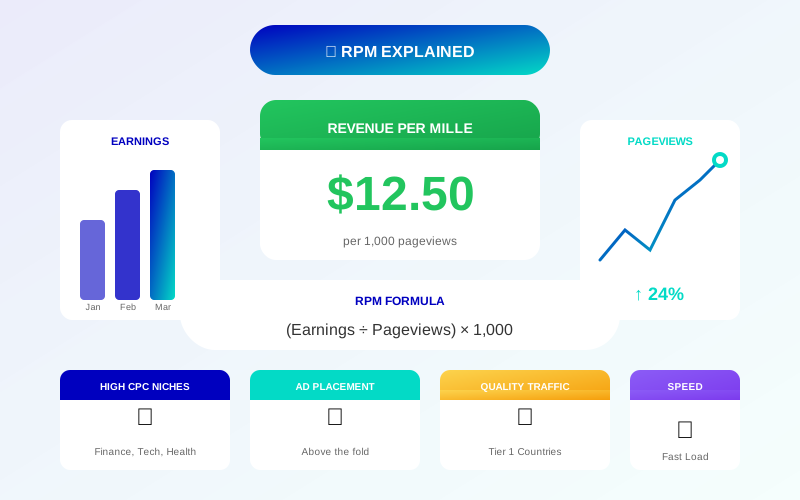
| Page RPM | Revenue per 1000 views | Higher is better |
| Bounce Rate | Are ads driving users away? | Under 60% |
| Time on Page | Are users engaging with content? | 2+ minutes |
| Pages per Session | Are users exploring your site? | 1.5+ |
Tools for Testing
- Google AdSense Experiments: Built-in A/B testing for ad settings
- Google Optimize: Test layout changes (now sunset, use alternatives)
- Ezoic: AI-powered ad placement testing
- Manual Testing: Change placements, track for 2 weeks, compare results
Optimization Workflow
- Establish baseline metrics (current RPM, viewability)
- Hypothesize improvement (e.g., "Moving ad higher will increase viewability")
- Implement change on test pages or percentage of traffic
- Monitor for 14-30 days
- Analyze results and roll out winners
- Repeat with next hypothesis
Maximize Your In-Content Revenue: Action Plan
In-content ads are your highest-potential revenue source. The key is strategic placement that respects reader experience while maximizing viewability.
Your immediate action steps:
- Audit your current in-content ad placements
- Implement the "First Paragraph Rule"—add an ad after your introduction
- Use the 500-word interval for longer content
- Remove any ads that break content flow
- Test responsive units on mobile
- Monitor RPM and viewability for 2 weeks
- Optimize based on data
For more ad placement strategies, read our complete Ad Placement Best Practices Guide and learn how to increase your AdSense revenue with proven techniques.
Frequently Asked Questions
How many in-content ads should I use per article?
For most articles, use 1 ad per 300-500 words. A 1500-word article can comfortably support 3-4 in-content ads. More than 5 ads in a single article risks policy issues and poor user experience. Focus on quality placements over quantity.
Should I use Auto Ads for in-content placement?
Auto Ads can work well for in-content placement, but manual placement typically performs better. If you use Auto Ads, enable only in-article ads and disable other formats for more control. Test both approaches and compare your RPM.
What ad size works best for in-content placements?
Responsive ad units typically perform best because they adapt to screen size. If using fixed sizes, 300x250 (medium rectangle) works well on both desktop and mobile. For wider content areas, consider 336x280 or responsive units.
Do in-content ads hurt my SEO?
Properly placed in-content ads do not hurt SEO. However, excessive ads that push content down, slow your site, or create layout shifts can impact rankings. Follow Google's guidelines and prioritize user experience.
How do I add in-content ads to WordPress automatically?
Use a plugin like Ad Inserter, WP-Insert, or Advanced Ads. These let you automatically insert ads after specific paragraphs, after headings, or at custom positions throughout your content. Configure rules like "insert ad after paragraph 3" for consistent placement.