Choosing the right ad unit sizes and placements can dramatically impact your AdSense earnings—sometimes doubling or tripling revenue without increasing traffic. If you want to increase your AdSense revenue, understanding strategic sizing options is essential. Yet many publishers simply accept Google's default settings without understanding the strategic options available.
This guide explores ad unit sizing, optimal placement positions, and how to balance revenue optimisation with user experience for sustainable long-term growth.
Understanding AdSense Ad Units
Google AdSense offers several ad unit types, each suited for different placements and purposes:
Display Ads
The most common ad type, display ads come in various sizes and can show text, image, or rich media content. They're versatile and work well in most placements.
In-Feed Ads
Designed to blend with content feeds, these ads match the look and feel of surrounding content. Ideal for blog listing pages or news feeds.
In-Article Ads
Native ads that fit naturally between paragraphs of content. Google optimises these automatically based on content and user behaviour.
Multiplex Ads
Grid-based units showing multiple recommendations in a single placement. Particularly effective at article endings where users seek more content.
For more on this topic, see our guide on Ezoic vs Mediavine: Which Ad Network Pays More in 2026? →
Best Performing Ad Sizes
While responsive ads adapt automatically, understanding which fixed sizes perform well helps you make informed decisions:
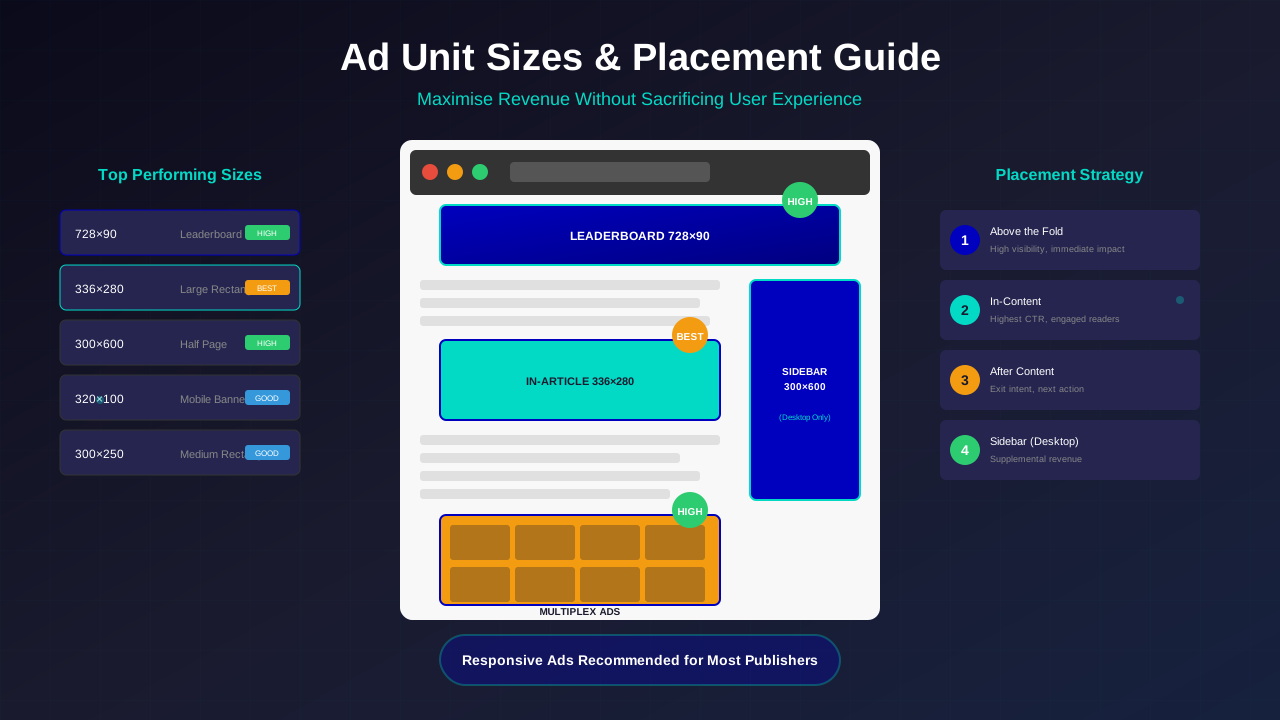
Top Performing Display Sizes
These sizes align with IAB standard ad units:
- 300×250 (Medium Rectangle): The most widely available size with strong advertiser demand
- 336×280 (Large Rectangle): Higher visibility, excellent for in-content placement
- 728×90 (Leaderboard): Classic header placement, good for desktop
- 300×600 (Half Page): High-impact sidebar unit with premium CPMs
- 320×100 (Large Mobile Banner): Optimised for mobile viewports
Responsive vs Fixed Size
Google recommends responsive ad units for most publishers. Responsive units automatically adjust to available space and device type, ensuring optimal display without manual configuration. However, fixed sizes can be useful when you need precise control over layout.
Mobile-Specific Considerations
With mobile traffic dominating most websites, mobile ad performance is critical:
Related reading: AdThrive Requirements Guide: What You Need to Join Raptive in 2026 →
- Anchor ads (sticky bottom) perform well but can impact user experience
- In-article ads often outperform banner placements on mobile
- Avoid large interstitial ads that block content—Google penalises these
- Ensure touch targets are appropriately spaced to avoid accidental clicks
Optimal Ad Placements
Where you place ads matters as much as what size you choose. For a deeper dive into placement strategy, check out our ad placement best practices guide. Here are proven placements:
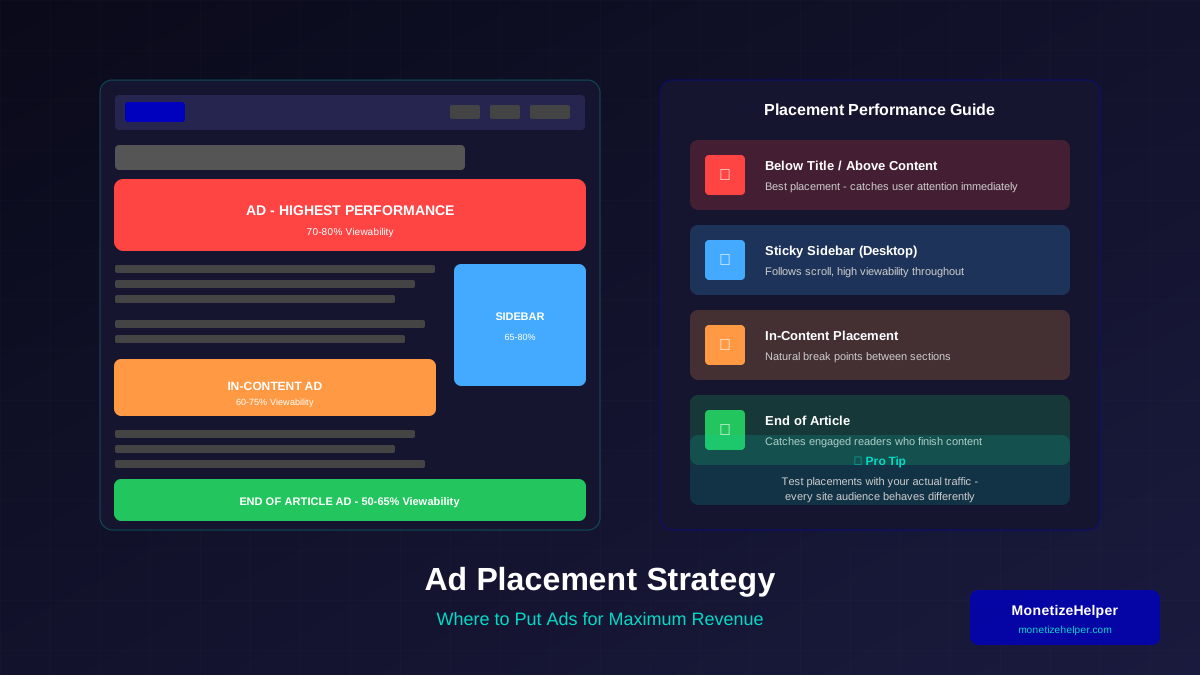
Above the Fold
Ads visible without scrolling typically have higher viewability and CTR. However, Google's Page Layout Algorithm penalises pages with too many ads above the fold. One or two units maximum is recommended.
In-Content Placements
Ads placed within article content, particularly after 2-3 paragraphs, often achieve the best balance of visibility and non-intrusiveness. Users are engaged with content and more likely to notice relevant ads.
After Content
Multiplex ads or display units at article end catch users seeking their next action. This placement converts well without interrupting content consumption.
For more on this topic, see our guide on Raptive Requirements Guide: Traffic, Content & Application Tips →
Sidebar Placements
Traditional sidebar ads have lower CTR on desktop (banner blindness) and disappear entirely on mobile. Consider sticky sidebar units for better visibility, but test impact on page speed. Our anchor ads vs sticky ads comparison explains when each format works best.
Ad Density and Policy Compliance
Google doesn't specify a maximum number of ad units, but policy requires that ads don't exceed content. Follow these guidelines:
Content-to-Ad Ratio
- Ensure valuable content is the primary focus of every page
- Ads should complement content, not dominate it
- Short articles (under 500 words) typically support fewer ads
- Long-form content can accommodate more placements naturally
Policy-Safe Practices
- Never place ads where users might accidentally click
- Avoid ads that push content below the fold on mobile
- Don't use pop-ups or interstitials that obstruct content
- Label ads appropriately (Google handles this automatically)
Auto Ads: Pros and Cons
Google's Auto ads use machine learning to automatically place and optimise ads. Here's what to consider:
Advantages
- Automatic optimisation based on performance data
- Fills inventory you might miss with manual placement
- Adapts to different page layouts automatically
- Less management overhead
Disadvantages
- Less control over exact placement
- May place ads in less-than-ideal locations
- Can impact page speed with additional scripts
- User experience may suffer if not carefully configured
Hybrid Approach
Many successful publishers use a hybrid approach: manual placements for key positions (in-content, after article) combined with Auto ads to fill supplemental inventory. Use Auto ads' exclusion settings to prevent ads in sensitive areas.
Learn more in Mediavine Requirements Guide: How to Qualify and Get Accepted →
Testing and Optimisation
Ad optimisation is an ongoing process. Here's how to test effectively:
A/B Testing Placements
Test one variable at a time—placement, size, or ad type. Run tests for at least two weeks to gather statistically significant data. Use AdSense experiments or third-party tools for structured testing.
Key Metrics to Monitor
- Page RPM: Revenue per thousand pageviews—your primary success metric
- Click-Through Rate: Percentage of impressions that result in clicks
- Viewability: Percentage of ad impressions actually seen by users
- Coverage: Percentage of ad requests that receive ads
Seasonal Adjustments
Ad rates fluctuate throughout the year. Q4 typically sees highest CPMs due to holiday advertising. January often sees sharp drops. Adjust expectations and focus on traffic during low-CPM periods.
Balancing Revenue and User Experience
Aggressive ad placement might boost short-term revenue but damages long-term success:
Learn more in RPM by Blog Niche: Which Topics Pay the Most in 2026 →
Signs of Over-Monetisation
- Increasing bounce rate over time
- Decreasing time on page
- Fewer returning visitors
- Negative user feedback or comments
User-Friendly Approaches
- Start with fewer ads and gradually test additional placements
- Prioritise content quality—engaged users generate more pageviews
- Ensure ads don't slow page loading significantly
- Consider ad-free or reduced-ad experiences for loyal visitors
Frequently Asked Questions
How many ad units should I place on a page?
There's no fixed limit, but quality matters more than quantity. For most content pages, 2-4 ad units (combination of display and native) provides good coverage without overwhelming users. Always ensure content remains the primary focus.
Should I use fixed sizes or responsive ads?
Responsive ads are recommended for most publishers as they automatically adapt to different screen sizes and devices. Use fixed sizes only when you need precise control over layout or are testing specific size performance.
Why are my ads not showing on some pages?
Ads might not show due to low ad inventory for your content, policy violations on specific pages, or technical issues. Check AdSense policy centre for any notifications and ensure pages meet content requirements.
Do ad placements affect SEO?
Yes, excessive ads above the fold or ads that significantly slow page loading can negatively impact search rankings. Google's Page Experience update considers Core Web Vitals, which ads can affect. Use PageSpeed Insights to monitor your site's performance.
How often should I change ad placements?
Avoid frequent changes as this makes performance analysis difficult. Test placements for 2-4 weeks before making decisions. Make one change at a time to clearly attribute performance differences.
Conclusion: Strategic Ad Implementation
Effective ad unit sizing and placement requires balancing multiple factors: revenue potential, user experience, policy compliance, and technical performance. Start with Google's recommended responsive units in proven placements, then test and optimise based on your specific audience behaviour.
Remember that sustainable AdSense success comes from building an engaged audience that returns repeatedly. Aggressive monetisation might spike short-term earnings but damages the user relationships that drive long-term revenue growth.
Focus on creating valuable content, implement ads thoughtfully, test continuously, and always prioritise the user experience that keeps visitors coming back.