Reached the AdSense payment threshold? Google will send you a PIN to verify your address before releasing payments. This guide walks you through the entire PIN verification process.
PIN verification is a security measure that protects both you and Google. While it can feel like an extra hurdle, completing it correctly ensures your payments reach the right person at the right address.
What You Will Learn:
- When and why Google sends verification PINs
- How long to wait for your PIN
- Steps to enter your PIN correctly
- What to do if your PIN never arrives
- Alternative verification options
What Is PIN Verification?
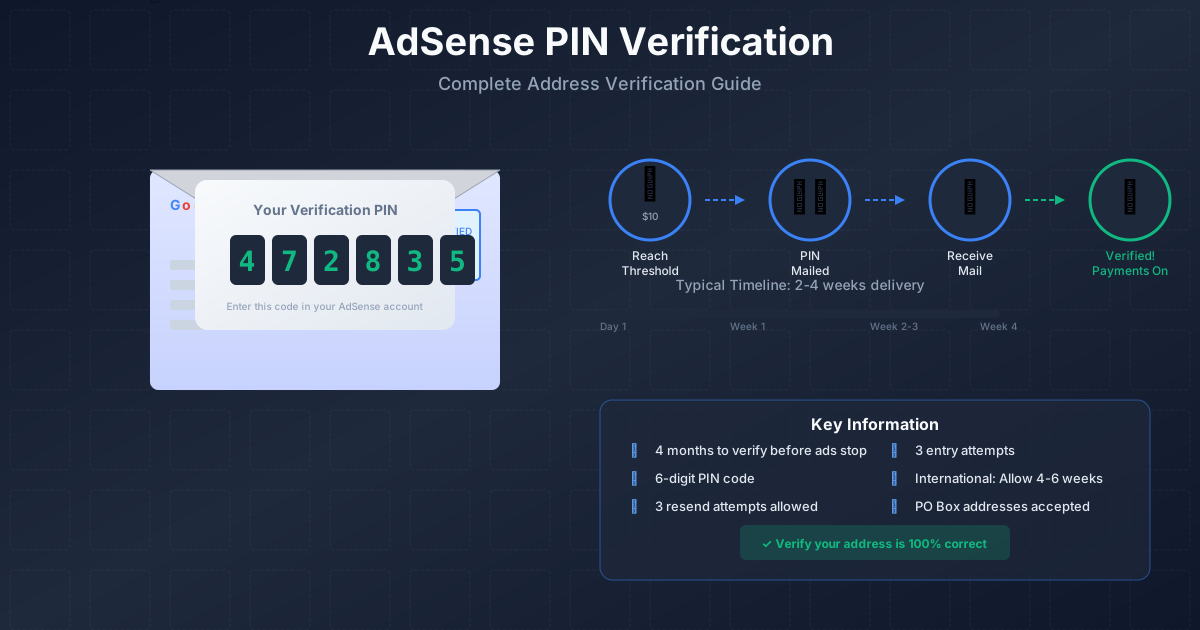
PIN verification is Google's way of confirming you live at the address in your AdSense account. Google mails a postcard containing a unique Personal Identification Number (PIN) to your registered address. You then enter this PIN in your AdSense account to verify ownership.
Why Google Requires PIN Verification
- Fraud prevention: Confirms the account holder exists at the stated address
- Tax compliance: Ensures payments go to the correct legal entity
- Payment security: Protects against unauthorized account access
- Identity confirmation: Validates you are who you claim to be
"Address verification helps protect your account and ensures that payments reach you securely."
— Google AdSense Help Center
When Google Sends Your PIN
Google automatically sends your PIN when your earnings reach a specific threshold.
Payment Threshold for PIN
| Currency | Verification Threshold |
|---|---|
| US Dollars (USD) | $10 |
| Euros (EUR) | €10 |
| British Pounds (GBP) | £10 |
| Indian Rupees (INR) | ₹1,000 |
| Nigerian Naira (NGN) | ₦1,600 |
The threshold varies by currency but is generally equivalent to $10 USD. Once you cross this threshold, Google automatically generates and mails your PIN.
Timeline Overview
- Earnings reach verification threshold
- Google generates PIN within 24-48 hours
- PIN mailed via standard postal service
- Delivery time: 2-4 weeks (varies by location)
- You have 4 months to enter the PIN
Receiving Your PIN
Understanding what to expect helps you prepare for the PIN arrival.
What the PIN Mail Looks Like
- Standard white envelope or postcard
- Google LLC return address
- 6-digit PIN printed inside
- Instructions for entering the PIN
Expected Delivery Times
| Region | Typical Delivery | Maximum Wait |
|---|---|---|
| United States | 1-2 weeks | 3 weeks |
| Europe | 2-3 weeks | 4 weeks |
| Asia | 2-4 weeks | 5 weeks |
| Africa | 3-5 weeks | 6 weeks |
| South America | 2-4 weeks | 5 weeks |
Tracking Your PIN
You can check PIN status in your AdSense account:
See also: AdSense Approval Checklist 2026: 15 Steps to Get Approved Fast →
- Go to AdSense → Payments
- Click "Verify address"
- View PIN status and send date
How to Enter Your PIN
Once your PIN arrives, entering it takes just a few minutes.
Step-by-Step Process
-
Log into AdSense:
Go to adsense.google.com and sign in
-
Navigate to payments:
Click "Payments" in the left sidebar
-
Find verification section:
Look for "Verify address" or PIN notification
-
Enter your PIN:
Type the 6-digit code exactly as shown
See also: Google AdSense Best Practices 2026: What Works Now (and What Doesn't) →
-
Click submit:
Confirm your entry
After Successful Verification
Once verified, you will see:
- Confirmation message in your account
- Address marked as verified
- Payments enabled (once you reach payment threshold)
Important Notes
- You have 3 attempts to enter the correct PIN
- After 3 failed attempts, you must request a new PIN
- PIN codes are case-sensitive—enter exactly as shown
- PINs expire after 4 months
Requesting a New PIN
If your PIN does not arrive or expires, you can request another.
How to Request a New PIN
- Wait at least 3 weeks after the first PIN was sent
- Go to AdSense → Payments → Verify address
- Click "Resend PIN"
- Confirm your address is correct
- Submit request
PIN Request Limits
- Maximum 3 PIN requests total
- After 3 requests without verification, alternative methods required
- Each request restarts the delivery timeline
Before Requesting a New PIN
Verify these details first:
- Check your address is 100% correct
- Confirm postal service delivers to your location
- Look for the mail carefully—it can look like junk mail
- Ask household members if they received it
Troubleshooting Issues
PIN Never Arrived
If your PIN does not arrive after 4 weeks:
Learn more in AdSense YouTube vs Website: Which Earns More Money in 2026? →
- Verify your address is spelled correctly
- Check with your local post office
- Look through all mail—the envelope is plain
- Request a new PIN
Wrong PIN Entered
If you entered an incorrect PIN:
- Double-check the code on your mail
- Ensure no extra spaces or characters
- Try again (you have 3 attempts)
- Request new PIN if all attempts fail
Address Changed
If you moved before receiving your PIN:
- Update your address in AdSense immediately
- Go to Payments → Manage settings
- Edit your payment address
- Request a new PIN to the updated address
PIN Expired
PINs expire 4 months after being sent. If expired:
- Request a new PIN
- The old PIN will no longer work
- New PIN sent to your current registered address
International Publisher Tips
Publishers outside the US face unique challenges with PIN delivery.
Address Formatting
Format your address for international mail:
Learn more in Free vs Self-Hosted Blogs for AdSense: Which One Gets Approved? →
- Use your local address format
- Include postal/ZIP code
- Add country name in English
- Avoid special characters
Common International Issues
| Issue | Solution |
|---|---|
| Slow postal service | Wait full 4-6 weeks before requesting resend |
| Address too long | Use abbreviations, multiple address lines |
| No postal delivery | Use PO Box or alternative address |
| Customs delays | Mail should not be held—contact post office |
Alternative Verification
After 3 failed PIN attempts, Google may offer alternative verification:
- ID verification through document upload
- Phone verification in some regions
- Contact AdSense support for assistance
After PIN Verification
Once verified, you are almost ready to receive payments.
Next Steps
-
Set up payment method:
- Add bank account or payment address
- Select payment type (wire transfer, check, etc.)
-
Complete tax information:
- Submit required tax forms
- US publishers: W-9
- Non-US publishers: W-8BEN
-
Reach payment threshold:
- Typically $100 for most payment methods
- Payments issued once threshold reached
Payment Schedule
After full verification:
- Payments processed around the 21st of each month
- For earnings from the previous month
- Delivery time depends on payment method
For more information on getting started with AdSense, see our complete AdSense approval guide.
Frequently Asked Questions
Can I use a PO Box for PIN verification?
Yes, Google can send PINs to PO Boxes. Just ensure the PO Box is registered in your name and you check it regularly. Some publishers in rural areas or countries with unreliable postal service successfully use PO Boxes for verification.
Learn more in AdSense vs Alternatives: Which Ad Network Pays You More? →
What if I share an address with someone else?
Each AdSense account must have a unique address associated with a unique person. If multiple people at the same address have AdSense accounts, each person needs their own PIN sent to their name at that address. Make sure mail recipients know to save any Google mail.
Can I get my PIN faster?
Unfortunately, no. Google only sends PINs via standard postal mail for security reasons. Express or expedited shipping is not available. The best approach is to ensure your address is correct from the start and wait patiently.
What happens if I do not verify within 4 months?
If you do not enter your PIN within 4 months, Google will stop showing ads on your site. Your earnings remain in your account, but you cannot access them until verification is complete. You can request a new PIN to restart the process.
Is PIN verification required every year?
No, PIN verification is a one-time process for each address. Once verified, you do not need to verify again unless you change your payment address. If you update your address, Google may require new verification.