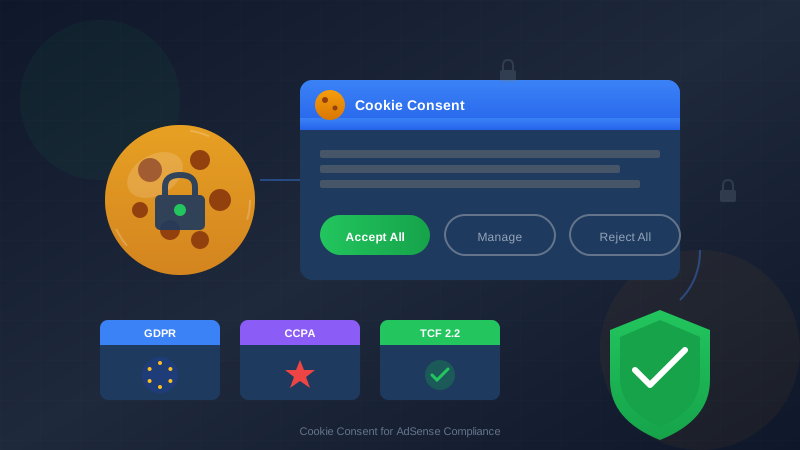
Cookie consent is not optional for AdSense publishers. Without proper consent mechanisms, you risk GDPR fines up to 4% of annual revenue, lost AdSense earnings, and even account termination. This guide shows you how to implement cookie consent correctly.
Privacy regulations have become stricter worldwide. Google now requires publishers to obtain user consent before serving personalized ads in regulated regions. Getting this right protects both your revenue and your legal standing.
What You Will Learn:
- Why cookie consent is legally required
- GDPR, CCPA, and other privacy law requirements
- Google's specific consent requirements for AdSense
- How to implement a compliant consent solution
- Testing and verification steps
Why Cookie Consent Matters
AdSense uses cookies to track users and serve personalized ads. Under privacy laws like GDPR and CCPA, you must get user consent before allowing this tracking.
The Legal Reality
Privacy laws have real enforcement. Since GDPR took effect, European authorities have issued billions in fines. Even smaller publishers have received penalties for non-compliance.
"Publishers are responsible for ensuring they have obtained consent from users before allowing Google to serve personalized ads."
— Google AdSense Program Policies
Impact on AdSense Revenue
Without consent, Google can only serve non-personalized ads, which typically earn 50-70% less than personalized ads. Proper consent implementation maximizes your revenue while keeping you compliant.
| Scenario | Ad Type Served | Typical RPM Impact |
|---|---|---|
| Valid consent given | Personalized ads | Full RPM |
| Consent declined | Non-personalized ads | -30% to -50% |
| No consent mechanism | Non-personalized (or none) | -50% to -70% |
| Invalid consent | Risk of violations | Account risk |
Legal Requirements by Region
Different regions have different privacy laws. You need to comply with laws that apply to your visitors, not just your location.
GDPR (European Union)
The General Data Protection Regulation applies to EU visitors regardless of where you are located.
Key requirements:
- Consent must be freely given, specific, informed, and unambiguous
- Pre-checked boxes do not count as consent
- Users must be able to withdraw consent easily
- You must keep records of consent
- Cookie walls (blocking content) are not allowed
CCPA/CPRA (California)
The California Consumer Privacy Act (now enhanced by CPRA) applies to California residents.
For more on this topic, see our guide on Terms & Conditions Generator Guide: Protect Your Blog Legally in 2026 →
Key requirements:
- Must provide "Do Not Sell My Personal Information" link
- Cannot discriminate against users who opt out
- Must honor Global Privacy Control signals
- Different from GDPR—opt-out rather than opt-in
Other Major Regulations
| Regulation | Region | Consent Model | Key Feature |
|---|---|---|---|
| LGPD | Brazil | Opt-in | Similar to GDPR |
| POPIA | South Africa | Opt-in | Reasonable grounds basis |
| PDPA | Thailand | Opt-in | Consent required |
| PIPEDA | Canada | Implied/Express | Context dependent |
| APPs | Australia | Notification | Transparency focused |
Google's Consent Requirements
Google has specific requirements for consent that go beyond just having a cookie banner.
Google Consent Mode
Google Consent Mode is a framework that adjusts how Google tags behave based on user consent. It supports two main consent types:
- ad_storage: Controls storage of advertising-related cookies
- analytics_storage: Controls storage of analytics cookies
Required Consent Signals
For GDPR regions, Google requires these consent signals:
// Basic consent state signals
gtag('consent', 'default', {
  'ad_storage': 'denied',
  'analytics_storage': 'denied',
  'ad_user_data': 'denied',
  'ad_personalization': 'denied',
  'wait_for_update': 500
});

// After user gives consent
gtag('consent', 'update', {
  'ad_storage': 'granted',
  'analytics_storage': 'granted',
  'ad_user_data': 'granted',
  'ad_personalization': 'granted'
});
IAB TCF 2.2 Compliance
Google requires publishers in the EEA and UK to use a Google-certified Consent Management Platform (CMP) that supports IAB's Transparency and Consent Framework version 2.2.
"Publishers serving ads in the EEA and UK must use a Google-certified CMP and obtain valid consent from users before serving personalized ads."
— Google EU User Consent Policy
Implementation Options
You have several options for implementing cookie consent. Choose based on your technical skills and budget.
For more on this topic, see our guide on COPPA Compliance for Bloggers: How to Protect Kids and Your AdSense Account →
Option 1: Google's Built-in CMP (Free)
Google offers a built-in consent solution through AdSense and Ad Manager called Google Funding Choices.
Pros:
- Free to use
- Automatically integrates with AdSense
- Maintained by Google
- TCF 2.2 compliant
Cons:
- Limited customization
- Basic appearance
- Focused on ads only
Option 2: Third-Party CMP (Free and Paid)
Google-certified third-party CMPs offer more features:
| CMP | Free Tier | Paid From | Best For |
|---|---|---|---|
| Cookiebot | Up to 50 pages | $12/month | Small-medium sites |
| Quantcast Choice | Unlimited | Free | All sizes, ad-focused |
| OneTrust | Limited | $50+/month | Enterprise |
| Termly | Basic | $10/month | Small sites |
| Usercentrics | Trial only | $30+/month | Medium-large sites |
Option 3: Custom Implementation (Advanced)
Build your own consent solution. Only recommended if you have legal expertise and development resources.
Requirements:
- TCF 2.2 integration
- Proper consent signal passing to Google
- Record keeping system
- Regular updates for compliance
Step-by-Step Setup Guide
Here is how to set up Google Funding Choices, the simplest compliant option for AdSense publishers.
For more on this topic, see our guide on Image Attribution & Copyright: The Complete Blogger Guide →
Step 1: Enable in AdSense
- Log into your AdSense account
- Go to Privacy & messaging in the left menu
- Click on "GDPR" message
- Select "Create message"
Step 2: Configure Your Message
- Choose the sites to display the message
- Select languages for your audience
- Configure message appearance (colors, position)
- Set up targeting (show to all users or EEA only)
Step 3: Customize Content
Customize the consent message text. Include:
- What data you collect
- How it is used (advertising, analytics)
- Third parties who receive data
- User rights
Step 4: Configure Consent Options
Set up the consent buttons:
- Accept All: Grants all consents
- Manage Options: Lets users choose specific purposes
- Reject All: Required in some jurisdictions
Step 5: Implement Consent Mode
Add this code before your AdSense code:
<script>
  // Set default consent state before any tags load
  window.dataLayer = window.dataLayer || [];
  function gtag(){dataLayer.push(arguments);}

  // Default to denied until consent is given
  gtag('consent', 'default', {
    'ad_storage': 'denied',
    'ad_user_data': 'denied',
    'ad_personalization': 'denied',
    'analytics_storage': 'denied'
  });
</script>

<!-- Then load Google tag -->
<script async src="https://www.googletagmanager.com/gtag/js?id=ca-pub-XXXXX"></script>
Step 6: Publish and Test
- Preview your consent message
- Test in different browsers
- Test on mobile devices
- Verify consent signals are passing correctly
- Publish when ready
Testing and Verification
After setup, verify everything works correctly.
Browser Testing Checklist
| Test | Expected Result | How to Check |
|---|---|---|
| Banner displays | Shows for new visitors | Clear cookies, reload |
| Accept works | Personalized ads load | Check ad tags |
| Reject works | Non-personalized ads | Check NPA parameter |
| Remember choice | No banner on return | Refresh page |
| Withdraw works | Can change consent | Use privacy link |
Verify Consent Signals
Use browser developer tools to check consent is passing:
- Open Developer Tools (F12)
- Go to Console tab
- Type:
dataLayer - Look for consent objects
Google Tag Assistant
Use Google Tag Assistant to verify implementation:
- Install the Tag Assistant browser extension
- Visit your site and enable recording
- Check that consent mode is properly configured
- Verify consent signals change when users interact
"Test your consent implementation from different regions using a VPN. What EU visitors see may differ from US visitors."
Related reading: Copyright Laws for Bloggers: How to Use Images Legally →
— Privacy Compliance Best Practice
Common Mistakes to Avoid
These mistakes can lead to non-compliance or lost revenue:
Mistake 1: Pre-Checked Consent Boxes
GDPR explicitly prohibits pre-checked consent boxes. Users must actively opt in.
Mistake 2: No Reject Option
In many jurisdictions, you must provide an equally prominent way to reject cookies as to accept them.
Mistake 3: Cookie Walls
Blocking content until users consent (cookie walls) is not valid consent under GDPR. Users must be able to access content regardless of consent choice.
Mistake 4: Missing Consent Records
GDPR requires you to prove consent was given. Your CMP should automatically log consent records.
Mistake 5: Not Updating for New Laws
Privacy laws change. Colorado, Virginia, and other US states have new laws. Keep your consent solution updated.
Mistake 6: Only Covering Ads
Your consent solution must cover all cookies—analytics, social media plugins, embedded videos—not just advertising.
See also: Sponsored Content Disclosure: Legal Requirements Every Blogger Must Know →
Mistake 7: Ignoring Mobile
Mobile visitors need consent too. Test your consent banner on mobile devices to ensure it works properly.
Maintaining Ongoing Compliance
Cookie consent is not a one-time setup. Maintain compliance with these practices:
- Monthly: Review consent rates in your CMP dashboard
- Quarterly: Test consent flow across devices
- When laws change: Update your consent implementation
- When adding new tools: Update cookie declarations
For complete privacy setup, see our guide to legal pages for AdSense.
Frequently Asked Questions
Do I need cookie consent if my visitors are only from the US?
Yes, increasingly so. California's CCPA/CPRA requires opt-out mechanisms, and several other states (Colorado, Virginia, Connecticut) have enacted similar laws. Even if most visitors are from non-regulated areas, you should implement consent for visitors from regulated regions.
Will cookie consent hurt my AdSense revenue?
It can reduce revenue slightly because some users decline consent. However, the alternative—not having consent—is worse. Without proper consent, you either serve lower-paying non-personalized ads or risk account violations. A good consent UX typically achieves 70-90% acceptance rates.
Can I use a free consent solution?
Yes. Google Funding Choices (built into AdSense) and Quantcast Choice are both free and TCF 2.2 compliant. For most small to medium publishers, these free options work well. Paid CMPs offer more customization and features for larger sites.
What happens if I do not implement cookie consent?
You face multiple risks: GDPR fines (up to €20 million or 4% of annual revenue), CCPA penalties ($7,500 per intentional violation), AdSense policy violations, and potential account termination. The cost of compliance is far less than the cost of non-compliance.
How often do I need to ask for consent again?
GDPR does not specify exactly, but best practice is to store consent for 6-12 months, then ask again. If your data practices change significantly, you should request fresh consent. Most CMPs handle consent expiration automatically.