
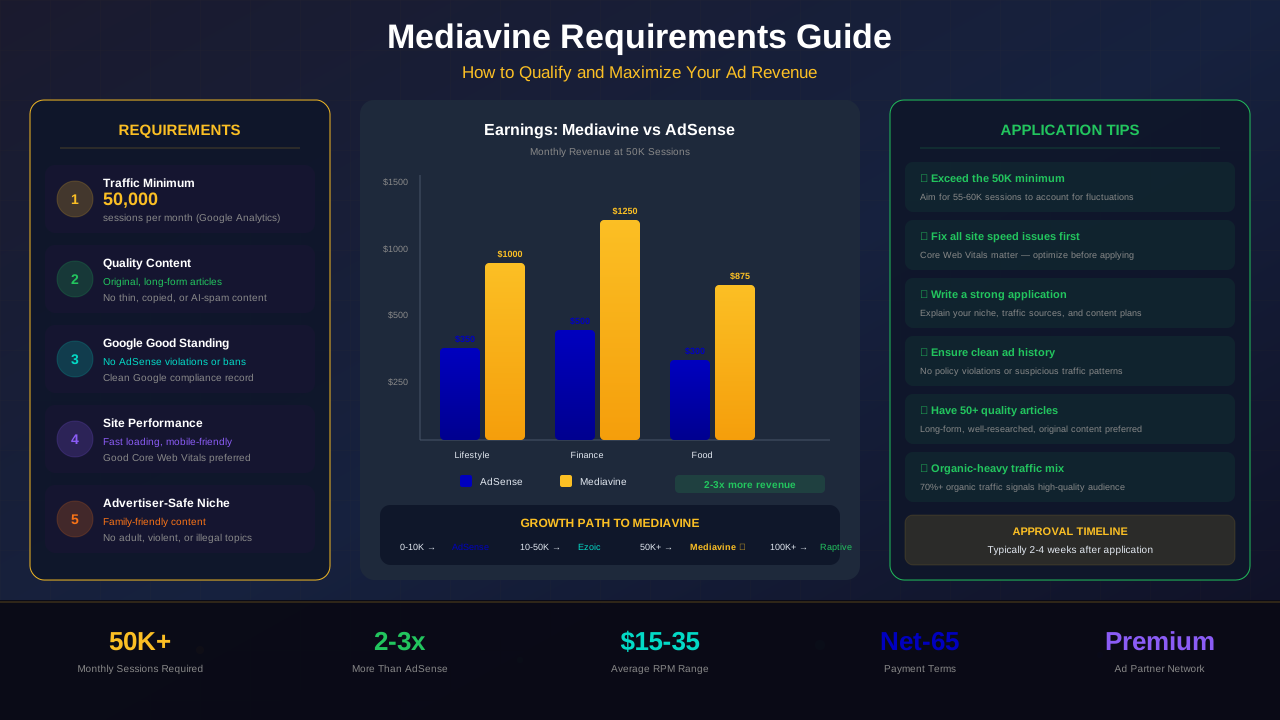
Mediavine is one of the most sought-after ad networks for bloggers and publishers. It offers some of the highest RPMs in the industry. But getting in is not easy. You need to meet strict requirements before they even look at your site.
This guide breaks down every Mediavine requirement in plain language. You will learn exactly what it takes to qualify, how to prepare your site, and how to boost your chances of getting accepted on the first try.
What You Will Learn
- The exact traffic threshold Mediavine requires
- Content quality standards your site must meet
- Technical requirements like site speed and SSL
- How Mediavine earnings compare to AdSense
- Step-by-step tips to grow your traffic to 50K sessions
- What to expect during the application process
- Common mistakes that lead to rejection
- How to prepare your site for approval
What Is Mediavine?
Mediavine is a full-service ad management company. It was founded in 2004 and became a Google Certified Publishing Partner. The company manages ad placements for over 10,000 publishers worldwide.
Unlike AdSense where you manage your own ads, Mediavine handles everything. They optimize ad placements, run header bidding, and negotiate deals with premium advertisers. This hands-off approach lets you focus on creating content.
Why Publishers Love Mediavine
The biggest draw is the earnings. Most publishers see a 2x to 10x increase in ad revenue after switching from AdSense. Mediavine uses advanced programmatic advertising and direct deals to get the best rates for your traffic.
They also provide a dedicated support team. Every publisher gets access to real humans who help optimize your site. This level of support is rare in the ad network world.
"Switching to Mediavine tripled my monthly ad revenue overnight. The difference was shocking."
— Sarah Mitchell, Lifestyle Blogger
The 50,000 Sessions Requirement
The biggest hurdle for most bloggers is traffic. Mediavine requires a minimum of 50,000 sessions per month. Note that this is sessions, not pageviews. Sessions are a count of unique visits to your site.
They verify this through your Google Analytics account. You will need to grant Mediavine read access during the application. The traffic must be consistent — a random spike from a viral post may not count.
Sessions vs. Pageviews
Many bloggers confuse sessions with pageviews. A single session can include multiple pageviews. For example, if a visitor reads three articles in one visit, that counts as one session but three pageviews.
The good news? If you have 50,000 sessions, you likely have 70,000 to 100,000 pageviews. Mediavine cares about sessions because it reflects real audience size. Understanding your RPM metrics will help you project future Mediavine earnings.
For more on this topic, see our guide on Ezoic vs Mediavine: Which Ad Network Pays More in 2026? →
Traffic Sources Matter
Mediavine prefers organic traffic from search engines. Social media traffic tends to have lower engagement and higher bounce rates. A site with 50,000 organic sessions is far more attractive than one with 50,000 Pinterest clicks.
"Focus on building organic search traffic. It is more sustainable and ad networks value it much more than social traffic."
— Eric Hochberger, Mediavine Co-Founder
Content Quality Standards
Mediavine is picky about content. They want original, high-quality articles that provide real value to readers. Thin content, scraped articles, or AI-generated spam will get you rejected immediately.
Your site should have a clear niche focus. Mediavine works best with lifestyle, food, travel, parenting, finance, and DIY niches. That said, they accept sites from many categories as long as the content is strong.
What Good Content Looks Like
Aim for posts that are at least 1,000 words. Mix in images, lists, and subheadings to keep readers engaged. Every article should answer a question or solve a problem for your audience.
Your site should have at least 50 published posts before applying. This shows Mediavine that you are committed and that your content library can support ad placements across many pages.
Content That Gets Rejected
Avoid controversial, adult, or violent content. Mediavine follows Google Ad Manager policies closely. Sites with excessive ads from other networks may also face rejection.
Duplicate content is a dealbreaker. Make sure every article on your site is unique. Run your pages through a plagiarism checker before applying if you are unsure.
Related reading: AdThrive Requirements Guide: What You Need to Join Raptive in 2026 →
Technical Requirements
Your site needs to be technically sound. Mediavine ads are resource-heavy, so your hosting and site speed must be up to par. A slow site means fewer ads load, which means less revenue for everyone.
Site Speed
Target a load time under 3 seconds. Use a CDN, compress your images, and minimize third-party scripts. Mediavine actually helps improve site speed after you join, but your baseline needs to be reasonable.
SSL and HTTPS
An SSL certificate is mandatory. Your entire site must run on HTTPS. Most hosting providers offer free SSL through Let's Encrypt. If your site still uses HTTP, fix this before applying. It is also essential for AdSense security and compliance.
Mobile Responsiveness
Over 60% of web traffic comes from mobile devices. Your site must look great on phones and tablets. Use a responsive WordPress theme and test your site on multiple screen sizes.
Good Standing with Google
Mediavine requires that your site is in good standing with Google. This means no active AdSense bans, no manual penalties in Google Search Console, and no history of policy violations.
If you have been banned from AdSense, your Mediavine application will likely be denied. They work closely with Google Ad Manager and need publishers who follow the rules.
How to Check Your Standing
Log into Google Search Console and check for manual actions. Review your AdSense account for any policy warnings. If you have resolved past issues, mention this in your application — honesty goes a long way.
Sites that have never used AdSense can still apply. You do not need an active AdSense account. Mediavine just needs to know you have not been banned from Google's ad ecosystem.
For more on this topic, see our guide on Raptive Requirements Guide: Traffic, Content & Application Tips →
How to Grow Traffic to 50K Sessions
If you are not at 50,000 sessions yet, do not worry. Most successful Mediavine publishers spent 12 to 24 months building their traffic. Here is a roadmap to get there.
Focus on SEO First
Search engine optimization is the fastest path to consistent traffic. Target long-tail keywords with low competition. Write comprehensive articles that answer specific questions your audience is asking.
Publish at least 2 to 3 new posts per week. Consistency matters more than perfection. Over time, older posts will gain authority and bring in steady traffic. Check out our guide on ad placement best practices to prepare your site for premium ads.
Build an Email List Early
Email subscribers come back to your site again and again. Each return visit counts as a new session. Start building your list from day one, even if your traffic is small.
Leverage Pinterest and Social Media
While organic traffic is best, social media can supplement your numbers. Pinterest is especially powerful for lifestyle, food, and DIY niches. Create pinnable images for every post and pin consistently.
The Application Process
Ready to apply? The process is straightforward but you need to be prepared. Mediavine reviews every application manually, so first impressions matter.
Step 1: Create Your Account
Visit the Mediavine website and click "Apply." You will fill out basic information about your site including your URL, niche, and traffic sources.
Step 2: Connect Google Analytics
Grant Mediavine read access to your Google Analytics account. They will verify your traffic numbers and review your audience demographics. Make sure your analytics tracking is properly installed on every page.
Learn more in RPM by Blog Niche: Which Topics Pay the Most in 2026 →
Step 3: Site Review
A Mediavine team member will manually review your site. They check content quality, site design, page speed, and overall user experience. This review typically takes 1 to 2 weeks.
Step 4: Approval and Setup
If approved, you will receive setup instructions. Mediavine installs their ad script on your site. The whole onboarding process takes about 2 to 3 weeks from application to your first ad impression.
"The application review took about 10 days for me. Be patient and do not pester them with follow-up emails."
— James Park, Travel Blogger
Mediavine Earnings vs AdSense
Let us talk money. This is the reason most publishers want to join Mediavine. The earnings difference is significant and well-documented. Understanding how different ad networks compare will give you a broader revenue perspective.
| Metric | Google AdSense | Mediavine |
|---|---|---|
| Average RPM | $2 - $8 | $10 - $30 |
| Monthly Revenue (100K PV) | $200 - $800 | $1,000 - $3,000 |
| Payment Threshold | $100 | $25 |
| Payment Schedule | NET 21 | NET 65 |
| Traffic Requirement | None | 50K sessions/mo |
| Ad Optimization | Manual | Fully Managed |
| Revenue Share | 68% to publisher | 75% to publisher |
The numbers speak for themselves. Mediavine consistently outperforms AdSense in RPM and total revenue. The higher revenue share and automatic optimization make it a clear upgrade for publishers who qualify.
Tips for Getting Accepted on Your First Try
Rejection stings and wastes time. Here are proven tips to maximize your chances of getting accepted the first time you apply.
Clean Up Your Site Design
Remove clutter, broken links, and outdated widgets. Your site should look professional and be easy to navigate. A clean design signals that you care about user experience.
Remove Other Ad Networks
If you are running multiple ad networks, remove them before applying. Mediavine wants a clean slate to work with. Too many existing ads can hurt your site speed and user experience scores.
For more on this topic, see our guide on Best Niches for AdSense Beginners: Top 15 Profitable Topics in 2026 →
Fix All Technical Issues
Run your site through Google PageSpeed Insights and fix major issues. Check for broken links, missing images, and mobile display problems. Every technical flaw is a potential red flag.
Write a Strong About Page
Mediavine wants to see real people behind the site. Create a detailed About page with your photo, bio, and story. This builds trust and shows you are a serious publisher.
Be Patient with Timing
Do not apply the moment you hit 50,000 sessions. Wait until you have maintained that level for 2 to 3 months. Consistent traffic is more impressive than barely meeting the minimum.
Frequently Asked Questions
Can I apply to Mediavine with less than 50,000 sessions?
No. The 50,000 sessions per month minimum is a hard requirement. Mediavine will not review applications below this threshold. Focus on growing your traffic first using SEO and content marketing strategies.
How long does the Mediavine application review take?
Most applications are reviewed within 1 to 2 weeks. During busy periods it may take up to 3 weeks. You will receive an email notification once a decision has been made on your application.
Can I use Mediavine and AdSense together?
No. When you join Mediavine, you must remove all other display ad networks including AdSense. Mediavine manages all display ad placements on your site exclusively. You can still use affiliate links and sponsored content alongside Mediavine.
What happens if I get rejected by Mediavine?
Mediavine will tell you why you were rejected. Common reasons include low traffic, thin content, or technical issues. Fix the problems and wait at least 30 days before reapplying. Many successful publishers were rejected on their first attempt.
Does Mediavine work with WordPress only?
No. Mediavine works with any platform including WordPress, Squarespace, Wix, and custom-built sites. However, WordPress is the most popular platform among Mediavine publishers because of its flexibility and plugin ecosystem.